Extension Settings
Postmate Client can be customized through standard VS Code settings. All settings live under the PostMate section.
How to Open Settings
- Open the Command Palette (
Ctrl+,/Cmd+,also works directly) - Go to Settings → Extensions → PostMate
- Or search for
postmatein the settings search bar
Settings can be configured at the User level (applies everywhere) or the Workspace level (applies to the current project only), just like any other VS Code setting.
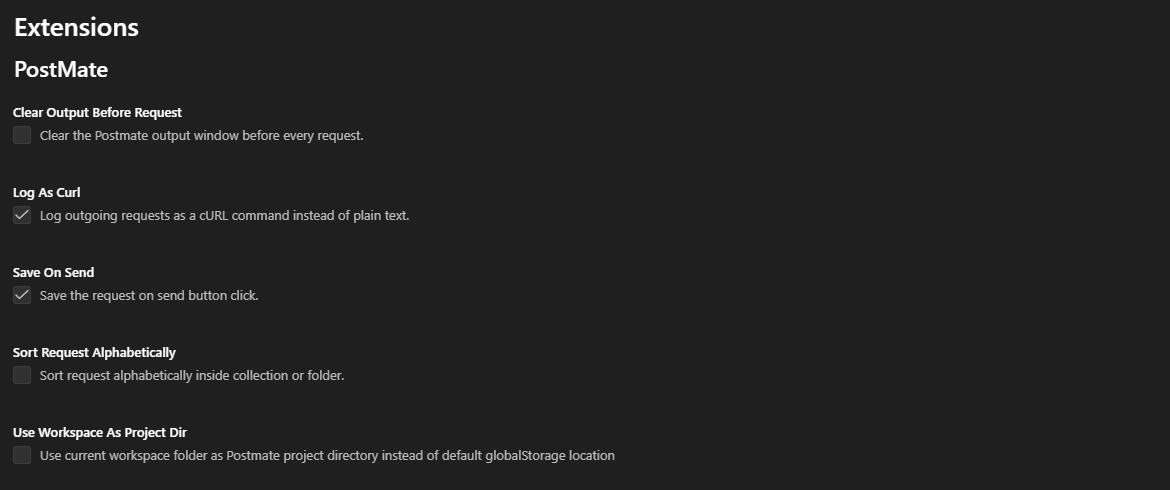
Available Settings
Clear Output Before Request
Clears the Postmate output window automatically before every request, so the output panel shows only the logs for your latest request.
- Default:
false(off) - Scope: Applies to individual HTTP requests only. It does not apply to collection runs or WebSocket connections — a collection run keeps its full consolidated log, and WebSocket sessions keep their streaming message history.
Manual alternative
You can always right-click inside the output panel and select Clear to wipe it manually, regardless of this setting.
Log As Curl
Logs each outgoing request to the output window as a ready-to-run cURL command instead of plain text. Useful for sharing a reproducible request with teammates or replaying it from a terminal.
- Default:
true(on)
Save On Send
Automatically saves the request when you click Send, so you never lose changes to the URL, headers, body, or scripts.
- Default:
true(on)
Sort Request Alphabetically
Sorts requests alphabetically inside each collection or folder, instead of showing them in creation order.
- Default:
false(off)
Use Workspace As Project Dir
Stores Postmate data (collections, environments, data tables) in the current workspace folder instead of the default VS Code globalStorage location. Enable this when you want your API collections versioned alongside your project in Git.
- Default:
false(off)
Heads-up
Changing this setting switches where Postmate reads and writes its data. Existing collections in the other location are not moved automatically.
MCP: Enabled
Runs a local MCP server on 127.0.0.1 so AI agents in your editor (GitHub Copilot and others) can read your active request panel and generate tests against the real response.
- Setting ID:
postmate.mcp.enabled - Default:
true(on) - Status: Beta
Postmate itself sends nothing anywhere — the server only listens. Anything the agent reads is handled by your agent's own model provider, under their data policy. Credentials are redacted before they leave Postmate.
Disabling takes effect immediately. Enabling requires a window reload before the agent reconnects.
Team-wide control
This setting can be committed to a workspace .vscode/settings.json, so a team can disable AI agent access for a specific repository.
Full details on what is captured and redacted →
Quick Reference
| Setting | Default | What it does |
|---|---|---|
| Clear Output Before Request | false | Clear the output window before each HTTP request |
| Log As Curl | true | Log outgoing requests as cURL commands |
| Save On Send | true | Save the request when Send is clicked |
| Sort Request Alphabetically | false | Alphabetical ordering inside collections/folders |
| Use Workspace As Project Dir | false | Store data in the workspace folder instead of globalStorage |
| MCP: Enabled | true | Let AI agents read your active request panel via a local MCP server |