Compare API Responses Side-by-Side in VS Code — Instantly in Postmate Client
Stop copying JSON into diff tools or switching between tabs. With Postmate Client, a Postman alternative for API response comparison in VS Code you can compare API responses side-by-side instantly inside VS Code — with real-time highlighted differences, no manual copy-paste, and no external tools.
Why Comparing API Responses Is So Painful in API Testing
You changed an endpoint. You switched environments. You refactored a service. Now you need to know: did the response change?
The old workflow is painful:
- Run request A, copy the response
- Run request B, copy the response
- Paste both into an online diff tool
- manually inspect differences
- Repeat for every environment, every data row, every change
Postmate Client eliminates all of that with a dedicated Compare Responses panel built directly into VS Code.
How to Compare JSON API Responses Side-by-Side in VS Code
Step 1 — Open the Compare Panel
Choose any request from your collection tree and click the ... menu and select Compare Responses.
The Compare Responses panel opens as a native VS Code tab. This feature is currently in BETA and actively improving based on developer feedback. 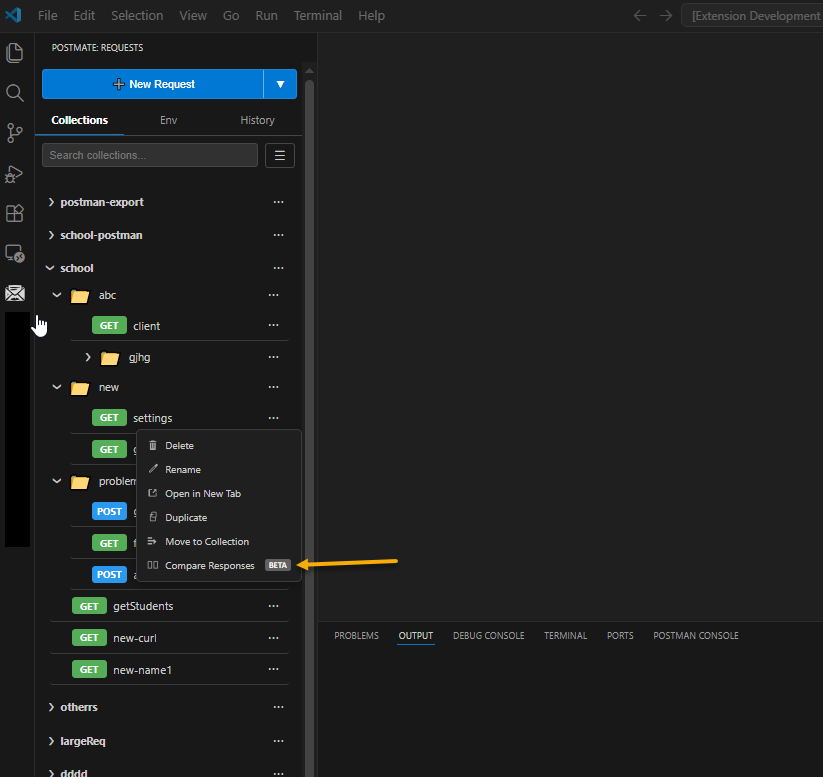
Step 2 — Select Your Two Requests
At the top of the panel you have two independent request slots. Each slot has three dropdowns:
- COL — pick any collection
- REQ — pick any request from that collection
- ENV — pick the environment to run it against
The two requests can come from different collections, environments, or APIs. This makes it easy to compare staging vs production, v1 vs v2, or any two endpoints side by side.
When you open the panel from a request's context menu, that request is pre-filled in slot one automatically.
Step 3 — Select a Data Row (Optional)
If your requests use dynamic variables from a data table — such as {{username}} or {{accountNumber}} — click the Data row field and pick a row from your CSV data table.
Both requests will use the same data row, so your comparison is consistent across the board.
Step 4 — Click Compare
Hit the Compare button. Both requests fire simultaneously in parallel — no waiting for request one to finish before request two starts.
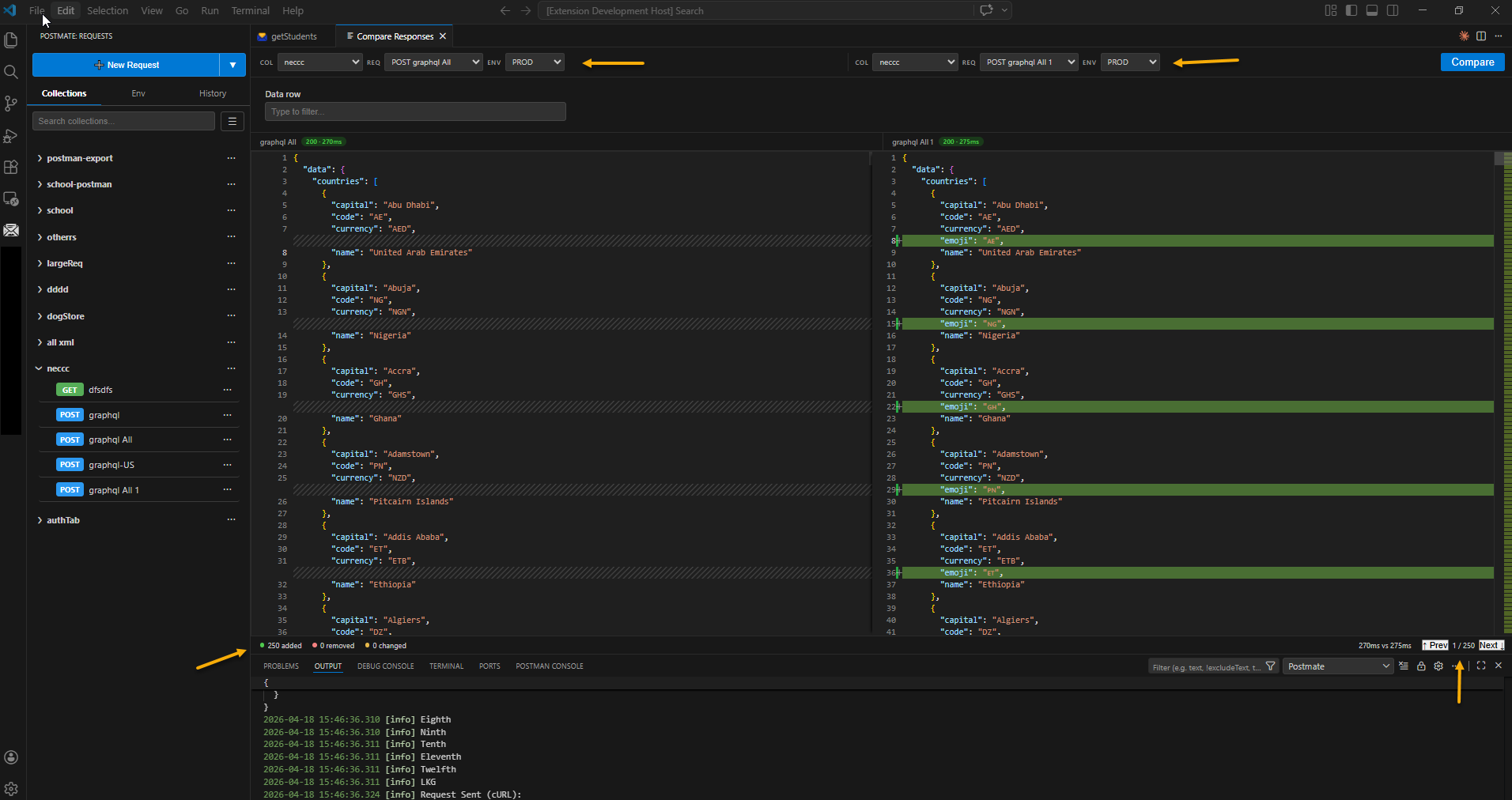
Step 5 — See the Results Side by Side
Instantly, both responses appear in a split editor:
- Left pane — Response from Request 1
- Right pane — Response from Request 2
- Green lines — values present only in the right response (added)
- Red lines — values present only in the left response (removed)
- Response time for each request shown in the header badge
The diff is order-independent. If both responses contain the same data but in a different order, Postmate Client treats them as identical. Only genuine value differences are highlighted.
Step 6 — Navigate Through Differences
Use the Prev and Next buttons in the bottom status bar to jump between every highlighted difference. The counter shows your position — for example 3 / 47 — so you always know how many differences remain.
Both panes scroll in sync as you navigate. If you have collapsed a section using the fold arrows, Postmate Client automatically expands the relevant block when you navigate to a difference inside it.
You can also click the fold icon > in the editor gutter to collapse and expand any JSON block manually.
Step 7 — Check the Summary
The status bar at the bottom of the panel shows:
- N added — lines present in the right response but not the left
- N removed — lines present in the left response but not the right
- N changed — lines that exist in both but with different values
- Xms vs Yms — response times for both requests
Step 8 — Compare Again Without Leaving the Panel
Change either request, switch an environment, pick a different data row, and click Compare again. The panel updates in place. You never need to leave the panel or switch tools..
Key Features at a Glance
| Feature | Detail |
|---|---|
| Parallel execution | Both requests fire at the same time |
| Any two requests | Mix collections, environments, and methods freely |
| Data row support | CSV-driven dynamic variables work out of the box |
| Order-independent diff | Array and key reordering is not flagged as a difference |
| Diff navigation | Prev / Next buttons with a position counter |
| Fold support | Collapse unchanged sections to focus on diffs |
| Auto-expand on navigate | Folded regions open automatically when you jump to a diff inside them |
| Diff summary | Added, removed, and changed line counts in the status bar |
| Theme aware | Follows your VS Code color theme automatically |
Why Not Just Use an Online Diff Tool?
Online diff tools require you to manually copy responses, handle authentication tokens, and switch between browser tabs and your editor. They have no concept of environments, collections, or data tables.
Postmate Client's Compare Responses panel lives inside VS Code. It knows your collections, your environments, and your data tables. It fires the real requests against the real endpoints. You get actual live responses, not pasted snapshots.
Common Use Cases
Regression testing — Compare the same endpoint before and after a code change to confirm the response is identical.
Environment validation — Run the same request against Dev and Production to verify parity before a release.
API versioning — Compare v1 and v2 of an endpoint to document what changed for your team.
Debugging — Compare a working request with a broken one to isolate exactly which field changed.
Data-driven comparison — Use the data row field to run the same comparison with different user accounts or input values.
A Better Alternative to Postman for Comparing API Responses
Tools like Postman and external diff tools require manual steps to compare API responses — copy-pasting JSON, switching tabs, and using external tools.
With Postmate Client, you can compare API responses directly inside VS Code with:
- Side-by-side JSON diff
- Real API execution
- Environment-aware comparisons
- No copy-paste workflow
Getting Started
Compare Responses is available in Postmate Client for VS Code. Install the extension from the VS Code Marketplace and look for the ... menu next to any request in your collection.
Postmate Client — API development inside VS Code, without the context switching.
Frequently Asked Questions (FAQ)
❓ What is API response comparison?
API response comparison is the process of checking differences between two API responses to identify changes in data, structure, or values. It is commonly used for regression testing, debugging, and validating API changes.
❓ How do I compare API responses in VS Code?
In Postmate Client, you can compare API responses by selecting two requests, choosing environments (if needed), and clicking Compare. Both responses are executed in parallel and shown side-by-side with highlighted differences.
❓ Can I compare JSON API responses side-by-side?
Yes. Postmate Client displays JSON responses in a side-by-side diff view. Differences are highlighted, including added, removed, and changed fields, making it easy to analyze changes visually.
❓ Can I compare APIs across different environments (dev vs prod)?
Yes. You can select different environments for each request slot. This allows you to compare:
- Dev vs Production
- Staging vs Production
- Any custom environments you define
❓ Does Postmate Client support Postman-like collections?
Yes. You can compare any requests across collections, folders, or environments. This makes it easier to validate changes across large API suites.
Is the comparison order-sensitive?
No. The comparison is order-independent, meaning:
- Arrays with the same elements in different order are treated as equal
- Only actual value differences are highlighted
❓ Can I use data-driven requests for comparison?
Yes. If your requests use a data table (CSV-based variables), you can select a row and run both requests using the same dataset for consistent comparison.
How is this different from using a diff tool?
Unlike external diff tools, Postmate Client:
- Runs real API requests directly inside VS Code
- Supports environments and authentication automatically
- Eliminates copy-paste steps
- Shows live responses, not static snapshots
❓ Can I compare API responses in Postman?
Tools like Postman do not provide a built-in response comparison feature. Users typically rely on:
- Manual copy-paste
- External diff tools
- Custom scripts
Postmate Client integrates this directly into the workflow.
❓ Does this work with large JSON responses?
Yes. The diff engine is optimized for large JSON payloads and supports navigation through differences using Next / Previous controls.
❓ Is this feature free?
Yes, Postmate Client is completely free.
❓ Can I navigate between differences?
Yes. You can use:
- Next / Previous buttons
- Difference counter (e.g. 3 / 45)
- Auto-scroll synced between both panels
❓ Does it support APIs with authentication?
Yes. Since requests run inside the Postmate Client environment, all authentication methods supported by your requests are automatically applied during comparison.