API Testing in VS Code: Tests & Assertions
What is API Testing in VS Code?
API testing in VS Code allows developers to send HTTP requests, validate responses, and automate API tests directly inside the editor without tools like Postman.
Postmate Client enables this with built-in tabular tests and JavaScript assertions.
Postmate Client lets you validate and automate API responses directly inside VS Code — as a fast, private Postman alternative.
No cloud sync. No login. No configuration.
Postmate Client supports two powerful ways to test APIs:
- Tabular Tests (No-Code) → Quick validations using a simple UI
- Script Assertions (JavaScript) → Advanced testing using Postman-style
pmAPIs
Tabular Tests (No-Code API Testing)
Quickly validate API responses without writing code.
Perfect for:
- Status code checks
- JSON field validation
- Response time assertions
- Environment variable extraction
How to Create a Test
- Open any request in Postmate Client
- Go to Post-request → Test
- Add rows — each row = one test
Test Table Columns
| Column | Purpose |
|---|---|
| Test Type | Select what to validate (status, body, env variable, etc.) |
| Action | Operation (equals, contains, less than, etc.) |
| Expected Value / Variable | Expected result or variable name |
| Description | Label shown in test results |
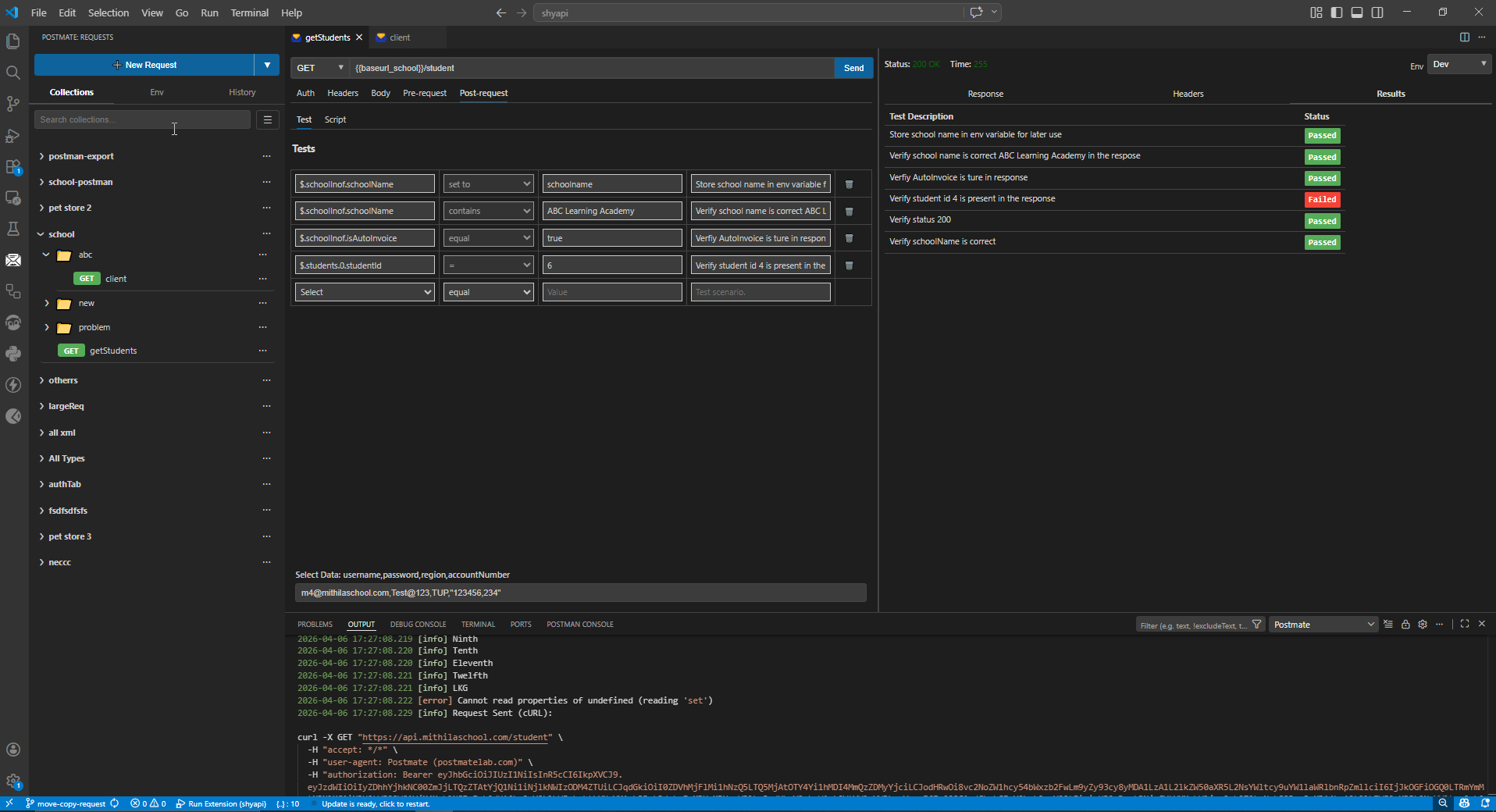
Supported Test Types
Validate JSON Response Body
Use In The Response Body to validate any JSON field.
- Supports:
equals,contains,exists, etc. - Works with deeply nested JSON
Smart JSONPath Autocomplete
Run your request once → Postmate Client indexes the response →
Start typing $. and get instant suggestions for all fields.
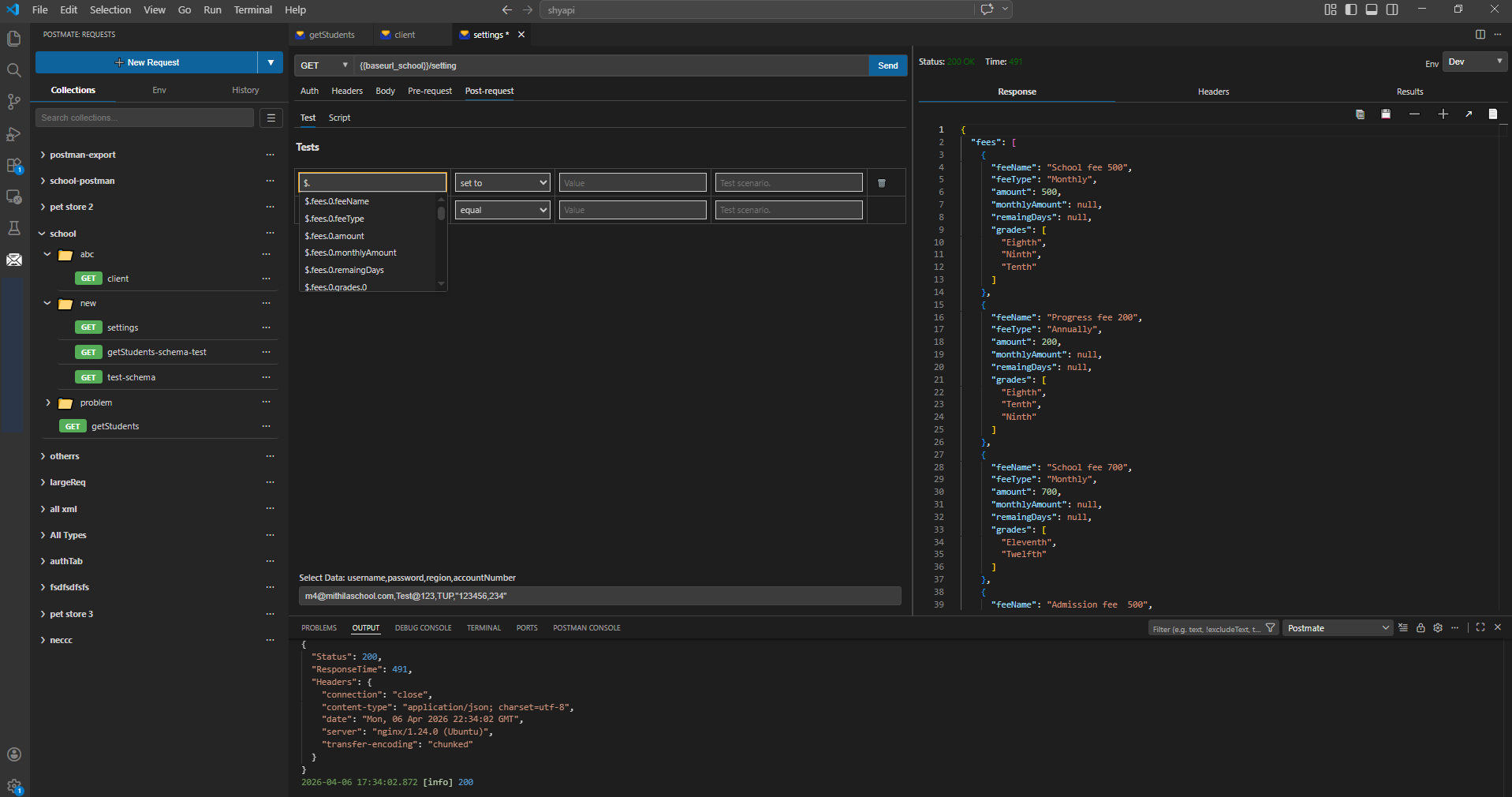
Validate HTTP Status Code
Use Response Code to assert API status (200, 201, 400, etc.)
Validate Response Time
Ensure APIs meet performance expectations.
Example:
- Response time < 500ms
Extract & Save Environment Variables
Capture values from responses and reuse them in future requests.
Steps:
- Select
Set Env Variable - Enter JSON path (e.g.
$.token) - Provide variable name
👉 This is commonly used in request chaining workflows (e.g., passing auth tokens between API calls).
JavaScript API Testing (Script-Based Assertions)
Write automated API tests using JavaScript directly inside VS Code with Postmate Client’s built-in scripting engine. For complex testing scenarios, use JavaScript assertions with a Postman-compatible pm API.
Perfect for:
- Complex logic
- Conditional validation
- Schema validation
- Migration from Postman
How to Write Script Tests
- Open request
- Go to Post-request → Script
- Start typing — get instant IntelliSense
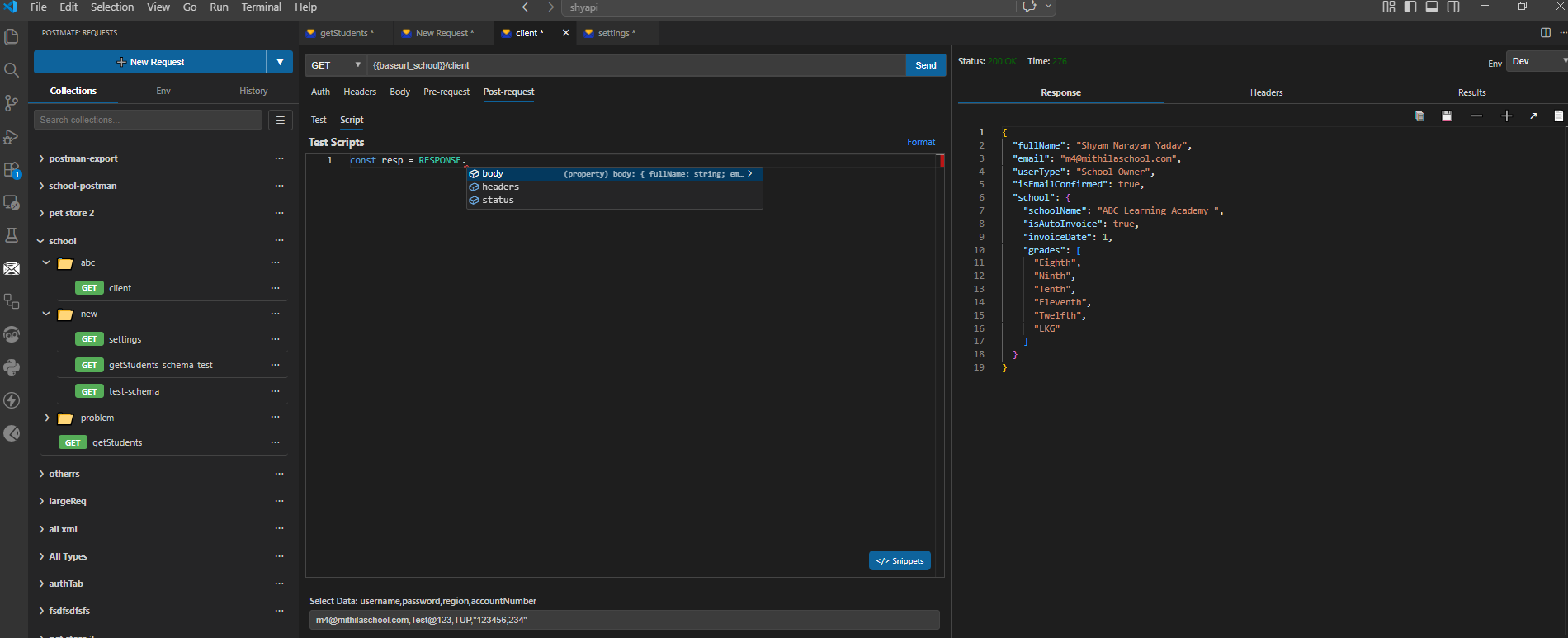
RESPONSE Object (Built-in API)
| Property | Description |
|---|---|
RESPONSE.body | Parsed JSON response |
RESPONSE.headers | Response headers |
RESPONSE.status | HTTP status code |
RESPONSE.responseTime | Response time in ms |
Example API Test Assertions
// Status code validation
pm.test('Status is 200', () => {
  pm.expect(RESPONSE.status).to.equal(200);
});

// Validate JSON field
pm.test('School name is correct', () => {
  pm.expect(RESPONSE.body.school.schoolName).to.equal('ABC Learning Academy');
});

// Performance test
pm.test('Response is under 500ms', () => {
  pm.expect(RESPONSE.responseTime).to.be.below(500);
});

// Contains check
pm.test('User type contains Owner', () => {
  pm.expect(RESPONSE.body.userType).to.include('Owner');
});
Built-in Code Snippets
Click </> Snippets to insert ready-made test templates:
- Validate status code
- Validate JSON field
- Save value to variable
- JSON schema validation
JSON Schema Validation (Like Postman — but Easier)
Validate full API response structure using JSON Schema:
const schema = {
    type: 'object',
    required: ['schoolName', 'isAutoInvoice', 'grades'],
    properties: {
        schoolName: { type: 'string' },
        isAutoInvoice: { type: 'boolean' },
        invoiceDate: { type: 'number' },
        grades: { type: 'array', items: { type: 'string' } }
    }
};

pm.schemaTest('Schema is valid', schema, RESPONSE.body);
→ Learn more about Postmate Client pm Library for full scripting capabilities.
→ Or let an AI write them: AI Test Generation
One-Click Schema Generator (No Online Tools Needed)
Unlike Postman, you don’t need external tools.
Generate schema instantly:
- Run request
- Click Generate Schema
- Paste into script
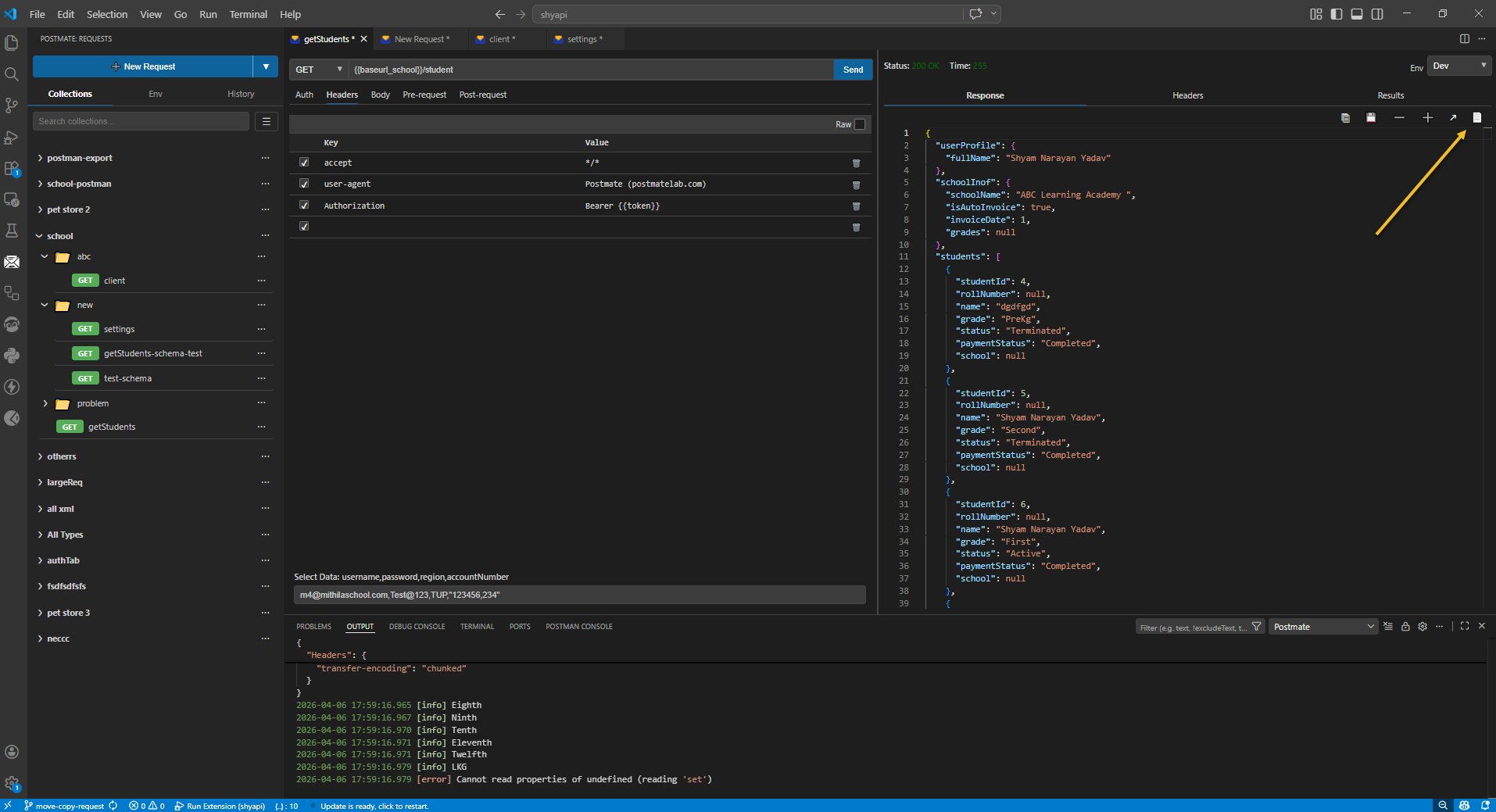
View Test Results
After sending a request, switch to the Results tab on the right panel.
Each test shows:
- ✅ Pass / ❌ Fail status
- Combined results (tabular + script)
- Clear failure messages
For full run summaries and shareable outputs, check API Test Reports (HTML & JSON).
Tabular vs Script Assertions
| Tabular Tests | Script Assertions | |
|---|---|---|
| Setup | No code required | JavaScript |
| Best for | Status codes, field checks, saving env variables | Complex logic, schema validation, chaining |
| Autocomplete | JSON path suggestions from last response | Full IntelliSense with dot-notation |
| Snippets | — | ✅ Built-in snippet library |
| Postman migration | — | ✅ pm library compatible |
Why Use Postmate Client for API Testing?
- ⚡ Lightweight VS Code extension
- 🔒 100% local (no cloud sync)
- 🚫 No login required
- 🔁 Built-in request chaining
- ▶️ Run tests with Collection Runner
- ⚙️ Automate via CLI
- 🧠 Smart autocomplete + IntelliSense
Next Steps
Continue exploring Postmate Client:
- Request Chaining — Pass data between API calls
- Collection Runner — Run automated test suites
- CLI Usage — Integrate API testing into CI/CD pipelines
- pm Library Reference — Write advanced test scripts
- API Test Reporting — Generate HTML & JSON reports
Missing a Feature?
Have an idea? Open a request on GitHub
Frequently Asked Questions
Can I replace Postman with Postmate Client?
Yes. Postmate Client provides request testing, assertions, scripting, environments, and collection runner features directly inside VS Code.
Does Postmate Client support automated API testing?
Yes. You can write tests using tabular UI or JavaScript and run them via CLI or collection runner.
Can I run API tests without Postman?
Yes. Postmate Client allows you to run and automate API tests directly inside VS Code without needing Postman or any external tools.