Compare Bulk API Responses Using a Data Table
Postmate Client's Data Table mode lets you compare API responses across two environments using bulk input data. Instead of comparing a single request/response pair, Postmate Client sends one request per row in your data table — in parallel to both environments — and shows you only the differences between the responses.
You can also filter and hide expected differences so you focus only on what's actually unexpected — turning hundreds of noisy diffs into a clean list of real problems.
This is a companion to Data Row mode. If you're new to response comparison in Postmate Client, start there.
When to use Data Table mode
Reach for Data Table mode when you need to verify API behavior across many inputs at once. Common scenarios:
- Environment migrations — confirm
stagingandprodreturn identical responses for a known set of inputs before cutting over. - Regression testing after a release — run the same dataset against
prodand a release candidate to catch unintended changes in response shape, status codes, or values. - Backend refactors — verify that a rewritten service returns the same data as the legacy service for every row in your test dataset.
- Data-driven contract testing — validate that an API contract holds across edge cases (empty fields, special characters, large payloads) sourced from a CSV.
If you only need to compare one request, use Data Row mode instead — it's simpler and faster for ad-hoc checks.
How Data Table mode works
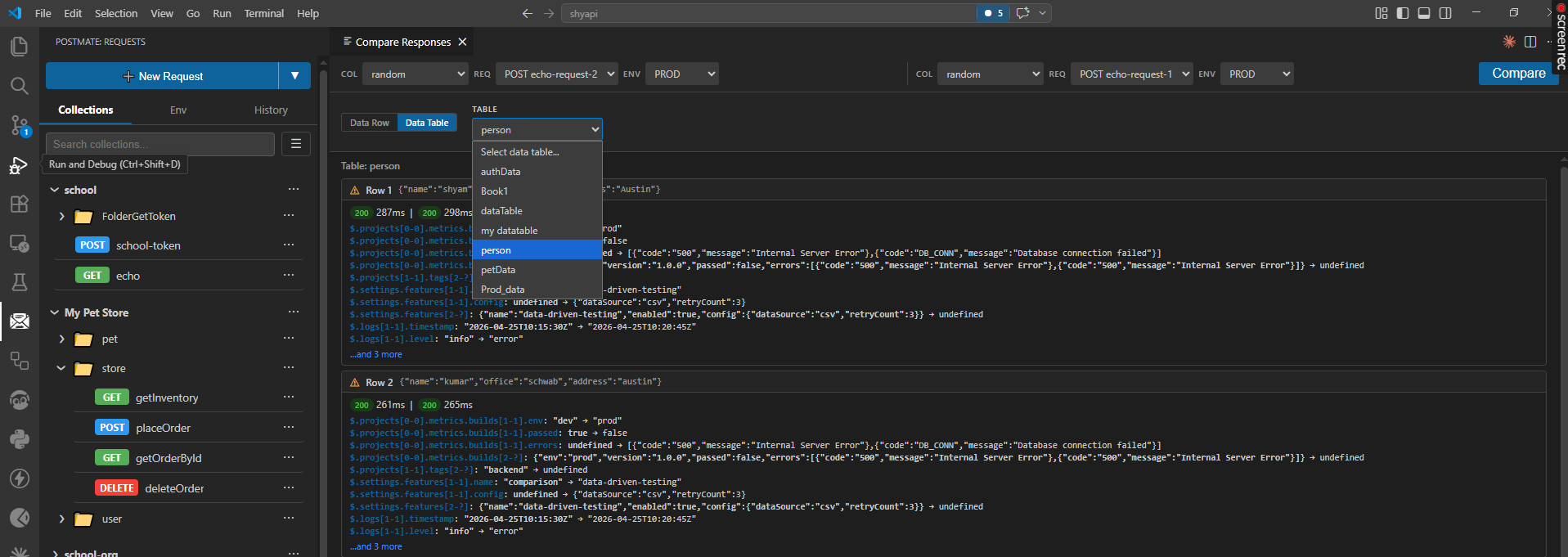
- Pick a data table — select any data table defined in your collection (for example, a
persontable with columns likename,office,address). - Select two requests and environments — choose the request and environment for each side of the comparison (e.g.
POST echo-request-1onPRODvs.POST echo-request-2onPROD). - Run the comparison — Postmate Client iterates through every row in the table and sends both requests in parallel, substituting row values into the request as variables.
- Review per-row diffs — each row gets its own result card showing only the JSONPath differences between the two responses. Identical fields are hidden so you can focus on what changed.
- Hide expected diffs and filter the noise — once results start streaming in, use the hide and filter controls (covered below) to reduce hundreds of expected differences into the small set you actually need to investigate.
Each row card displays:
- The input row data (so you know which input produced the diff).
- Response status codes and response times for both sides.
- A line-by-line list of differences using JSONPath notation (e.g.
$.projects[0-0].metrics.builds[1-1].env: "dev" → "prod"). - An expandable ...and N more link when there are additional differences beyond the first few.
Reading the diff output
Differences are expressed as JSONPath transitions from the left response to the right response. A few examples:
$.projects[0-0].metrics.builds[1-1].env: "dev" → "prod"
$.projects[0-0].metrics.builds[1-1].passed: true → false
$.logs[1-1].level: "info" → "error"
The notation [1-1] refers to array index 1 on both sides; [2-?] means the index exists on one side but not the other. A value of undefined on either side of the arrow means the field is missing in that response.
Filter and hide expected diffs
Bulk comparison runs can produce hundreds or thousands of diffs across rows — many of which are expected (different IDs, timestamps, environment names, hostnames, etc.). Postmate Client gives you two complementary tools to cut through this noise.
Hide an expected diff
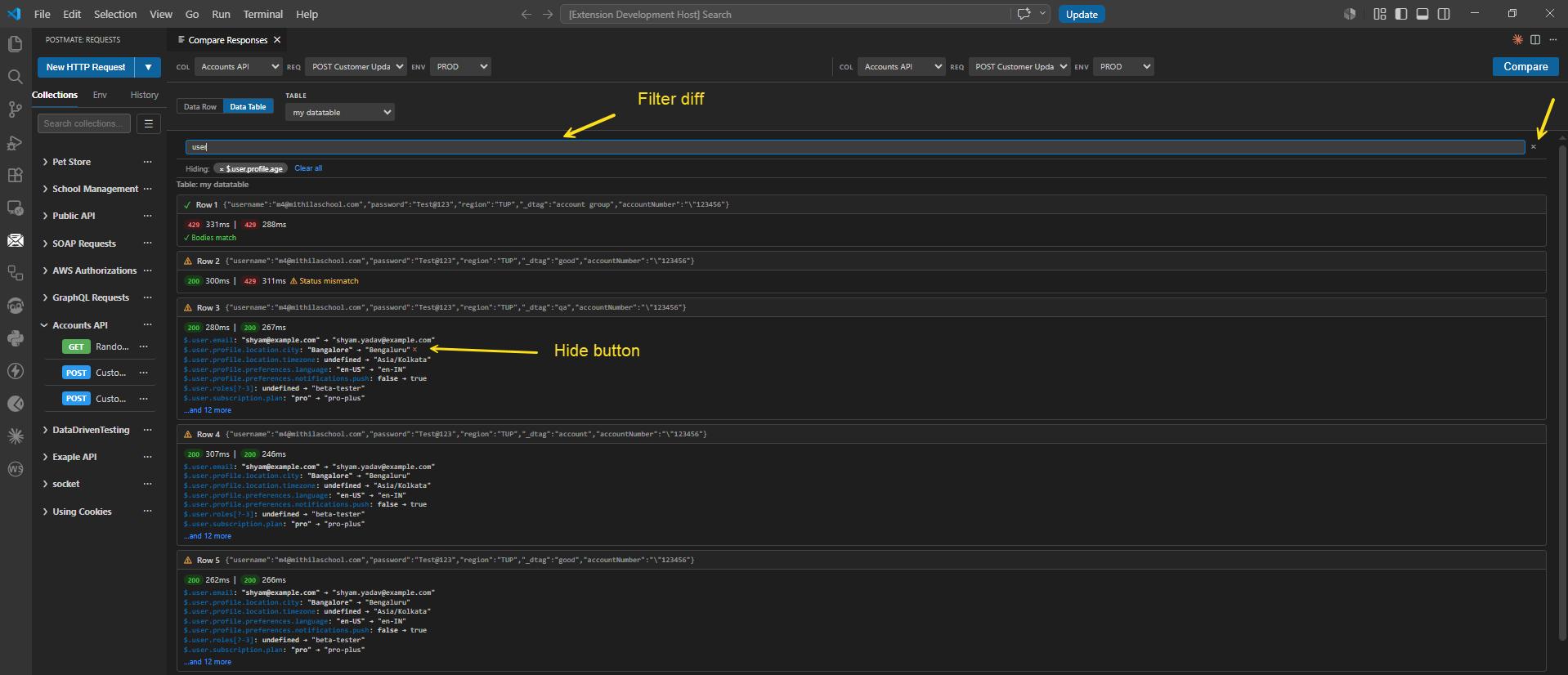
When the results stream in, hover over any diff line to reveal a small × (hide) button on the right side of the line. Click it to suppress that JSONPath across every row in the result set.
The hidden key is added to the Hiding: panel at the top of the diff view as a chip — for example, × $.user.profile.age.
Array indexes are normalized
Hiding ignores array index numbers when matching. If you hide $.orders[1-1].items, Postmate Client suppresses every variant of that path — $.orders[0-0].items, $.orders[2-2].items, $.orders[7-?].items, and so on. This means one click hides a class of expected differences, not just a single occurrence.
This is the main noise-reduction mechanism. Use it for paths you know will always differ between the two environments — generated IDs, timestamps, internal hostnames, anything environment-specific.
Unhide a key
To bring a hidden key back, click its chip in the Hiding: panel — every previously-suppressed diff matching that path will reappear in the result list.
Clear all hidden keys
Click Clear all next to the hiding chips to unhide everything at once, restoring the full unfiltered diff list. Useful after a long investigation when you want to reset and start fresh.
Filter by text
The text input above the diff list works as a substring filter. As you type, only diff lines containing your text remain visible — useful when you want to focus on a specific area of the response (e.g. type user to see only diffs under $.user.*).
Filter is non-destructive: it narrows the view without changing the underlying data, and clearing the text restores the full list immediately. Use the × at the right side of the text box to clear the filter in one click.
Filter vs Hide — when to use which
| Filter | Hide | |
|---|---|---|
| Mechanism | Narrows the view to lines matching text | Suppresses entire JSONPath patterns |
| Array-index aware? | No — literal substring match | Yes — [N-N] is normalized |
| Persists across runs? | Local to current view | Local to current view |
| Best for | Focusing on one area temporarily | Permanently silencing expected diffs |
| Restore | Clear the text box or click × | Click chip or Clear all |
In practice you'll use both: hide the diffs you know are expected (timestamps, generated IDs), then filter to drill into the area you care about most.
Parallel execution
Both requests for a given row are sent at the same time, so wall-clock runtime is roughly the slower of the two environments per row, not the sum. Response times are shown per row so you can spot environments that are degrading even when the response bodies match.
Tips for effective bulk comparison
- Start small. Run against 5–10 representative rows first to confirm your variable substitution works before pointing at a 10,000-row table.
- Hide expected diffs aggressively. Identifiers, timestamps, computed hashes, environment hostnames — all of these will differ by design. Hide them on the first run and the unexpected diffs become much easier to spot.
- Watch response times, not just bodies. A matching body with a 10x slower response is still a regression worth investigating. The per-row response times surface this even when the diff list is empty.
- Combine hide with filter for big result sets. First hide the categories of expected diffs, then use the filter to focus on the area you're actively investigating.
- Keep a "golden" dataset. Maintain a curated table of inputs that exercise known edge cases — it pays for itself the first time it catches a regression.
Data Row vs Data Table — quick reference
| Data Row | Data Table | |
|---|---|---|
| Input | Single request | One request per table row |
| Execution | Two parallel requests | 2 × N parallel requests |
| Output | One diff view | One diff card per row |
| Filter & Hide controls | — | ✅ Available |
| Best for | Ad-hoc checks, debugging | Regression testing, migrations |