Request Chaining in Postmate Client (Postman Alternative for API Workflows)
Postmate Client makes it easy to chain API requests in VS Code and build complete API workflows
Request chaining is a common API testing technique used to execute multiple requests in sequence while passing data (such as auth tokens or IDs) between them.
With Postmate Client, you can build these workflows visually or with scripts — no copy-paste, no manual token handling.
This is especially useful if you're looking for a Postman alternative in VS Code that supports both no-code and script-based API workflows.
What Is Request Chaining?
Request chaining connects multiple API requests so they run in sequence while sharing data between them.
This is ideal for workflows like:
- Authenticate → fetch protected data
- Create a resource → read it → delete it
- Log in → search → paginate through results
Postmate Client vs Postman for Request Chaining
Unlike Postman, where chaining is primarily script-driven, Postmate Client also provides a visual (no-code) way to build request workflows.
Postmate Client supports both script-based and visual request chaining, giving you flexibility based on your workflow.
In Postman, request chaining typically requires writing scripts to manually pass data between requests using environment variables.
In contrast, Postmate Client lets you:
- Visually chain requests without writing code
- Link requests directly from any collection
- Execute multiple requests in sequence automatically
- Still use scripts when you need advanced control
This makes it easier to build and manage API workflows without the overhead of scripting.
Setting Up a Request Chain
To create a chain, open any request, go to the Pre Request tab, and click + Add Request.
You can add as many requests as you need, selecting each one from any collection in your workspace. Postmate Client will execute them in the exact order they appear before running the current request.
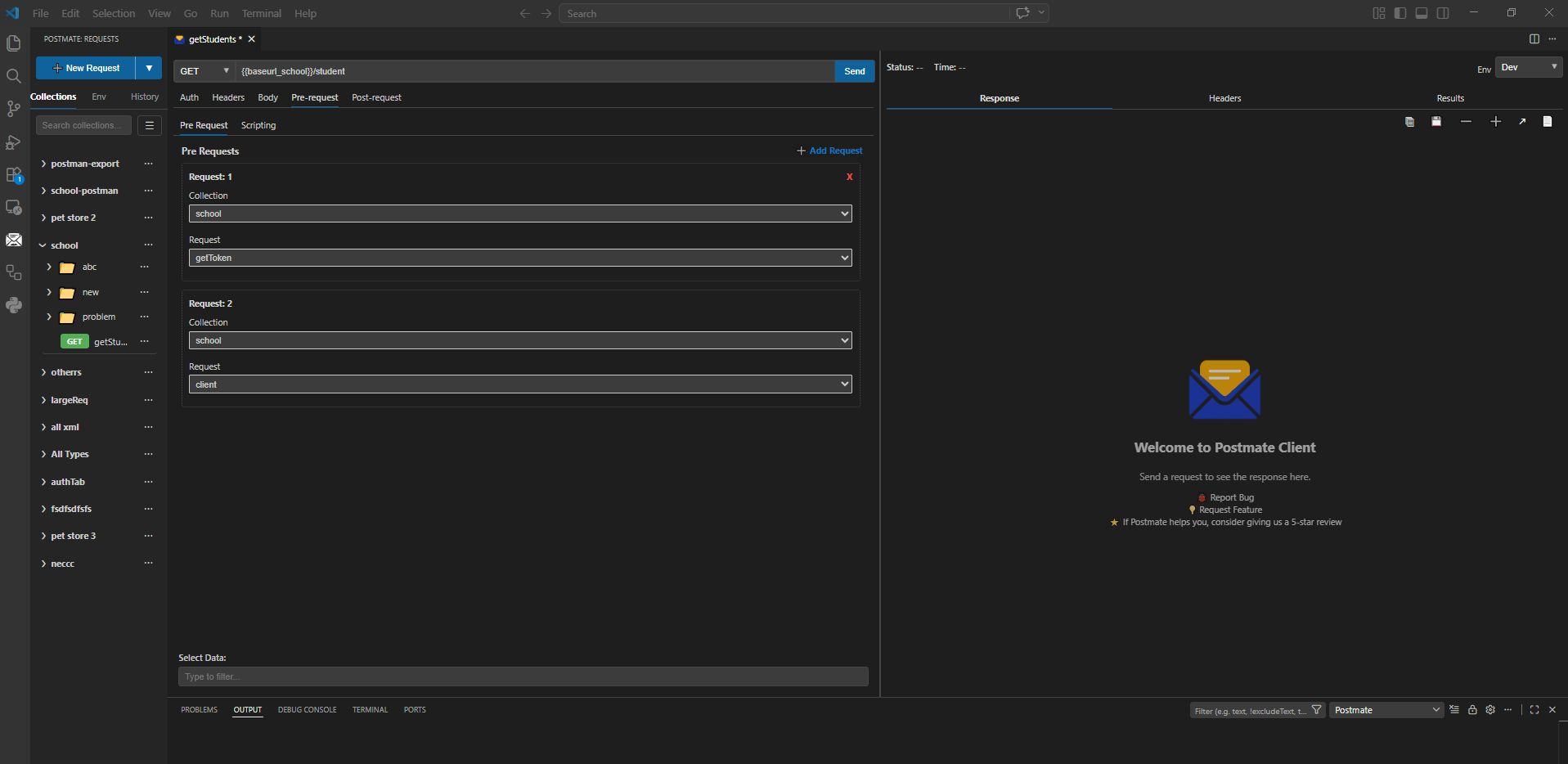
Steps:
- Open the request you want to chain prerequisites for.
- Click the Pre Request tab.
- Click + Add Request.
- Select a Collection and then the specific Request within it.
- Repeat for as many prerequisite requests as needed.
- Hit Send — Postmate Client runs the chain in order, passing context through each step.
How Variables Flow Through the Chain
Postmate Client maintains a shared variable context across every request in a chain. When a request in the chain sets a variable (via a post-request script), that variable is available to all subsequent requests in the same run.
Reference variables anywhere — URLs, headers, query params, or the request body — using the syntax.
Example: Authenticate Then Fetch Students
This is the pattern shown in the screenshot above. Before GET /student runs, the chain executes:
- getToken — authenticates and stores the token
- client — fetches client context if needed
getToken — Post-request Script
pm.setVariable('authToken', RESPONSE.body.token);
pm.setVariable('userId', RESPONSE.body.user.id);
GET /student
GET {{baseurl_school}}/student
Authorization: Bearer {{authToken}}
The token captured in getToken flows automatically into the student request — no manual steps required.
Example: Create → Read → Delete
A classic three-step lifecycle test:
Request 1: POST /items — Post-request Script
pm.test('Item created', () => {
  pm.expect(RESPONSE.status).to.equal(201);
});
pm.setVariable('itemId', RESPONSE.body.id);
Request 2: GET /items/
GET {{baseUrl}}/items/{{itemId}}
Authorization: Bearer {{authToken}}
Request 3: DELETE /items/
DELETE {{baseUrl}}/items/{{itemId}}
Authorization: Bearer {{authToken}}
The itemId set in step one carries through to both the read and delete steps automatically.
Tips
- Variable scope — Variables set in a chain persist for the entire run. They are available to every request that comes after, including the main request.
- Order matters — Requests execute top to bottom. If
getTokenmust run beforeclient, place it first in the Pre Request list. - Mix collections freely — Each entry in the chain can come from a different collection. You are not limited to one collection per chain.
- Debug with logs — Use
pm.log()in post-request scripts to print captured values to the Output panel while building your chain. - Combine with Data Tables — Pair chaining with Data-Driven Testing to replay the same end-to-end flow across multiple users, environments, or input sets.
When to Use Request Chaining
Use request chaining when:
- You need to authenticate before calling protected APIs
- One request depends on data from another (IDs, tokens)
- You want to test full API workflows end-to-end
- You are replacing Postman collection runner workflows in VS Code
Frequently Asked Questions
Can I chain API requests from different collections? Yes. Each request in the Pre Request list can come from any collection in your workspace.
Is there a limit to how many API requests I can chain? There is no hard limit. You can add as many pre-requests as your workflow requires.
Do chained requests run every time I send the main request? Yes. Every time you click Send, Postmate Client executes the full chain in order before the main request.
Can a chained request itself have pre-requests? Pre-requests are resolved for the top-level request only. Nested chaining (a pre-request that has its own pre-requests) is not executed recursively.