Let Your AI Agent Run Your API Requests
An assistant that can read your last API response is useful. An assistant that can send the request is a different thing — it can work the debug loop with you instead of waiting for you to click Send between every question.
Turn on one setting and GitHub Copilot can run any request you have already saved in Postmate Client, read what comes back, and keep going.
Send the getClient request against QA and tell me why it's returning 401
It cannot invent a URL. It can only run requests you have already built. That constraint is the whole design, and the rest of this page is about why.
The loop it closes
Debugging an endpoint is rarely one question. It's send, look, change something, send again — and every one of those cycles used to need you in the middle of it.
With send access on, a single sentence covers the round trip:
- Run Students against staging and against prod, and tell me what's different
- Send the login request, then getClient, and check whether the token is actually being picked up
- This endpoint feels slow. Run it a few times and tell me if it's the server or the payload.
The last one works because the response the agent gets back includes timing split into time-to-first-byte and total, plus the body size — so it can tell you the server answered in 80 ms and then spent two seconds shipping 4 MB of JSON.
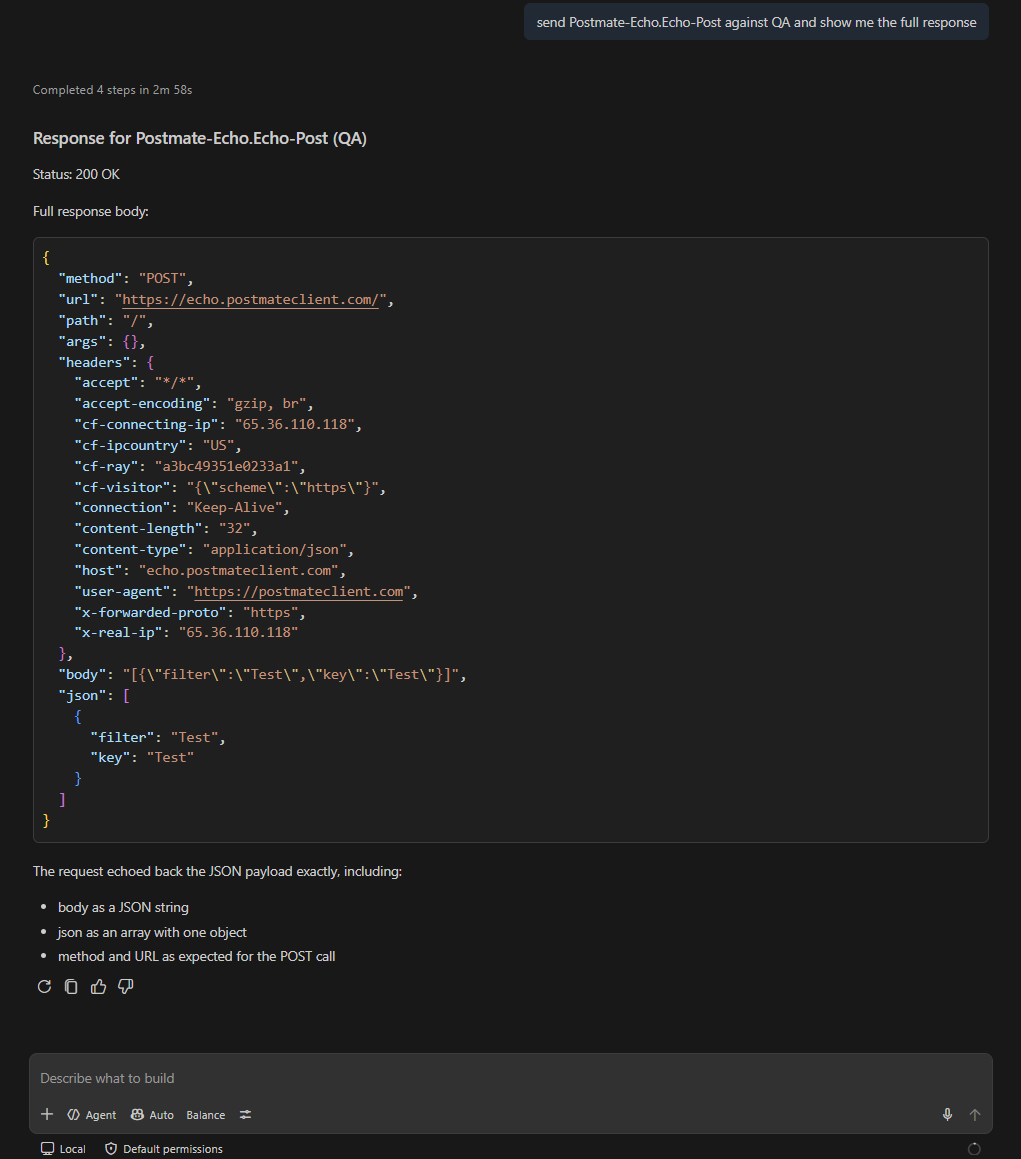
Pre-requests run exactly as they do when you hit Send yourself. A request chained behind a login still gets its token, so the agent sees the real authenticated response rather than a 401 it caused by skipping a step.
Turning it on
Send access is off by default. Until you enable it, the tool isn't registered at all — your agent won't see it in its tool list and won't try to use it.
{
  "postmate.mcp.allowSend": true
}
Or search for "postmate mcp" in VS Code Settings and tick Allow Send.
Everything else is already there: Postmate Client runs a local MCP server that GitHub Copilot discovers automatically. There's no API key, no account, and no Postmate model — your own assistant connects to your own editor.
Like any VS Code setting, this can live in a workspace .vscode/settings.json, so a team can enable it for a scratch repository and leave it off everywhere else.
What the agent can and cannot do
| Run a request you have saved | ✅ |
| Choose which environment it runs against | ✅ |
| Fill in variables your environment doesn't define | ✅ |
| Read the response, headers, timing, and test results | ✅ |
| Invent a URL, method, header, or body | ❌ |
| Override a value your environment defines | ❌ |
| Create, edit, or delete a saved request | ❌ |
| Send a multipart request | ❌ |
Saved requests only
The agent addresses a request by name — CollectionName.RequestName, for example School API.getClient. If that request doesn't exist in one of your collections, nothing happens and the agent is told to ask you for the right name.
This is deliberate. The attack surface of "an AI can make HTTP requests from your machine" is large; the attack surface of "an AI can run the requests you already wrote" is the set of endpoints you already work with every day.
Your environment wins
The agent can supply values for — an ID to look up, a search term, a row of test input:
Send getStudent with student_id 1001 and show me the payment status
But values defined in your environment always take precedence. If or lives there, the agent cannot override it no matter what it passes. Keep credentials and base URLs in an environment and they stay outside the agent's reach while it still gets to fill in the harmless parts.
This is the same variable resolution order the request panel uses — nothing special happens for AI.
Anything that isn't a read asks first
Any send that isn't GET, HEAD, or OPTIONS shows a dialog with the method, the resolved URL, and the environment before a single byte leaves your machine.
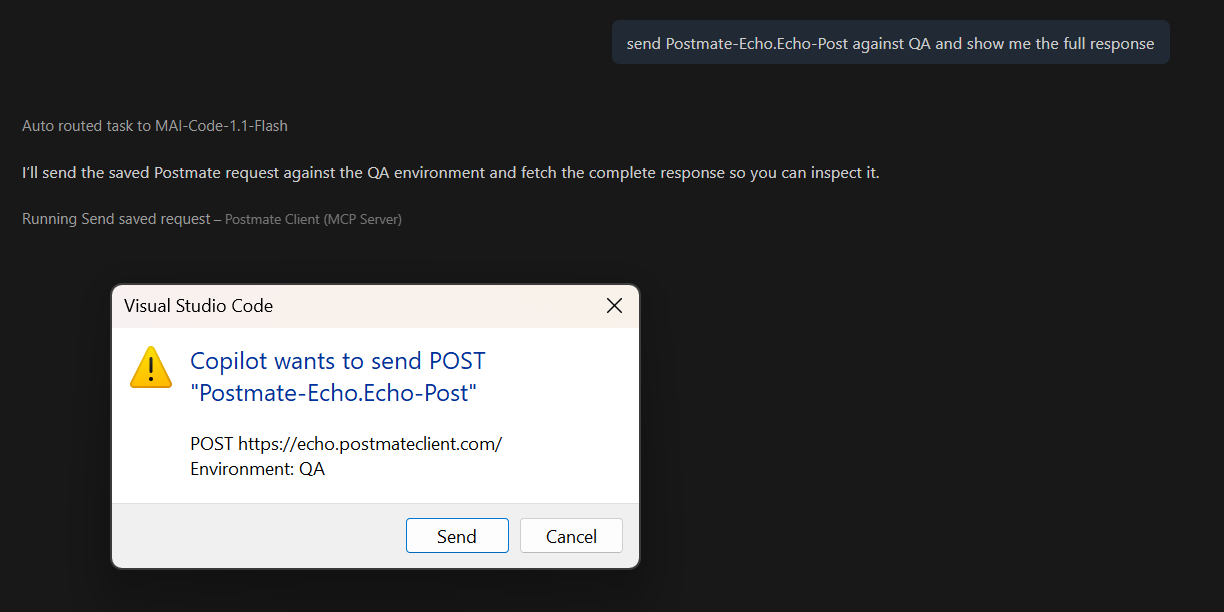
Nothing is sent until you approve it. Decline, and the agent is told you declined and asked not to retry — it comes back and asks what you'd like to do instead of looping on the dialog.
If you're iterating against a scratch environment and the prompts get in the way:
{
  "postmate.mcp.confirmMutations": false
}
Your agent may also show its own confirmation on top of this one. Copilot asks before running any tool it considers destructive; that prompt is Copilot's, not Postmate's.
What leaves your machine
Postmate sends nothing anywhere. The MCP server binds to 127.0.0.1, requires a per-session token, and never initiates an outbound connection.
When the agent runs a request, that request goes to your API — the one you saved — over your normal proxy and TLS path, exactly as if you had clicked Send. It doesn't pass through anything of ours, because there is no "ours" to pass through.
What the agent then does with the response is between you and your AI provider. If you use GitHub Copilot, that's GitHub and its model providers under whatever agreement covers your plan. Worth checking, especially on a Business or Enterprise plan where the terms differ from individual ones.
Before anything is returned to the agent, credential-shaped values are replaced with [redacted by Postmate]: Authorization, Cookie, X-Api-Key and similar headers, body keys containing token, password, secret and friends at any depth, JWT-pattern strings regardless of key name, and data-table columns using the __ prefix. Auth configuration is never captured — only the auth type is exposed.
→ See Security Overview · MCP reference
How this compares
| Postmate Client | Postman | Thunder Client | |
|---|---|---|---|
| AI can run your saved requests | Yes, opt-in | Cloud agent | No |
| Runs locally | Yes | No | — |
| Uses your own AI subscription | Yes | No, Postman's credits | — |
| Account required | No | Yes | Yes |
| Restricted to requests you saved | Yes | No | — |
| Confirmation before mutating calls | Yes, per request | — | — |
| Price | Free | Metered credits, then paid | Business tier and up |
Checked September 2026 against each vendor's published documentation. Tools change — tell us if something here is out of date.
Timeouts
Requests the agent sends time out after 30 seconds. This is deliberately separate from postmate.request.timeoutMs, which defaults to no timeout at all: a request you send yourself can hang as long as you're willing to wait for it, but an agent stuck on a dead endpoint blocks the whole conversation.
On timeout the agent gets a REQUEST_TIMEOUT error naming the host it was trying to reach, so it reports the problem instead of guessing at one.
Limitations
- GitHub Copilot only. Other MCP clients read their own config files rather than VS Code's MCP API, so they aren't supported yet.
- Multipart requests can't be sent by the agent. File contents aren't stored with a saved request, so the tool declines and asks you to send it from the panel.
- The most recent send wins. A request the agent runs becomes the active response, the same as if you'd sent it yourself. Focusing a panel makes that panel active again.
- Enabling needs a reconnect. If the tool doesn't appear after you turn the setting on, reload the window.
This is a beta and the design is still moving. If the agent sends something it should have asked about first, or refuses something it shouldn't have, that's worth telling us.
FAQs
Can the AI make requests I didn't write?
No. It runs a request by name from your collections. If the name doesn't resolve to a saved request, the call fails. There is no parameter for a raw URL, method, or header.
Can it delete my data?
Only through a DELETE request you wrote yourself, and only after you approve the confirmation dialog showing the method and resolved URL. The dialog can be turned off with postmate.mcp.confirmMutations, which is a deliberate choice you make, not a default.
Does it use AI credits?
No. Postmate doesn't call a model — your editor's assistant calls Postmate. The cost is whatever your Copilot subscription already is.
Can I let it read responses but not send requests?
Yes, and that's the default. postmate.mcp.enabled controls reading; postmate.mcp.allowSend controls sending. Leave the second one off and the agent can read your active response and nothing else.
Does this work with the collection runner or the CLI?
Not directly. The agent runs one saved request at a time. For running a whole collection, use the collection runner or the pmc CLI.
What happens with OAuth requests?
Token fetching works the same as it does from the panel — client credentials and password grants are fetched automatically. The authorization code grant needs an interactive browser login, so the agent gets an error asking you to click Get New Access Token in the request panel first.
Can the agent write a test against what it just sent?
Yes, and that's a good pairing. The response it gets back becomes the active one, so the usual test-generation flow works straight after. See Generate API Tests with AI.