MCP Server Reference
Postmate Client runs a local MCP server on 127.0.0.1 so AI agents in your editor can read the request panel you are actually looking at — and, once you turn it on, run requests you have already saved. It exposes three tools, redacts credentials before returning anything, and can be disabled with a single setting.
This page is the complete reference: every tool, every parameter, what gets redacted, and how to configure it.
Beta
The MCP server arrived in v2.0.0 and send_request in v2.1.0. Both are marked beta — behaviour and tool names may change. Feedback welcome.
Postmate does not call an AI. An AI calls Postmate
How it works
There is no Postmate AI vendor, no API key, and no model endpoint. Postmate exposes a local MCP server on 127.0.0.1 and waits. Your agent — the one you already use and your company already approved — connects to it locally.
That means Postmate itself still sends nothing anywhere — the same guarantee that covers everything else in Security & Privacy. Everything the agent reads is then handled by your agent's own model provider, under their data policy.
Data and privacy below covers exactly what that involves.
Setup
GitHub Copilot
Nothing to configure. Postmate registers the server with VS Code, and Copilot discovers it automatically.
- Open Copilot Chat (
Ctrl+Alt+I/Cmd+Alt+I) - Switch the mode dropdown to Agent — tools are not available in Ask mode
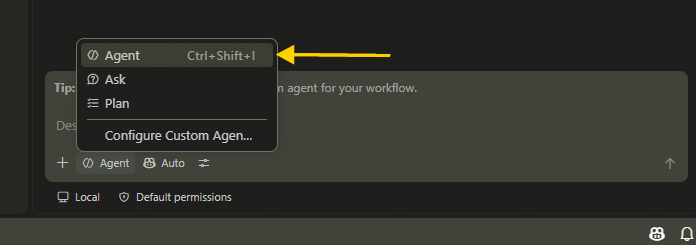
- Ask about your active Postmate panel
To confirm the server is connected, run MCP: List Servers from the Command Palette. You should see Postmate Client.
Other MCP clients
Claude Code, Cursor, and Windsurf read their own configuration files rather than VS Code's MCP API, so they are not supported yet. Support for manual configuration is planned — let us know if you want it.
Tools
Two tools are always available. The third, send_request, is off until you enable it.
get_active_response
Returns the request and response from the panel you last had focused.
| Field | Description |
|---|---|
request | Method, resolved URL, headers, body, and auth type |
response | Status, response time, TTFB, body size, headers, body |
testResult | Results of any tests on the request |
error | Present instead of a response when the request failed |
bodyShape | Top-level keys and array lengths, so the agent knows what it can query |
Variables are resolved before capture. The agent sees https://api.example.com/client, not /client.
Parameters
json_path(optional) — a JSONPath expression to extract part of the body, for example$.students[*].gradeor$.users[?(@.active==true)]count_only(optional) — return only the number of matches, not the matched values
list_open_panels
Lists your open request panels with method, URL, last status, and which one is active. The agent uses this when it is not obvious which panel you mean.
send_request 2.1.0
Runs a request that already exists in one of your collections and returns the response. Off by default — see Letting the agent send requests.
The agent cannot invent a URL. It can only run a request you have already saved, so the set of endpoints it can reach is exactly the set you have defined.
Parameters
request_path(required) — the request to run, written asCollectionName.RequestName, for exampleSchool API.getClientenvironment(optional) — the environment to run against. Defaults to your active one.data(optional) — values forthe request needs, as a key-value object
The return shape matches get_active_response — request, response, test results, body size and shape — with the same redaction applied. The response also becomes the active one, so a follow-up get_active_response reads it.
Pre-requests run exactly as they do from the panel, so a request chained behind a login still gets its token.
Example
Send the getClient request against QA and tell me why it is failing
send_request({ request_path: "School API.getClient", environment: "QA" })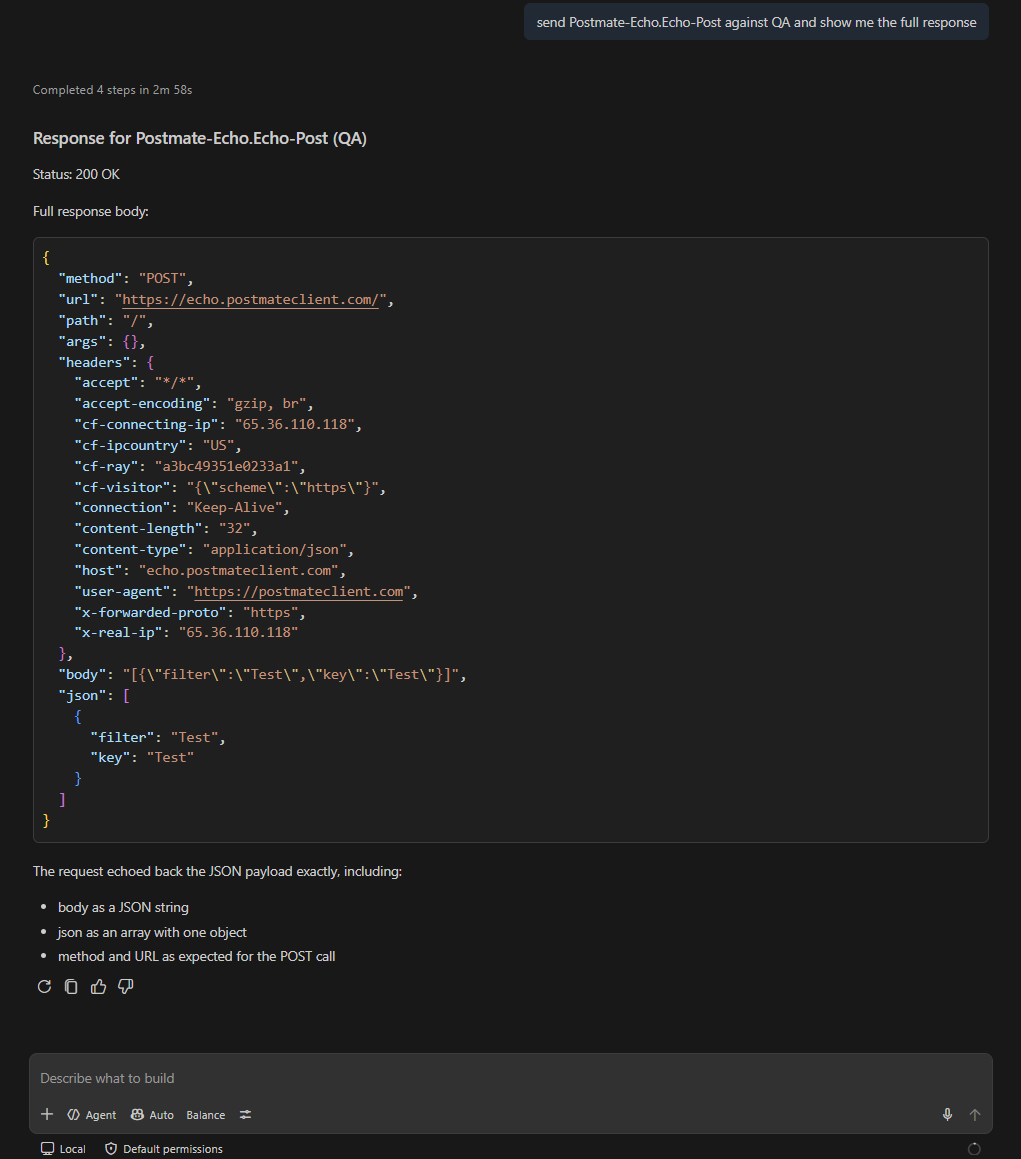
Where data fits
data is for values the request needs but your environment does not hold — an ID to look up, a search term, a row of test input:
Send getStudent with student_id 1001
Environment values always win. If or is defined in the environment, the agent cannot override it through data, no matter what it passes. Keep credentials and base URLs in your environment and they stay outside the agent's reach, while the agent can still supply the harmless parts of a request.
This is the same resolution order the request panel uses — see Building Requests.
Letting the agent send requests
send_request is opt-in. Until you turn it on the tool is not registered at all, so your agent will not see it in its tool list and will not try to use it.
{
  "postmate.mcp.allowSend": true
}
Or search for "postmate mcp" in VS Code Settings and tick Allow Send. Changing it takes effect on the agent's next connection; reload the window if the tool does not appear.
Like every other Postmate setting, this can live in a workspace .vscode/settings.json, so a team can enable it for a scratch repository and leave it off everywhere else.
Confirmation before mutating requests
Any send that is not GET, HEAD, or OPTIONS shows a dialog with the method, resolved URL, and environment before anything leaves your machine.
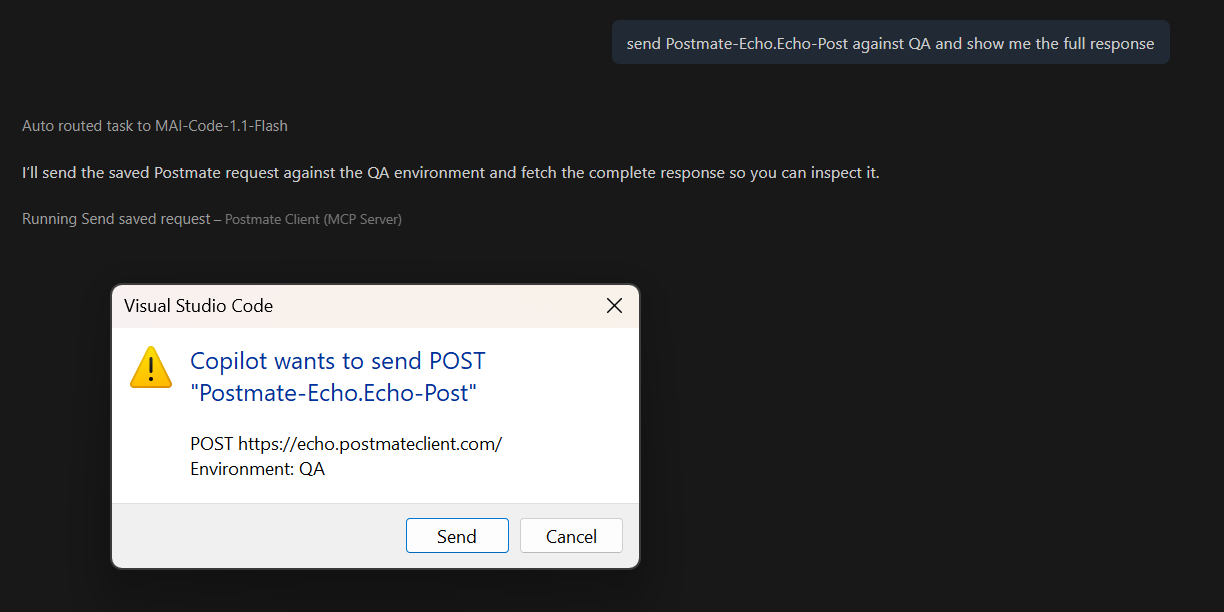
Nothing is sent until you approve it. If you decline, the agent is told you declined and asked not to retry — it will come back and ask what you want instead of looping on the dialog.
To send without confirming, which is reasonable when you are iterating against a scratch environment:
{
  "postmate.mcp.confirmMutations": false
}
Your agent may show its own confirmation on top of this one. Copilot, for example, asks before running any tool it considers destructive. That prompt is Copilot's, not Postmate's, and it appears whether or not confirmMutations is on.
What the agent can and cannot do
| Run a request you have saved | ✅ |
| Choose which environment it runs against | ✅ |
| Supply values for variables your environment does not define | ✅ |
| Read the response, headers, timing, and test results | ✅ |
| Invent a URL, method, header, or body | ❌ |
| Override a value your environment defines | ❌ |
| Create, modify, or delete a saved request | ❌ |
| Send a multipart request | ❌ — file contents are not stored with a saved request |
What to ask
Prompts that work well:
- What was the last API response in Postmate?
- Write a test to validate the response in the active Postmate panel
- Write a schema test for this response
- Why did this request fail?
- How many items are in the response?
- Which Postmate panels do I have open?
With send_request enabled:
- Send the getClient request and tell me why it is failing
- Run Students against QA and check the response shape
- Send getStudent with student_id 1001 and show me the payment status
- Run the login request, then getClient, and tell me if the token is being picked up
TIP
Mention "Postmate" or "the active panel" in your prompt. Without it the agent may not realise it should look at your request panel at all.
→ See AI Test Generation for a walkthrough of a real generated test
Generated tests use Postmate's API
Postmate's scripting differs from Postman's in one place: there is no pm.response object. The response is exposed through a RESPONSE global.
const response = RESPONSE.body;
const status = RESPONSE.status;
const headers = RESPONSE.headers;
Everything else — pm.test, pm.expect, Chai matchers — works as you would expect.
The agent is told about this difference automatically, so generated tests use RESPONSE.body and run as-is. It also knows about pm.schemaTest, which Postman does not have, and will generate a JSON Schema from the actual response shape rather than writing out a long list of individual property assertions.
See the scripting reference for the full pm API, and AI Test Generation for worked examples of what the agent produces.
Large responses
Sending a multi-megabyte response body to an AI agent is slow, expensive, and often gets silently truncated by the agent before the model sees it — which leads to confidently wrong answers about data the model never actually received.
Postmate handles this differently. Bodies over the size limit are not sent at all. The agent gets the body's size and shape instead, and queries what it needs:
get_active_response({ json_path: "$.students[*].grade" })For a 900-item response, that returns 900 short strings instead of hundreds of kilobytes of objects. For counting questions, count_only returns just a number and no data at all.
The same limit applies to responses from send_request. A large response comes back as size and shape, and the agent queries it with get_active_response afterwards.
Timeouts
Requests the agent sends time out after 30 seconds. This is deliberately separate from postmate.request.timeoutMs, which defaults to no timeout: a request you send yourself can hang as long as you are willing to wait for it, but an agent waiting on a dead endpoint blocks the conversation.
On timeout the agent gets an error with a REQUEST_TIMEOUT code and the host it was trying to reach, so it can report the problem rather than guessing.
Data and privacy
This is the section worth reading carefully, especially if you are evaluating Postmate for a workplace that restricts where API data can go.
What Postmate sends
Nothing. Postmate has no telemetry, no cloud service, and no AI vendor. The MCP server listens on 127.0.0.1 and responds to requests from your local agent. It never initiates an outbound connection.
When the agent runs a request through send_request, that request goes to your API — the one you saved — over your normal proxy and TLS path. It does not pass through anything of ours.
What your agent sends
Whatever it reads, to its own model provider. If you use GitHub Copilot, that means GitHub and its model providers, under whatever agreement covers your Copilot plan. Check your agent's data policy — Copilot Business and Enterprise plans typically carry different terms than individual plans.
Specifically, when you ask a question that triggers a tool call, your agent may receive:
- The request method, resolved URL, headers, and body
- The response status, headers, and body
- Test results for the request
- The names of your open request panels
- The same details for any request it runs itself, if you have enabled
send_request
What is redacted
Credentials are replaced with [redacted by Postmate] before the tool returns anything. This applies to both the request and the response, and to every tool equally.
Headers — Authorization, Proxy-Authorization, Cookie, Set-Cookie, X-Api-Key, X-Auth-Token, X-CSRF-Token, and similar. The header name is kept so the agent knows it was present; only the value is removed.
Body keys — any key containing token, password, secret, apikey, authorization, credential, privatekey, clientsecret, or sessionid, at any depth. Matching is deliberately broad.
Data table secrets — any key using Postmate's __ prefix convention, consistent with how those columns are masked in HTML reports.
JWT-shaped values — any string matching a JWT pattern is redacted regardless of its key name, since tokens often appear under innocuous field names.
Auth configuration — only the auth type is exposed (bearer, oauth2). Client secrets, refresh tokens, AWS keys, and stored credentials are never captured, including for requests the agent runs itself.
Redaction applies to JSON bodies and URL-encoded form bodies. Binary and multipart bodies are not sent at all.
What is not redacted
Response data is passed through in full, minus credentials. Postmate does not attempt to detect or remove personal information — names, email addresses, account numbers, and anything else in your response body reaches the agent as-is.
This is deliberate. There is no reliable way to identify PII across arbitrary APIs, and attempting it would break the feature: a test that asserts a name field is correct needs to see the name.
If you work with production data containing personal information, take that into account, and consider turning the feature off for that work.
Turning it off
Search for "postmate mcp" in VS Code Settings and uncheck it:

Or in settings.json:
{
  "postmate.mcp.enabled": false
}
Disabling takes effect immediately — the server shuts down and the agent loses access on its next call. No reload needed.
Enabling requires a window reload before the agent will reconnect. This is a VS Code limitation: stopped MCP servers are not restarted automatically.
The setting can be committed to a workspace .vscode/settings.json, so a team can disable it for a specific repository.
Settings reference
| Setting | Default | What it does |
|---|---|---|
postmate.mcp.enabled | true | Runs the local MCP server. Off means no tools at all. |
postmate.mcp.allowSend | false | Exposes send_request. Off means the tool is not registered. |
postmate.mcp.confirmMutations | true | Asks before any send that is not GET, HEAD, or OPTIONS. |
Limitations
- GitHub Copilot only. Other MCP clients are not supported yet.
- Enabling requires a window reload. Disabling does not.
send_requestruns saved requests only. The agent cannot construct a request that does not already exist in a collection.- Multipart requests cannot be sent by the agent. File contents are not stored with a saved request, so the tool declines and asks you to send it from the panel.
- The agent may use a stale response. If you switch panels mid-conversation, the agent sometimes answers from a response it read earlier. Asking again prompts a fresh read.
- The most recent send wins. A request the agent runs becomes the active response, the same as if you had sent it yourself. Focusing a panel makes that panel active again.
- Counting questions can take several tool calls. The agent may query each distinct value separately rather than fetching them all at once.
Feedback
This is a beta and the design is still moving. If the agent picks the wrong panel, generates a test that does not run, sends something it should have asked about first, or something is redacted that should not be, that is useful to know.