Security & Privacy
Postmate Client is a VS Code extension that runs entirely on your machine. There is no Postmate account, no cloud workspace, no telemetry endpoint, and no Postmate server for your data to reach — we don't operate one.
This page is written for the person who has to sign off on a new tool. It covers what the extension does and doesn't send, where your data lives, how credentials are handled, and — the part most vendors skip — how to verify all of it yourself, in about two minutes
For file paths, settings and day-to-day specifics, see the Security Overview.
What leaves your machine
| Leaves your machine? | |
|---|---|
| API requests you send | Yes — to the host you typed, and nowhere else |
| Collections, environments, variables | No |
| Secrets in VS Code SecretStorage | No |
| Client certificates and private keys | Used for the TLS handshake with your API only |
| Usage analytics, crash reports, telemetry | None collected |
| Licence or activation checks | None — there is no licence |
| Your response data, when you use an AI agent | Yes — to your agent's provider. Details below |
The extension makes no outbound connection of its own. Requests go where you point them, and the MCP server listens on 127.0.0.1 without ever initiating a connection.
Verify it yourself
You don't have to take that on trust. Put a proxy in front of VS Code, use Postmate normally, and read what comes out.
There are two levels to this. The first answers where does traffic go and takes about two minutes. The second answers what exactly is being sent and needs one extra step.
Run a proxy
mitmproxy is free, open source, and has a web UI.
- Windows — install from the Microsoft Store. The standalone
.exeinstaller works too, but some antivirus products flag it: a TLS-intercepting proxy looks, by design, exactly like the thing they're built to catch. The Store build is signed and generally passes. - macOS —
brew install mitmproxy - Linux — your package manager, or
pip install mitmproxy
Start it on a port nothing else is using:
mitmweb --listen-port 8082TIP
8082 rather than the usual 8080 because 8080 is almost always taken by something. If you get Errno 10048 or address already in use, pick another port.
The web UI opens at http://127.0.0.1:8081.
Level 1 — where traffic goes
Point VS Code at the proxy. Ctrl+Shift+P → Preferences: Open User Settings (JSON):
{
  "http.proxy": "http://127.0.0.1:8082",
  "http.proxySupport": "on"
}
Reload the window, then use Postmate normally — send a few requests, run a collection, save an environment.
Now read mitmproxy's event log. Every connection appears as a server connect line, and those lines appear before any encryption happens, so you can read them without configuring a single certificate:
[127.0.0.1:49421] server connect api.mithilaschool.com:443 (150.136.96.70:443)
[127.0.0.1:57832] server connect api.github.com:443 (140.82.114.5:443)
That's the whole picture. api.mithilaschool.com is the API the request was pointed at. api.github.com is VS Code itself, checking for extension updates.
No Postmate domain appears, because there isn't one to appear.
You'll also see TLS handshake failures at this level — expected, since nothing trusts the proxy's certificate yet. The connection destinations are still logged, which is the part that matters here.
What you can ignore
Requests to 169.254.169.254/metadata/instance/compute are mitmproxy's own — it checks whether it's running on a cloud VM. Nothing to do with Postmate.
Level 2 — what is actually sent
To read full request and response bodies, Postmate needs to trust the proxy's certificate. mitmproxy generates one on first run at %USERPROFILE%\.mitmproxy\ (or ~/.mitmproxy/).
Add one setting:
{
  "postmate.proxy.caBundle": "C:\\Users\\you\\.mitmproxy\\mitmproxy-ca-cert.pem"
}
Backslashes are doubled because it's JSON. On macOS and Linux, use the normal path.
This is worth being clear about: this setting only affects Postmate. You are not installing a certificate into your system trust store, and nothing else on your machine starts trusting the proxy. On a locked-down work laptop, where touching the trust store is often not permitted, this still works.
Reload, send a request, and mitmproxy decrypts it:
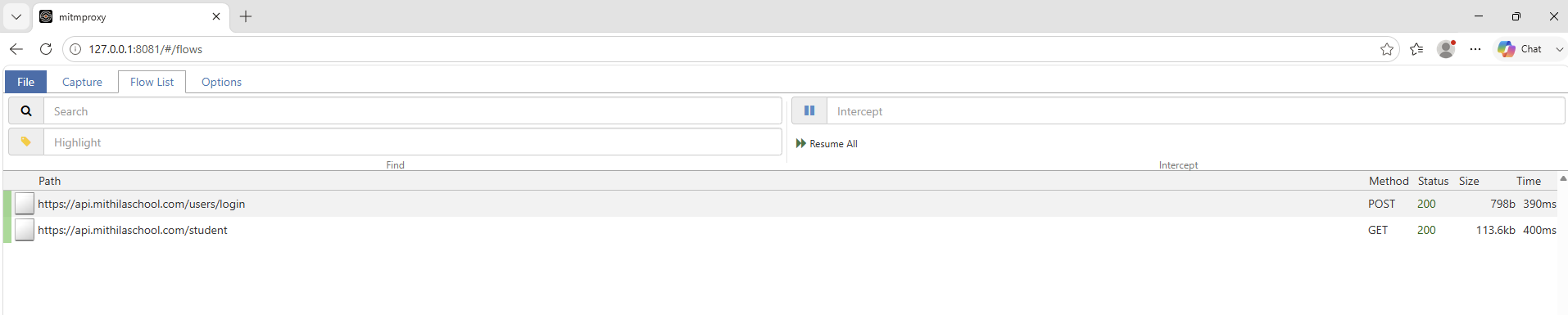
Click any flow to read the full request and response — headers, body, everything Postmate sent.
Now search for our own domain and confirm the result is empty:

Your own credentials appear here, and should
If your request has an Authorization header, you'll see it in the capture in plaintext. That's correct: Postmate is sending your request to your API exactly as you built it, and the proxy is sitting in the middle reading it.
The redaction described elsewhere on this page applies to what an AI agent can read, not to requests you deliberately send.
Save the evidence
File → Save in the mitmweb UI writes a flow file you can attach to a security review, or hand to whoever asked you to check.
Cleaner capture
For a capture with nothing but VS Code core and Postmate in it, do this in an empty VS Code profile (Ctrl+Shift+P → Profiles: Create Profile → Empty Profile) with only Postmate installed. Otherwise your other extensions' traffic shows up too, and an unfamiliar domain in the log is harder to attribute.
Afterwards
Remove http.proxy and http.proxySupport when you're done. Leaving them set means everything in VS Code breaks the moment mitmproxy stops running.
Where your data lives
Collections, environments and data tables are plain files in your workspace or in VS Code's global storage — readable, diffable, and committable to your own repository. Nothing is written to a database you can't inspect.
Secrets are the exception, and deliberately so: values you mark as secrets go into VS Code SecretStorage, which is backed by the OS keychain (Keychain on macOS, Credential Manager on Windows, libsecret on Linux). They are never written into collection files, and never appear in exports.
Credentials and secrets
- Access tokens are never saved to disk. OAuth 2.0 stores the token request configuration; the token itself lives in memory and is refetched when it expires.
- Secrets stay out of exports. Exporting a collection to share with a colleague does not carry secret values with it.
- Data table columns prefixed with
__are treated as secrets — masked in HTML reports and redacted before any AI agent sees them. - Client certificates are used for the TLS handshake with the host you configured them for. Private keys are read at request time and not transmitted.
Enterprise networks
Postmate Client is built to work inside a corporate network rather than around it.
- Corporate proxies — HTTP/HTTPS tunnelling, authenticated proxies,
NO_PROXYrules, and custom root CAs for TLS-intercepting proxies. Settings apply live, no reload. → Proxy guide - mTLS — per-host client certificate authentication, including through a proxy. → Client certificates
- Workspace settings — extension configuration can be committed to
.vscode/settings.json, so a team can standardise or disable features per repository.
AI agents and MCP
Postmate can expose your live request panel to an AI agent in your editor. This is the one feature where data reaches a third party, so it's worth being precise.
Postmate has no AI vendor. There is no API key, no model endpoint, and no Postmate-operated service. The extension runs a local MCP server on 127.0.0.1 and waits for your agent — the one your organisation already approved — to connect.
Your agent sends what it reads to its own provider. If that's GitHub Copilot, your response data is handled under your Copilot agreement. Check that agreement; Business and Enterprise plans usually differ from individual ones.
Credentials are redacted before the agent sees anything. Authorization and cookie headers, credential-shaped body keys, JWT-pattern values, and __-prefixed data table columns are all replaced with [redacted by Postmate].
Response data is not redacted beyond credentials. Names, emails and account numbers in a response body reach the agent as-is. There's no reliable way to detect PII across arbitrary APIs, and stripping it would break the feature.
The whole thing is off with one setting, committable per workspace:
{ "postmate.mcp.enabled": false }→ Full MCP reference, including the complete redaction list
Supply chain
Postmate Client is distributed only through the VS Code Marketplace, published as PostMate-lab.postmate. There is no separate installer, no post-install script, and no runtime downloaded after install — the extension ships with everything it needs.
The pmc CLI is published on npm and pinned by version in your pipeline like any other dependency.
What we don't claim
Being straight about the limits is more useful than a wall of badges.
- Postmate Client is not open source. You cannot read the source to verify our claims. That's why this page leads with a verification method that works without it — behaviour you can observe beats source you'd never actually read.
- There is no third-party security audit. We haven't paid for one. If your process requires it, tell us — it affects how we prioritise.
- No SOC 2, no ISO 27001. These certify an organisation's operational controls. Postmate stores none of your data and operates no service, so they'd certify very little, but we understand that some procurement processes ask anyway.
- Beta features are marked as such. MCP access is currently beta and its behaviour may change between releases.
If any of this is a blocker for your organisation, say so below — knowing what's blocking adoption is genuinely useful.
Questions from a security review?
Send them over. Architecture questions, questionnaires, or a specific control you need to verify — whatever your team needs answered before it can approve a new tool.
Your name, email and message are emailed to us and nowhere else. No CRM, no marketing list, no follow-up sequence.