Generate API Tests with AI
Ask GitHub Copilot to write a test for the request you just sent, and it reads the actual response sitting in your Postmate Client panel — status, headers, body, timing — then writes assertions against what your API really returned.
No pasting payloads into a chat window. No generating tests from a spec and finding out later that the spec was wrong.
There are no AI credits to run out of, because Postmate doesn't call a model. Your editor's assistant does.
How it works
Postmate Client runs a local MCP server that exposes your live request panels to AI agents in your editor. When you ask for a test, the agent calls get_active_response, gets the real payload back, and writes the script from that.
Ask in plain language:
generate postmate test from active response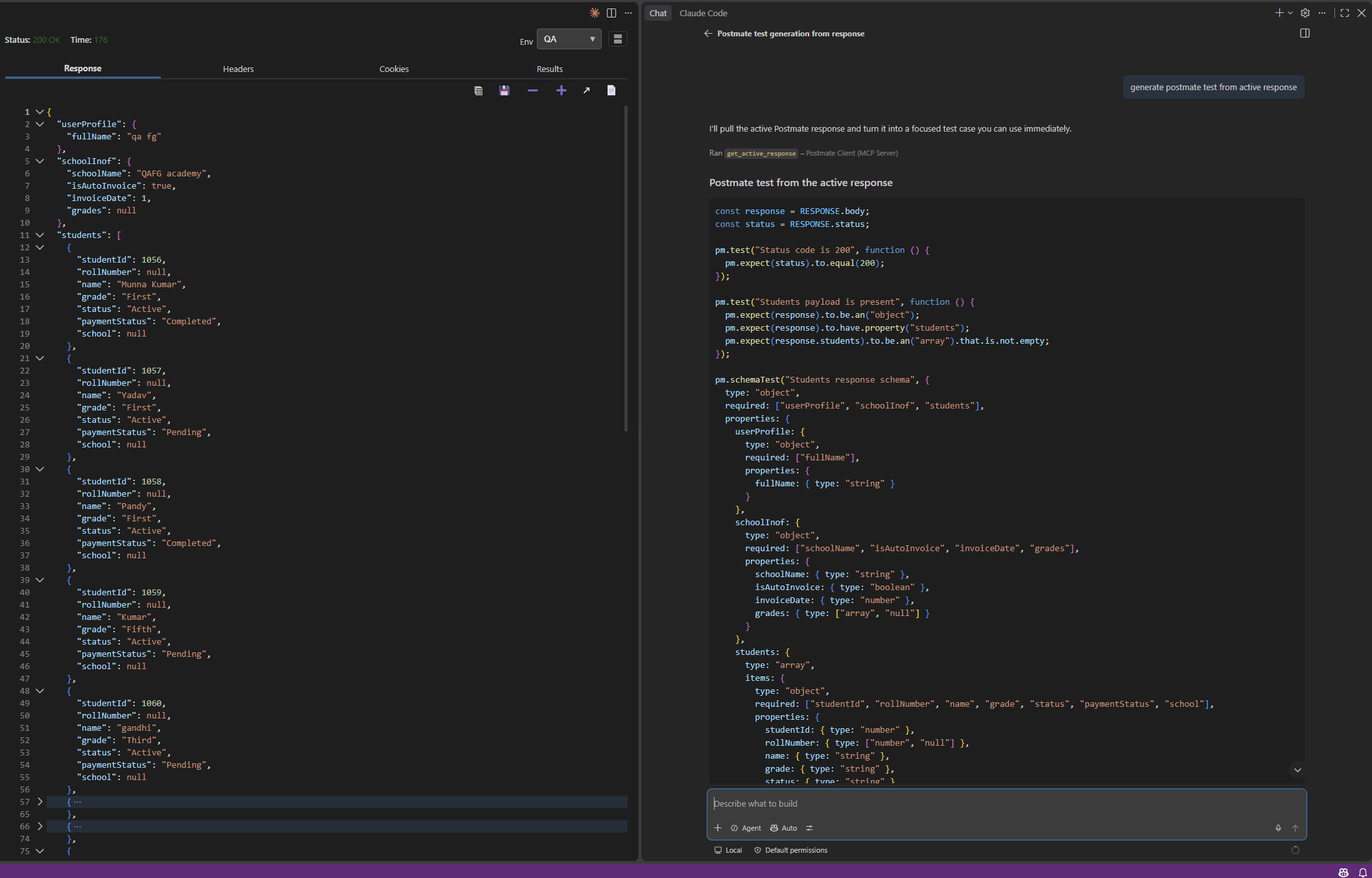
Look at what happened in that screenshot. The response has "grades": null and "rollNumber": null. The generated schema says type: ["array", "null"] and type: ["number", "null"] — it allows both, because the agent saw the nulls.
A tool generating tests from an OpenAPI spec would have asserted grades is an array. That test passes in review and fails on the first real run.
Grounded in the response, not the spec
This is the difference that matters. Most AI test generation works from a schema, a spec, or a description of your API — a model of your API rather than your API.
Because the agent reads the response your server actually sent, the tests it writes know:
- Which fields are nullable right now, not which fields the spec says are required
- The real shape of nested objects and arrays, including fields the spec never documented
- The actual status, headers and response time from the request you just ran
- Field names as they really are — including the typos your API has and your spec doesn't
Postmate also tells the agent to assert structure rather than sample values, so you get pm.expect(student.name).to.be.a("string") instead of pm.expect(student.name).to.eql("Munna Kumar"). Tests that survive the next deploy, not tests that pass once.
It can run the request too
Reading the last response covers the common case: you send a request, you ask for a test. But debugging is a loop, and with one setting turned on the agent can send the request itself rather than waiting for you to click Send between every question.
Send the getClient request against QA and tell me why it's returning 401
It can only run requests you have already saved — it cannot construct a URL — and anything that isn't a GET asks for confirmation first. It is off by default.
→ See Let Your AI Agent Run Your API Requests for how it works and what the limits are
No credits, no cloud, no account
The AI is yours. Postmate is the thing holding the response, not the thing calling a model.
| Postmate Client | Postman (Postbot) | Thunder Client | |
|---|---|---|---|
| AI test generation on the free tier | Yes | Metered — 50 AI credits/month | No |
| AI can run your saved requests | Yes, opt-in and local | Cloud agent | No |
| Where the AI runs | Your editor's assistant, your subscription | Postman's cloud | Paid MCP server, Business tier and up |
| Where your response data goes | Your own AI provider, under your agreement with them | Postman's servers | Your own AI provider |
| Account required | No | Yes | Yes, for paid features |
Checked 30 August 2026 against each vendor's published pricing. Tools change — tell us if something here is out of date.
Worth being precise about the privacy claim: Postmate itself sends nothing anywhere. The MCP server binds to 127.0.0.1, requires a per-session token, and redacts credential-shaped values before returning anything. When the agent runs a request, that request goes to your own API over your normal proxy and TLS path — it doesn't pass through anything of ours. But once the agent has the response, it goes to your agent's model provider under their data policy. That's your Copilot subscription, not ours — and it's the same path your source code already takes.
→ See Security Overview for what gets redacted
Setting it up
Nothing to configure with GitHub Copilot — install Postmate Client, send a request, and ask. The MCP server starts with the extension.
| Setting | Default | What it does |
|---|---|---|
postmate.mcp.enabled | true | Runs the local MCP server. Off means no AI access at all. |
postmate.mcp.allowSend | false | Lets the agent run your saved requests. |
postmate.mcp.confirmMutations | true | Asks before any send that isn't GET, HEAD, or OPTIONS. |
Other MCP clients aren't supported yet. This is a beta; feedback is welcome.
→ See AI Agent Access (MCP) for the full tool reference and configuration
Postmate's scripting API
Generated scripts use Postmate's own globals, not Postman's:
const response = RESPONSE.body;      // not pm.response.json()
const status = RESPONSE.status;
const responseHeader = RESPONSE.headers;

pm.test("Status code is 200", function () {
  pm.expect(status).to.eql(200);
});
pm.test and pm.expect work as they do in Postman, and chai matchers are available. Postmate also has pm.schemaTest(name, schemaObj, RESPONSE.body) for validating response shape in one assertion instead of twenty.
The agent is told all of this, so generated scripts run as-is — no find-and-replace afterwards.
→ See pm Library Reference for every available method
Don't want to use AI?
You don't have to. Postmate's test editor builds assertions from table rows — pick a JSON path, pick an operator, type the expected value. No code, no model, no network call.
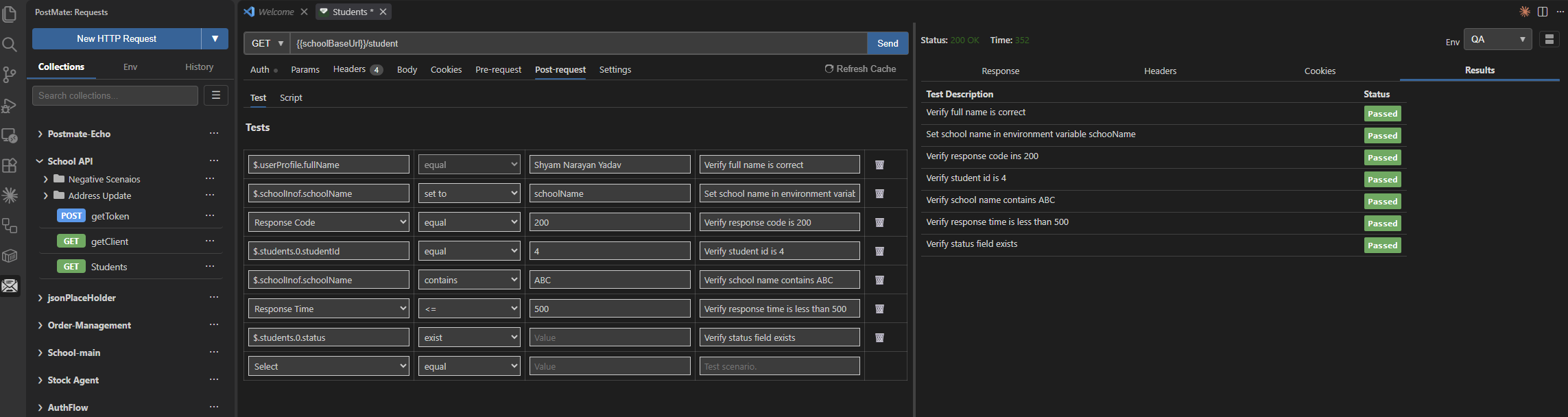
JSON paths autocomplete from the last response, so you're picking real field names rather than typing them. The set to operator stores a response value into an environment variable instead of asserting on it — that's how you chain a token from one request into the next without writing a script.
Both paths work on the same request. Build the obvious checks as rows, drop into the Script tab for the logic that needs code, and run them together.
→ See Tests & Assertions for the full guide
FAQs
Does Postmate Client charge for AI test generation?
No. Postmate is free, including this. There are no AI credits because Postmate doesn't call a model — your editor's assistant does, on whatever subscription you already have.
Which AI assistants work with this?
GitHub Copilot works with no configuration. Other MCP clients aren't supported yet — this is a beta.
Can the AI send requests, or only read them?
Both, but sending is opt-in. Reading the active response works out of the box. Running a request requires postmate.mcp.allowSend, and even then the agent can only run requests you have already saved to a collection — it cannot build one from scratch. See Let Your AI Agent Run Your API Requests.
Does my API response get sent to Postmate's servers?
No. Postmate has no servers. The MCP server runs on 127.0.0.1 inside the extension. The response does go to your AI assistant's model provider, the same way your open files do — that's between you and them.
Are credentials sent to the AI?
No. Authorization, Cookie, X-Api-Key and similar headers, credential-shaped body keys like token and password, JWT-pattern values, and data-table columns prefixed with __ are all replaced with [redacted by Postmate] before anything leaves the extension. This applies to requests the agent runs itself as well as ones you sent.
Can it generate tests for a large response?
Yes. Bodies over the size limit aren't sent at all — the agent gets the shape and queries just the part it needs with JSONPath, so a 5 MB response doesn't blow up your context window.
Do the generated tests run in CI?
Yes. Save the script to the request, commit the collection, and run it with the free pmc CLI in GitHub Actions, GitLab CI, Jenkins or anywhere else. No subscription for CI runs.
Can I generate tests without AI?
Yes — the tabular test editor builds assertions from dropdowns and needs no model at all. See Tests & Assertions.