How to Export a Bruno Collection to Postman
Bruno stores collections in its own .bru format, but it ships with a built-in Export to Postman option. That single feature is all you need — there's no separate Bruno-to-Postman converter, and no third-party tool involved.
Once you have the exported .json file, you can import it into Postman, into Postmate Client, or into anything else that reads the Postman Collection format.
This guide covers the export step first, then both import paths.
Why This Works
Bruno's Share → Export menu converts any collection into a Postman Collection JSON file. Postman reads that format natively, and so does Postmate Client. So the same exported file works for either destination — which is why "Bruno to Postman converter" tools aren't needed.
Prerequisites
- Bruno installed, with the collection you want to export
- Whichever client you're importing into — Postman, or the Postmate Client extension for VS Code
Step 1: Export Your Collection from Bruno
Open your collection in Bruno.
Click the collection options (•••) menu and select Share.
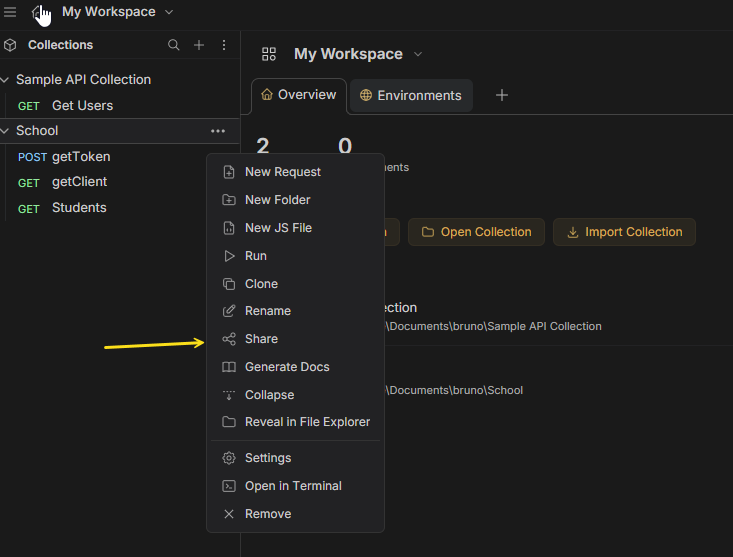 The collection's ••• menu — select "Share" to open the export panel.
In the Share Collection panel, select the Export tab → Postman.
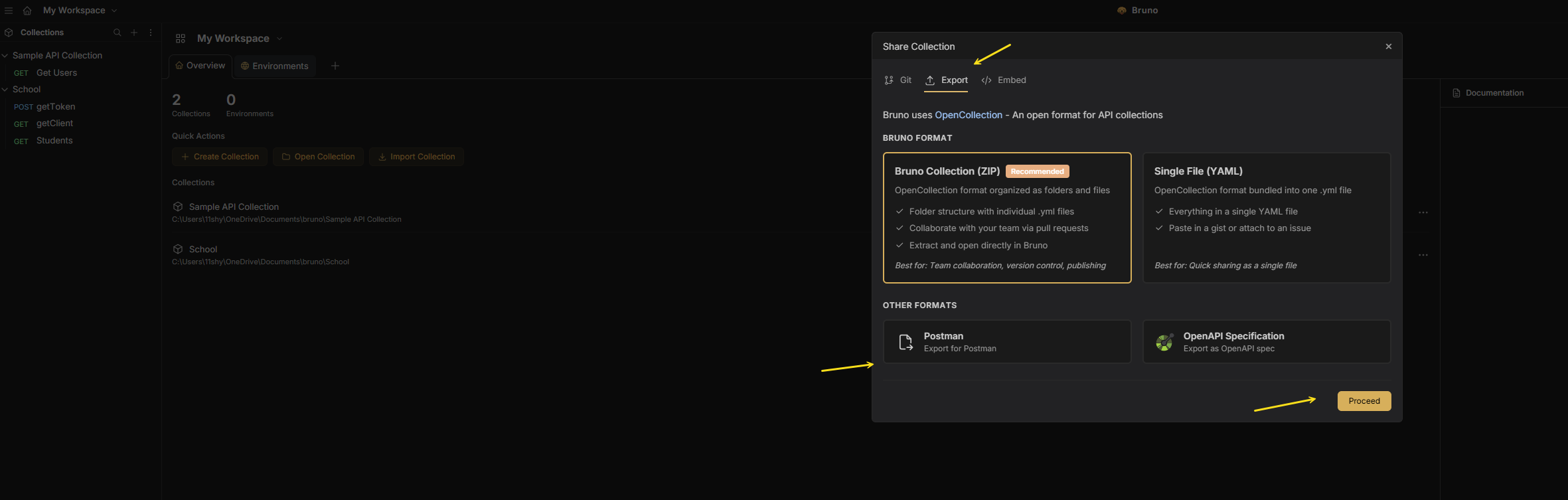 The Bruno "Share Collection" panel — choose Export, then Postman.
Click Proceed.
Save the exported
.jsonfile to your machine.
Tip: Bruno's Export panel also offers Bruno Collection (ZIP), Single File (YAML), and OpenAPI Specification formats. Choose Postman unless you specifically need one of the others — it's the format both Postman and Postmate Client import directly.
Now pick your destination below.
Option A: Import into Postman
- Open Postman and click Import (top-left, next to the workspace selector).
- Drag the exported
.jsonfile into the import dialog, or click files to browse to it. - Postman detects the Postman Collection v2.1 format automatically — confirm and click Import.
Your collection appears in the sidebar with folder structure intact.
What to check after import: Bruno's scripting API (bru.setVar, bru.getEnvVar) doesn't map to Postman's pm API, so pre-request and post-response scripts need manual adjustment. Bruno's native assert blocks won't carry over as Postman tests either.
Option B: Import into Postmate Client
In the Postmate Client sidebar, click the hamburger menu (☰) next to the collection search bar.
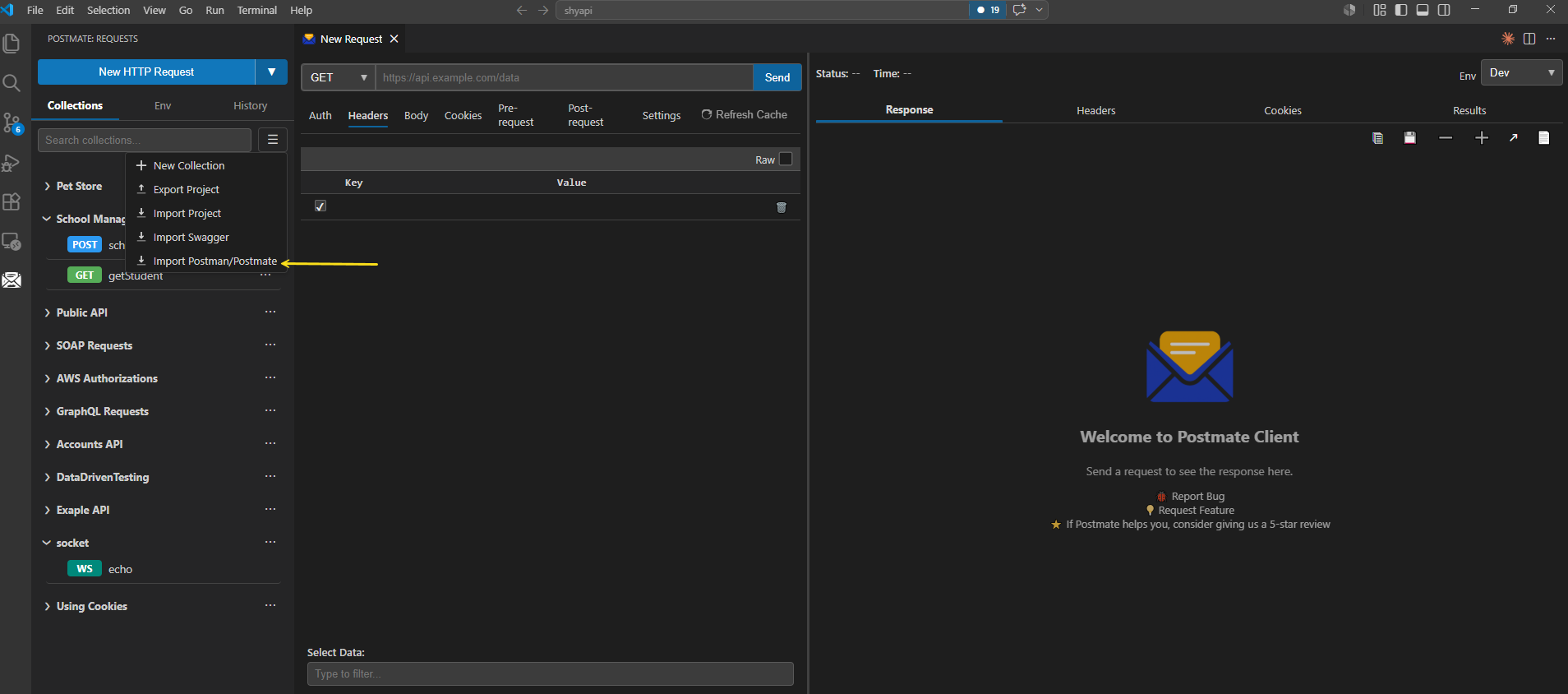 Click the hamburger icon above your collections list to open the import menu.
Select Import Postman/Postmate.
From the "Select collection type" dropdown, choose Postman.
 Choose "Postman" since that's the format you exported from Bruno.
Browse to the exported
.jsonfile.Click Import Postman Collection.
Your Bruno collection will now appear in the Postmate Client sidebar — fully structured and ready to use.
What Transfers Cleanly
Regardless of which client you import into:
- ✅ URLs, methods, headers, body
- ✅ Folder structure
- ✅ Environment variables
What to Double-Check After Import
- ⚠️ Pre-request / post-response scripts — Bruno uses its own scripting API (
bru.setVar, etc.). Both Postman and Postmate Client use apm-style API instead, so imported scripts need syntax adjustments. For Postmate Client, see thepmlibrary reference. - ⚠️ Assertions — Bruno's native
assertblocks don't map one-to-one to either client's test format. Re-check and re-run after import. For Postmate Client, see Tests & Assertions.
Going the Other Way: Postman → Bruno
Moving in the opposite direction is just as direct. In Bruno, click Create Collection → Import, choose Postman Collection, and select your exported Postman .json file. Bruno converts it into .bru files on import.
If you're leaving Postman because of the login requirement or cloud sync, it's worth knowing Bruno isn't the only local-first option — see migrating from Postman to Postmate Client for a VS Code-native alternative.
Quick Reference Summary
| Step | What to Do |
|---|---|
| 1 | In Bruno, open collection ••• menu → Share → Export → Postman |
| 2 | Click Proceed and save the .json file |
| 3a | To Postman: click Import → drag the .json file → Import |
| 3b | To Postmate Client: click ☰ → Import Collection → choose Postman → select the .json file |
| 4 | Review scripts and assertions — these don't transfer automatically |
You can also import from Swagger/OpenAPI if that fits your situation better.
If You're Evaluating Where to Land
Plenty of people export from Bruno without having decided on a destination yet. A quick honest comparison:
Bruno is genuinely good at local-first, Git-friendly API testing. If it's working for you, the main reasons people leave are wanting richer test data handling or a client that lives inside the editor.
Postman has the largest ecosystem and the best team collaboration features. The tradeoffs are a required account, cloud sync by default, and a heavier app.
Postmate Client runs inside VS Code with no login and no telemetry. Collections are plain JSON files that live in your repo, so team sharing happens through Git — branches, pull requests, review, and full history, using the workflow your team already has. Need to hand off a complete setup instead? One-click project export bundles collections, environments, and data tables into a single file that imports on the other end with zero configuration. On top of that you get data-driven testing from CSV, response comparison across environments, and CI/CD via the pmc CLI, which also generates standalone HTML reports that anyone can open in a browser.
The tradeoffs, plainly: there's no cloud workspace layer — no live sync between teammates, no in-app comments on requests. It's also a newer tool than both Bruno and Postman, so the community is smaller and there are fewer third-party guides and answers when you hit an edge case. And it runs as a VS Code extension, which ties it to that editor.
Frequently Asked Questions
Is there a Bruno to Postman converter?
You don't need one. Bruno has built-in Postman export — open the collection's ••• menu → Share → Export → Postman. The resulting .json file imports directly into Postman.
How do I export a Bruno collection?
Open the collection in Bruno, click the ••• menu, choose Share, then the Export tab. Pick your format (Postman, Bruno ZIP, YAML, or OpenAPI) and click Proceed.
Do I need a special Bruno importer for Postmate Client?
No. Bruno exports in Postman format, and Postmate Client imports Postman collections natively — so no dedicated Bruno importer is needed.
Will my Bruno scripts work after import?
Not automatically. Bruno's scripting API differs from the pm API used by both Postman and Postmate Client, so pre-request and post-response scripts need minor manual adjustments.
What export format should I choose in Bruno?
Choose Postman. It's the format that imports directly into both Postman and Postmate Client. The other options (Bruno ZIP, YAML, OpenAPI) serve different purposes.
Share Your Feedback
Exported from Bruno recently? We'd love to hear how it went.