Update an API Resource with AI: GET, Change One Field, PUT It Back
Many APIs only accept a whole resource back. To change one setting you GET all of them, edit one field, and PUT the full body. By hand that is three steps and some careful copying. For an AI agent it is harder still: a settings response can run to thousands of lines, the agent may only ever see its shape, and any secrets in it are redacted — so it can't rebuild the body itself.
Postmate does that part. The agent says which request to read from and what to change; Postmate fetches the full response, applies the change, and sends it.
Prompt: Change my nickName to Sam using putUserSettings with the body from getUserSettings, then check it was saved
Requires send access (postmate.mcp.allowSend).
How it works
The agent calls send_request with two extra inputs:
send_request({
  request_path: "Settings.putUserSettings",
  body_from_response: "Settings.getUserSettings",
  patch: [{ op: "replace", path: "/nickName", value: "Sam" }]
})- Postmate sends
getUserSettingswith the same environment and variables, and takes its full, unredacted response body. That body stays inside Postmate. - It applies the JSON Patch. Here, one
replaceon/nickName. Everything else is left exactly as the API returned it, including fields the agent never saw. - It sends the result as the body of
putUserSettings— after your confirmation if it's a mutation — and returns that response as usual.
Then the agent can send getUserSettings again and check $.nickName to verify the change was applied.
Try it with httpbin
You don't need your own API to see it work. httpbin's /put echoes back whatever body it receives.
- Create a collection settingUpdate with two requests:
- getSettings —
GET https://httpbin.org/json - putSettings —
PUT https://httpbin.org/put, body format JSON, body{}
- getSettings —
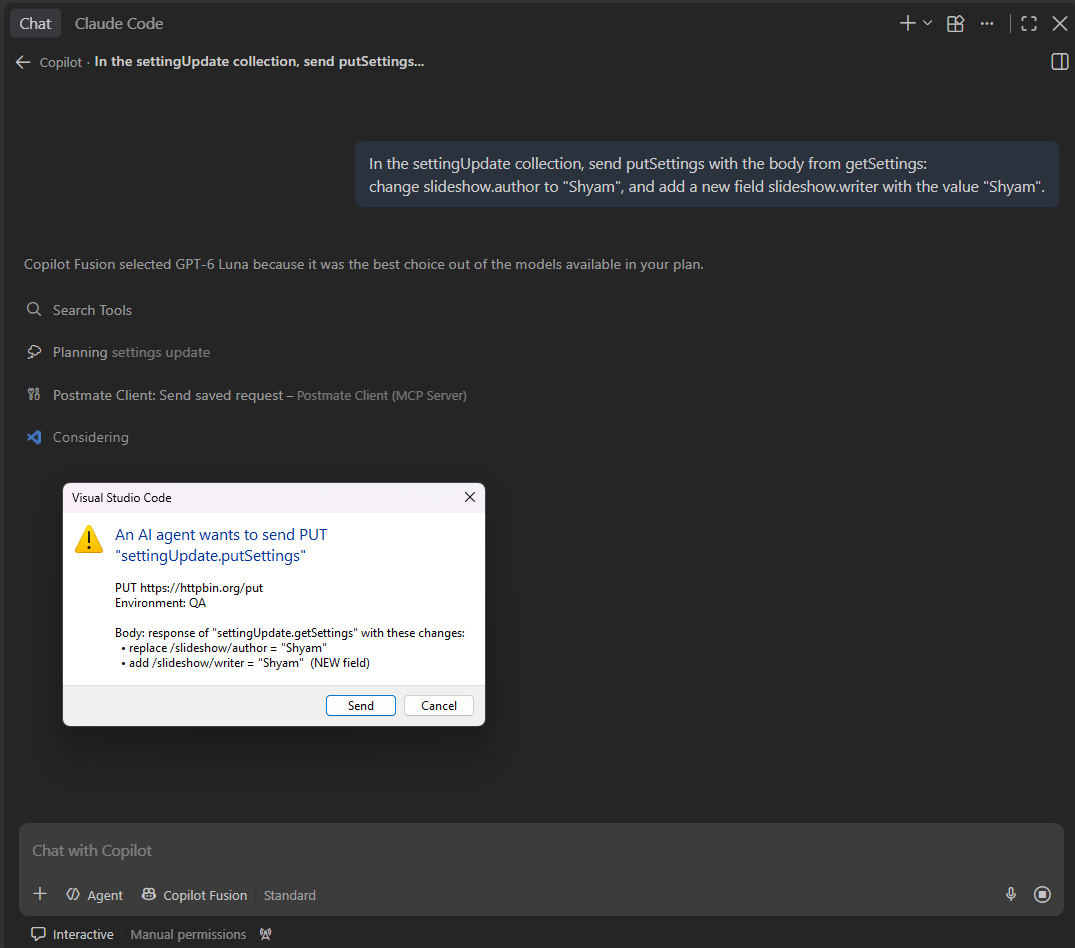
- Ask Copilot, in Agent mode:
Prompt: In the settingUpdate collection, send putSettings with the body from getSettings, changing slideshow.author to "Shyam". Then check that json.slideshow.author is "Shyam" and the title is unchanged.
The echoed json shows the whole slideshow — date, slides, title — with only author changed.
The confirmation shows every change
For any send that isn't GET, HEAD or OPTIONS, Postmate's confirmation dialog shows where the body came from and each change:
PUT https://api.example.com/settings
Environment: QA

Body: response of "Settings.getUserSettings" with these changes:
  • replace /nickName = "Sam"
An add that creates a field the response didn't have is marked (NEW field), so it stands out.
When the field doesn't exist
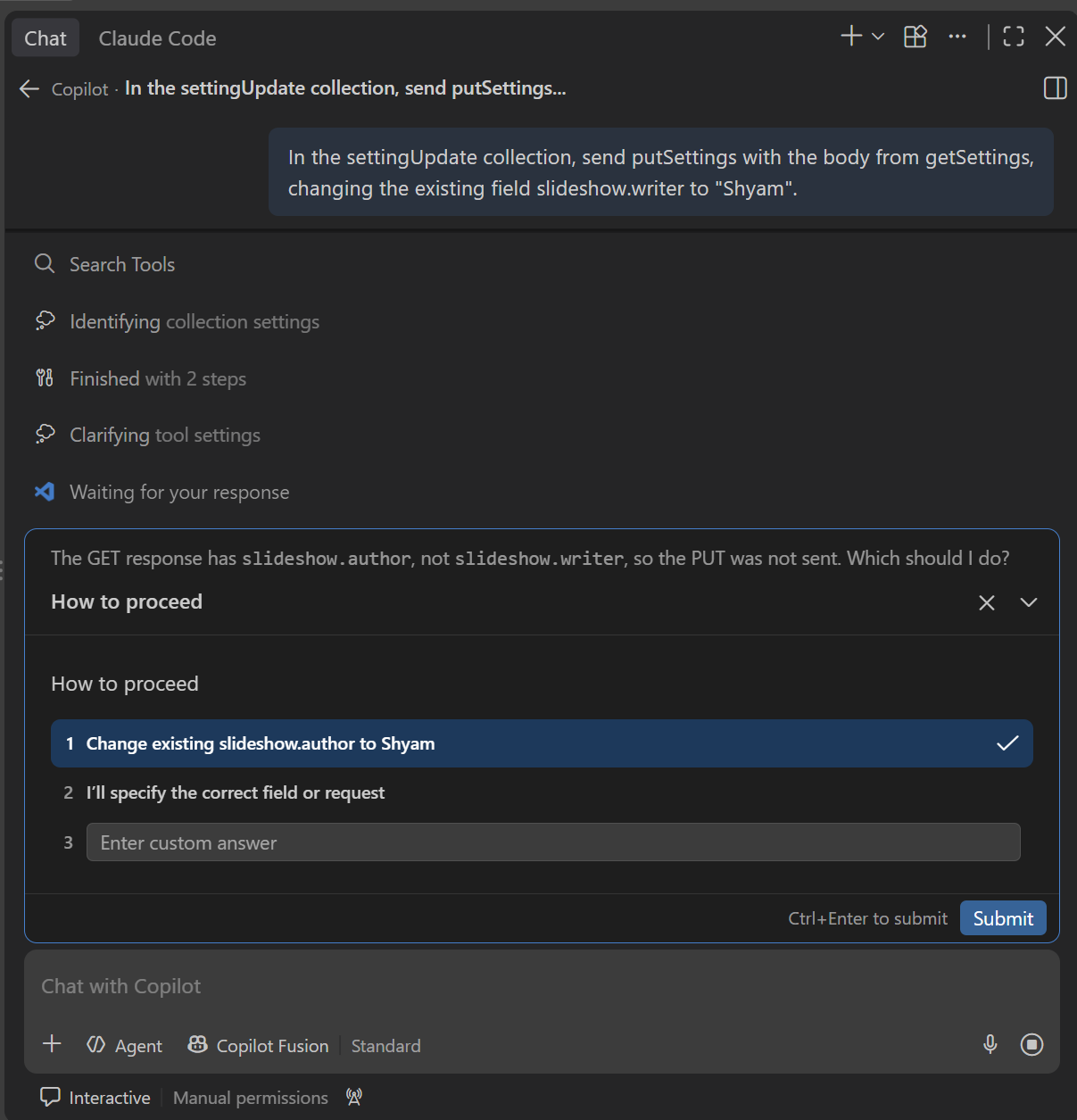
A typo in a field name is the easiest way to corrupt a settings object: nickname instead of nickName would quietly add a second, useless field. Postmate refuses instead, and nothing is sent:
path "/nickname" does not exist. Did you mean "/nickName"?
Existing keys at (root): nickName, theme, language, notifications, …
"Settings.putUserSettings" was not sent.
The agent gets the keys that do exist, so it can ask you the right question — "there's no nickname, did you mean nickName?" — instead of guessing.
Adding a new field
Sometimes you do want a new field. An add that creates one only works when the agent passes allow_new_fields: true, and it's told to do that only when you asked for a new field. Adding items to an array (/tags/-) always works.
We tested this the hard way: an agent told "don't switch from replace to add" did it anyway. Guidance is advice; this rule is enforced by Postmate.
Not only PUT
The target can be any saved request, whatever its method:
- Copy a record — GET order 123, remove
/id, change/name, POST it to create a new order - Move settings between users — GET user A's settings, PUT them to user B, with the user id passed through
data - Act on a search result — POST a search, then use the result as the body of the next request
The saved request's own body is replaced. The source can be any request that returns a JSON object or array; if it's a mutation itself, it asks for confirmation too.
Content-Type
The new body goes out as JSON. The Content-Type is, in order: the one on your saved request, if it has one; otherwise the source response's own JSON type (APIs often expect their vendor type back, such as application/vnd.acme.settings+json); otherwise application/json. Without this, the body would go out as text/plain — which most APIs reject with 415.
Patch operations
| Operation | Example | Notes |
|---|---|---|
replace | { "op": "replace", "path": "/nickName", "value": "Sam" } | Fails if the path doesn't exist |
add | { "op": "add", "path": "/tags/-", "value": "beta" } | New object fields need allow_new_fields |
remove | { "op": "remove", "path": "/legacyFlag" } | Fails if the path doesn't exist |
test | { "op": "test", "path": "/nickName", "value": "Old" } | Stops everything if the current value differs |
Paths are JSON Pointers: /a/b/0/c, with ~1 for / and ~0 for ~ inside a key. If any operation fails, nothing is sent.
Limitations
- The source must return 2xx and JSON. Otherwise nothing is sent.
- The whole body is sent. For
PATCHendpoints that expect only the changed fields, this sends the full resource — check what your API wants. - Multipart requests can't be sent by the agent, as with every
send_request. - GitHub Copilot only, like the rest of Postmate's MCP tools for now.
FAQs
Does the agent see my full settings body?
No. Postmate fetches and patches the full body itself. The agent only sees the response of the request it sent, redacted as usual — and only within the size limit.
What happens to secrets in the body, like tokens?
They're sent back exactly as the API returned them. The agent never handled them, so it couldn't have replaced them with [redacted by Postmate] by mistake.
Can the agent write a body from scratch?
No. The body always comes from the response of a request you saved, with only the changes in the patch.
What if I mistype a field name in my prompt?
The patch is refused, nothing is sent, and the agent is told which fields exist so it can ask you. It can't add a misspelled field unless you confirm you want a new field.
Does this work in the collection runner or CLI?
Not yet — it's part of the agent's send_request. For repeatable flows today, a post-request script can build the body and a pre-request chain can run the GET first.