gRPC Testing in VS Code
Postmate Client is a free gRPC client built natively into VS Code. Point it at a server, load the service definition by server reflection or from your .proto files, pick a method, write the message as JSON, and send — then read the response, metadata, and trailers in the same panel. gRPC requests save to your collections alongside REST, GraphQL, and WebSocket requests.
Reflection and .proto parsing happen on your machine. No schema is uploaded to a registry, and Postmate sends nothing anywhere except the call you make.
Open a new gRPC request
Click the dropdown arrow next to the New HTTP Request button in the Postmate Client sidebar, then choose gRPC.
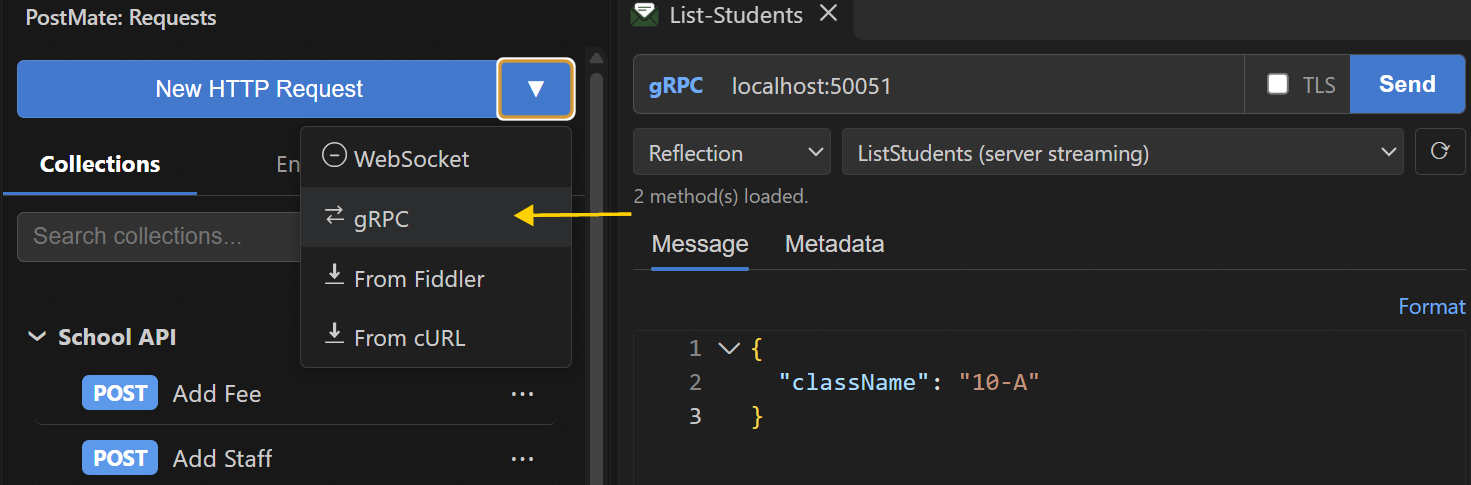
A gRPC panel opens with a target bar, a schema picker, Message and Metadata tabs, and a response panel on the right.
Set the target
Enter the server address as host:port — for example localhost:50051 or api.internal.example.com:443. There is no URL scheme: a leading grpc://, grpcs://, or // is removed for you.
Use the TLS checkbox to choose how to connect:
- TLS off — plaintext. Typical for local development servers.
- TLS on — encrypted, like HTTPS. Production gRPC servers almost always use TLS.
TLS mismatch
If the checkbox doesn't match the server — plaintext to a TLS port, or TLS to a plaintext port — the call fails with 14 UNAVAILABLE. Flip the checkbox and try again.
Load the service definition
gRPC needs the service schema to build a request. Choose where it comes from with the dropdown under the target:
Reflection
Choose Reflection and click ⟳. Postmate asks the server for its services and fills the method dropdown, grouped by service. This is the quickest way in, and it needs nothing on your disk.
Many production servers turn reflection off. If yours does, Postmate tells you so and suggests attaching a .proto file instead.
Proto file
Choose Proto file, click Browse…, and pick your .proto. The methods load right away. Imports are resolved from the folder the file is in, and Google's well-known types (google/protobuf/timestamp.proto and friends) work out of the box.
Click ⟳ after editing the .proto to reload it.
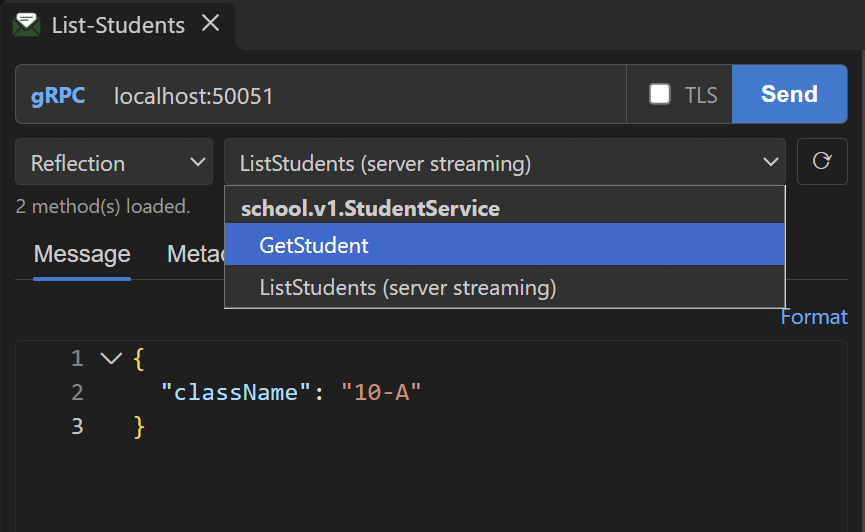
Supported call types
Unary and server-streaming methods can be sent. Client-streaming and bidirectional methods are listed but disabled for now.
Write the message
The Message tab takes the request message as JSON. Pick a method, write the fields, and press Send (or Ctrl+Enter in the editor).
{ "id": 101 }Click Format (or press Shift+Alt+F) to pretty-print the message. Ctrl+Z undoes a format.
JSON rules for protobuf messages
Postmate converts your JSON to protobuf using the standard protobuf JSON mapping. A few types are written differently from what you might expect:
| Protobuf type | Write it as | Example |
|---|---|---|
int64, uint64 | a string (avoids JavaScript number precision loss) | "quantity": "9007199254740993" |
bytes | a base64 string | "payload": "aGVsbG8=" |
enum | the value's name (or its number) | "side": "BUY" |
google.protobuf.Timestamp | an RFC 3339 string | "placedAt": "2026-10-17T10:00:00Z" |
google.protobuf.Duration | seconds with an s suffix | "timeout": "1.5s" |
repeated fields | a JSON array | "subjects": ["Maths", "Science"] |
map<K, V> | a JSON object | "tags": { "desk": "equities" } |
Field names can be written either way: as they appear in the .proto (class_name) or in their JSON form (className).
Unknown fields are rejected, not dropped. A typo like clasName stops the call with Unknown field "clasName" in ListStudentsRequest — did you mean "className"?. Without this check a misspelled filter would vanish and the server would quietly return unfiltered results.
Add metadata
gRPC metadata is the equivalent of HTTP headers. Add key-value pairs in the Metadata tab — for example authorization: Bearer <token> or x-request-id: 1234.
Authentication
There is no separate Auth tab for gRPC. Put tokens and API keys in Metadata, the same way most gRPC clients do.
Keys ending in -bin are binary metadata in gRPC; give their values as base64.
Read the response
After Send, the status line shows the gRPC status code, the time, and the response size. Server-streaming calls also show how many messages arrived.
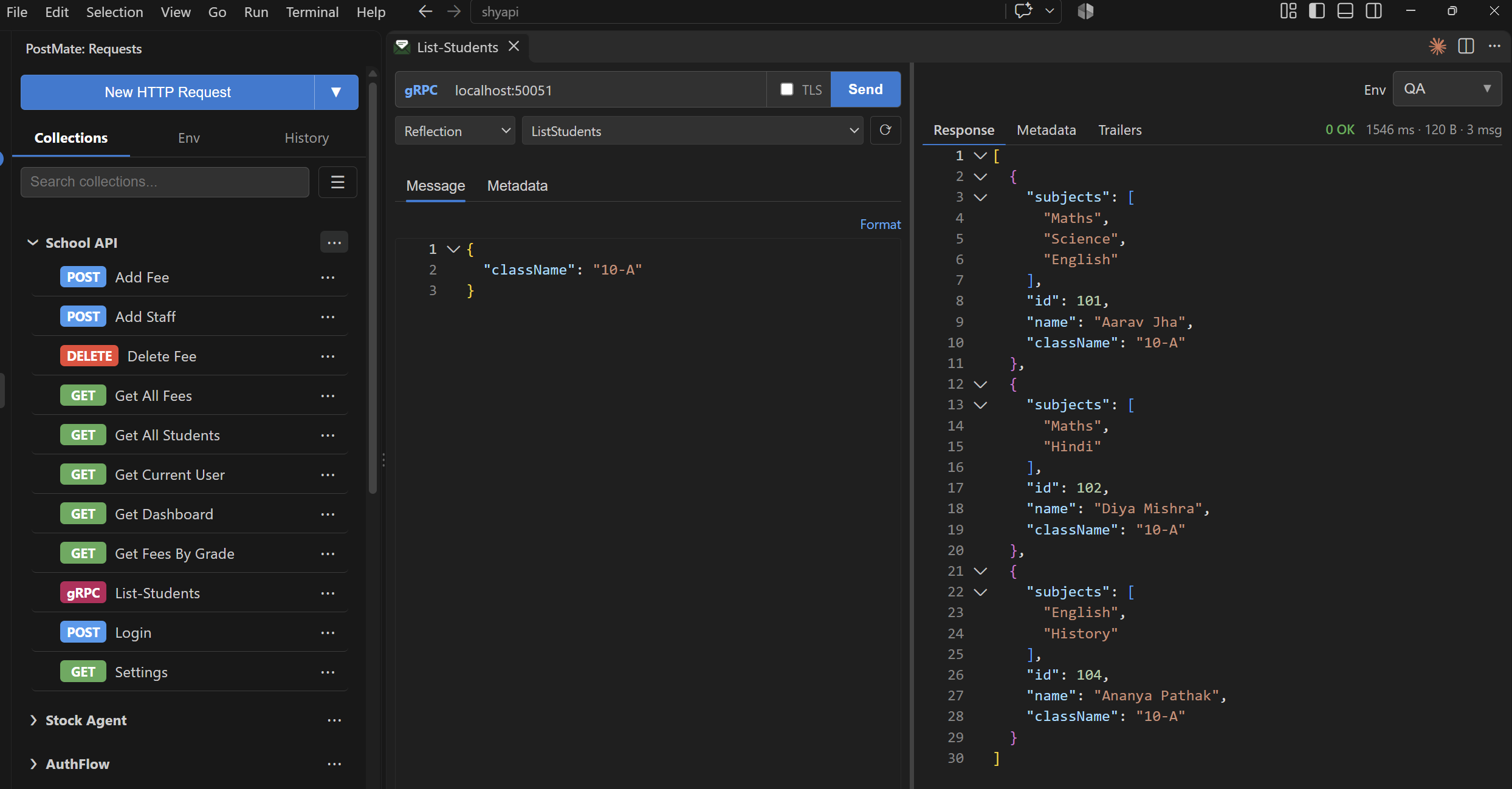 The response panel has three tabs:
- Response — the response message as JSON, with folding. For server streaming, all messages as a JSON array, in the order they arrived.
- Metadata — the initial metadata the server sent back.
- Trailers — metadata sent at the end of the call. Servers often put request IDs or debugging details here.
Status codes
gRPC has its own status codes, separate from HTTP status codes. An error status is a normal response — you see the code and the server's message, not a crash.
| Code | Name | What it usually means |
|---|---|---|
0 | OK | Success |
3 | INVALID_ARGUMENT | The server rejected a field value |
4 | DEADLINE_EXCEEDED | The call took longer than the timeout |
5 | NOT_FOUND | The requested entity doesn't exist |
7 | PERMISSION_DENIED | Authenticated but not allowed |
12 | UNIMPLEMENTED | The server doesn't implement this method |
14 | UNAVAILABLE | Couldn't reach the server, or a TLS mismatch |
16 | UNAUTHENTICATED | Missing or invalid credentials |
Timeouts
The postmate.request.timeoutMs setting is used as the call's deadline. If a server-streaming call hits the deadline, the messages that arrived before it are kept and the status shows 4 DEADLINE_EXCEEDED.
Save a gRPC request
Press Ctrl+S (or Cmd+S on macOS), pick a collection, and enter a name. Saved gRPC requests show a gRPC badge in the sidebar and keep the target, TLS setting, schema source, method, message, and metadata. Open one from the sidebar and the method is ready to send without reloading the schema.
Sharing collections with a .proto file
The .proto path is saved as an absolute path on your machine. If you share the collection, teammates whose .proto lives elsewhere need to pick it again with Browse….
Troubleshooting
"Server reflection is not available on this server" — the server has reflection turned off. Switch the schema source to Proto file and attach the service's .proto.
14 UNAVAILABLE — check the host and port, check that the server is running, and check that the TLS checkbox matches the server.
"Method … not found in schema" — the saved method no longer exists in the schema. Click ⟳ to reload the method list and pick it again.
"Message 1 is not valid JSON" — the message has a JSON syntax error. Click Format to find it.
"Unknown field … did you mean …?" — a field name doesn't exist on the request message. Use the suggested name.
Feedback and feature requests
gRPC support is new, and we want to hear how you're using it. Missing something you need — a call type, scripting, the collection runner, the CLI? Hit a bug? Open an issue on GitHub or ask in the discussion forum.
How Postmate Client compares for gRPC support
| Postmate Client | Postman | Thunder Client | |
|---|---|---|---|
| gRPC support | ✅ Free | ⚠️ Yes (login required) | 💰 Paid tier only |
| Runs inside VS Code | ✅ Native | ❌ Desktop app | ✅ Native |
| Collections stored locally | ✅ Always | ⚠️ Cloud by default | ✅ Local |
| No telemetry | ✅ None | ❌ Yes | ❌ Yes |
| Price | ✅ Free forever | 💰 Paid plans | 💰 Paid tier |
Frequently Asked Questions
Do I need the server's .proto file to use Postmate Client?
No, if the server has reflection turned on — choose Reflection and click ⟳. If reflection is off, you need the .proto file.
Why is my int64 field written as a string?
The protobuf JSON mapping writes 64-bit integers as strings because JavaScript numbers can't hold every 64-bit value exactly. Postmate accepts and returns int64 and uint64 values as strings so large IDs and amounts don't lose precision.
Is gRPC metadata the same as HTTP headers?
It works the same way and travels as HTTP/2 headers. Add it in the Metadata tab. Responses have two kinds: initial Metadata and end-of-call Trailers, shown in separate tabs.
Does Postmate Client support gRPC-Web?
Not yet. Postmate talks native gRPC over HTTP/2.