Running Collections with GitHub Actions
Run your Postmate Client API tests automatically on every push, pull request, or on-demand — without any cloud dependency.
Live Example
See a working example on GitHub: pmcSampleProject
Prerequisites
- A GitHub repository
@postmate/cli(pmc) knowledge — see CLI Reference
Overview
Postmate Client stores everything locally in a .postmate folder. This makes CI/CD straightforward — just commit your .postmate folder to GitHub and let the CLI do the rest.
Your .postmate folder structure:
.postmate/
├── collections/
│   └── School.json
├── data/
│   └── dataTable.csv
├── reports/
├── postmate-envs.json
└── postmateHeader.json
Step 1: Prepare Your Repository
Initialize Git
mkdir my-api-tests
cd my-api-tests
git init
Add .gitignore
Never commit your history file or reports — they may contain sensitive request data:
.postmate/reports/
.postmate/postmate-history.json
Sanitize postmate-envs.json
Remove sensitive values before committing. Real values will be injected at runtime via GitHub Secrets:
{
  "environments": [
    {
      "name": "QA",
      "variables": {
        "baseUrl": "https://api.yourapp.com",
        "apiKey": "",
        "authToken": ""
      }
    }
  ]
}
WARNING
Never commit API keys, tokens, or passwords to GitHub. GitHub's secret scanning will block your push if it detects exposed credentials.
Step 2: Add GitHub Secrets
For any sensitive environment variables:
- Go to your GitHub repo → Settings → Secrets and variables → Actions
- Click New repository secret
- Add each sensitive value (e.g.
API_KEY,AUTH_TOKEN)
If your Postmate environment uses secret variables (values stored in the OS keychain, {"$secret": true} markers in the committed file), expose each one to pmc as a POSTMATE_SECRET_<NAME> environment variable in the workflow — name uppercased, non-alphanumerics as _:
      - name: Run collection
        working-directory: .postmate
        run: pmc run -c School -e QA -d dataTable -r report
        env:
          POSTMATE_SECRET_APITOKEN: ${{ secrets.API_TOKEN }}
          POSTMATE_SECRET_AWS_SECRET: ${{ secrets.AWS_SECRET }}
A referenced secret with no value fails the run immediately with an error naming the variable — so a missing workflow secret shows up as a clear failure, not a mysterious 401.
Step 3: Create the Workflow File
Create .github/workflows/api-tests.yml:
name: Postmate API Tests

on:
  push:
    branches: [main]
  pull_request:
    branches: [main]
  workflow_dispatch:  # enables manual trigger from GitHub UI

jobs:
  run-collection:
    runs-on: ubuntu-latest

    steps:
      - name: Checkout repo
        uses: actions/checkout@v4

      - name: Setup Node.js
        uses: actions/setup-node@v4
        with:
          node-version: '20'

      - name: Install Postmate CLI
        run: npm install -g @postmate/cli

      - name: Run collection
        working-directory: .postmate
        run: pmc run -c School -e QA -d dataTable -r report

      - name: Upload report
        if: always()
        uses: actions/upload-artifact@v4
        with:
          name: postmate-report
          path: .postmate/reports/report.School*.html
working-directory: .postmate
pmc resolves collection names relative to the .postmate folder. Always set working-directory: .postmate in your workflow step.
Step 4: Push to GitHub
git add .
git commit -m "feat: add postmate collections and CI workflow"
git remote add origin https://github.com/YOUR_USERNAME/YOUR_REPO.git
git push -u origin main
Viewing Results
Logs
Go to Actions tab → click the latest run → expand Run collection step to see request-by-request output.
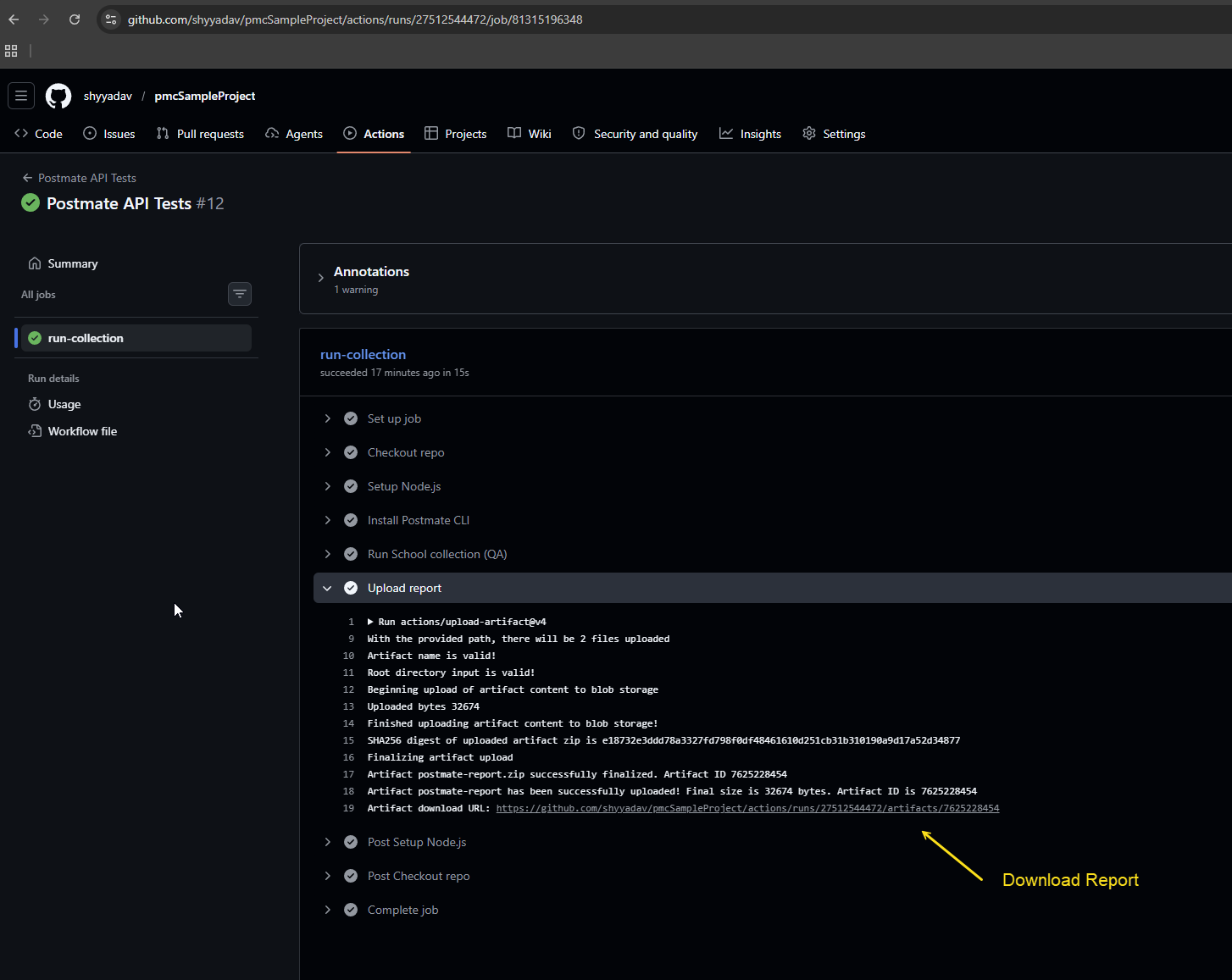
Download Report
- Actions tab → click the run
- Click Summary on the left
- Scroll to bottom → Artifacts section
- Download
postmate-reportzip → extract → open the.htmlfile in browser
Manual Trigger
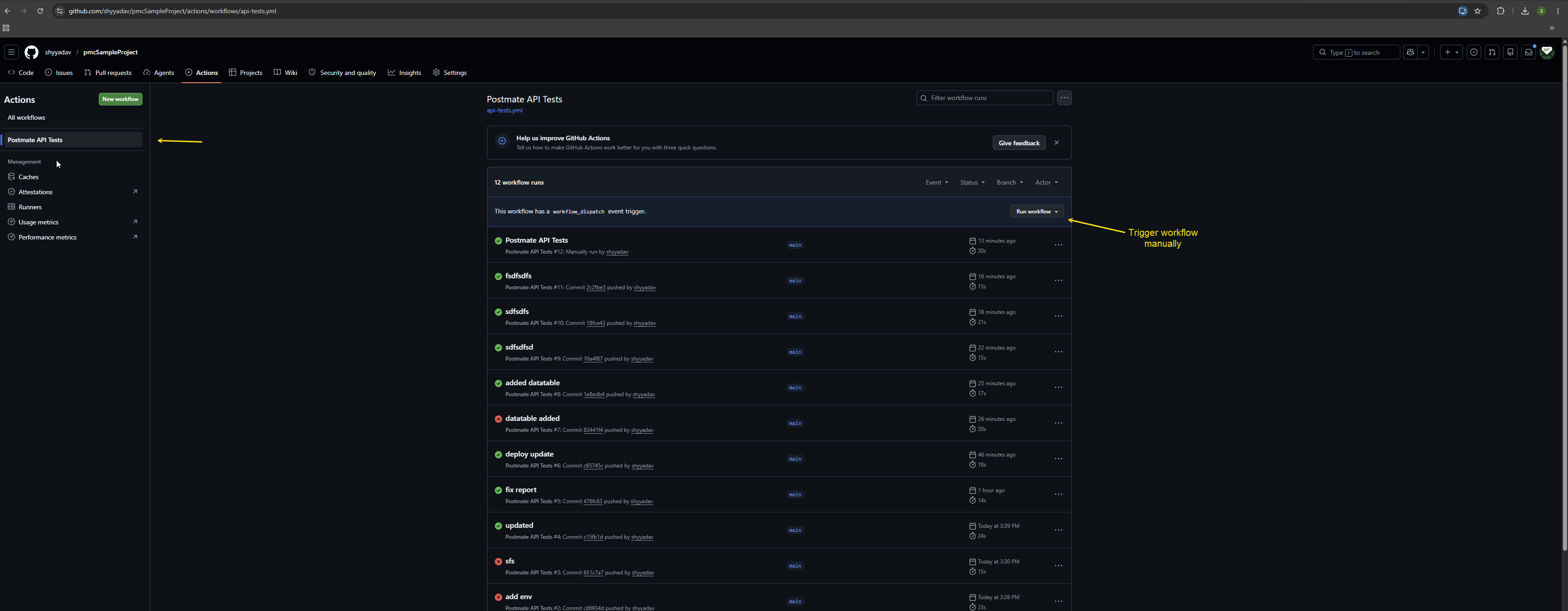
No commit needed — trigger anytime from GitHub UI:
- Actions tab → Postmate API Tests
- Click Run workflow → Run workflow
Running Multiple Environments
jobs:
  run-collection:
    strategy:
      matrix:
        env: [QA, Prod]
    runs-on: ubuntu-latest

    steps:
      - uses: actions/checkout@v4
      - uses: actions/setup-node@v4
        with:
          node-version: '20'

      - run: npm install -g @postmate/cli

      - name: Run collection (${{ matrix.env }})
        working-directory: .postmate
        run: pmc run School ${{ matrix.env }} -r report-${{ matrix.env }}

      - name: Upload report
        if: always()
        uses: actions/upload-artifact@v4
        with:
          name: postmate-report-${{ matrix.env }}
          path: .postmate/reports/report-${{ matrix.env }}.School*.html
This runs your collection against both QA and Prod in parallel.
Running Multiple Collections
    steps:
      # ... setup steps ...

      - name: Run School collection
        working-directory: .postmate
        run: pmc run School QA -r report-school

      - name: Run Stock Agent collection
        working-directory: .postmate
        run: pmc run "Stock Agent" QA -r report-stock
Data-Driven Runs
If your collection uses a data table:
      - name: Run with data table
        working-directory: .postmate
        run: pmc run School QA dataTable -r report
See Data Tables for more on data-driven testing.
Complete pmc run Reference
pmc run [collection] [env] [data] [options]

Options:
  -c, --collection <name>   collection name
  -e, --env <name>          environment name
  -d, --data <name>         data table name
  -r, --report <name>       custom report file name