Secret Variables: Keep API Keys and Tokens Out of Your Files
Available from Postmate Client 1.5.7
API testing tools have a long history of leaking credentials: an environment file with a real AWS key gets committed, a collection export with a bearer token gets shared in Slack, and suddenly a secret is public. Secret variables in Postmate Client solve this at the storage level — the value of a secret never touches a file at all.
How It Works
Mark any environment variable as secret and its value is stored in your operating system's keychain (Windows Credential store, macOS Keychain, or libsecret on Linux) via VS Code's encrypted secret storage. The environment file on disk only keeps a marker:
{
  "dev": {
    "baseUrl": "https://api.example.com",
    "apiToken": { "$secret": true }
  }
}
That's the whole trick. The env file is now safe to commit, sync, and share by construction — there is no value in it to leak. At request time, Postmate resolves the real value from the keychain in memory, injects it into your request (URL, headers, body, auth — including AWS SigV4 signing), and never writes it anywhere.
Like everything in Postmate Client, this is 100% local — no cloud vault, no account, no sync servers.
Marking a Variable as Secret
- Open the environment in the Environment Details panel.
- Click the 🔓 icon on the variable's row — it becomes 🔒.
- Enter the value (the field masks input like a password field).
- Click Save — the value moves to your OS keychain; the file gets the
$secretmarker.
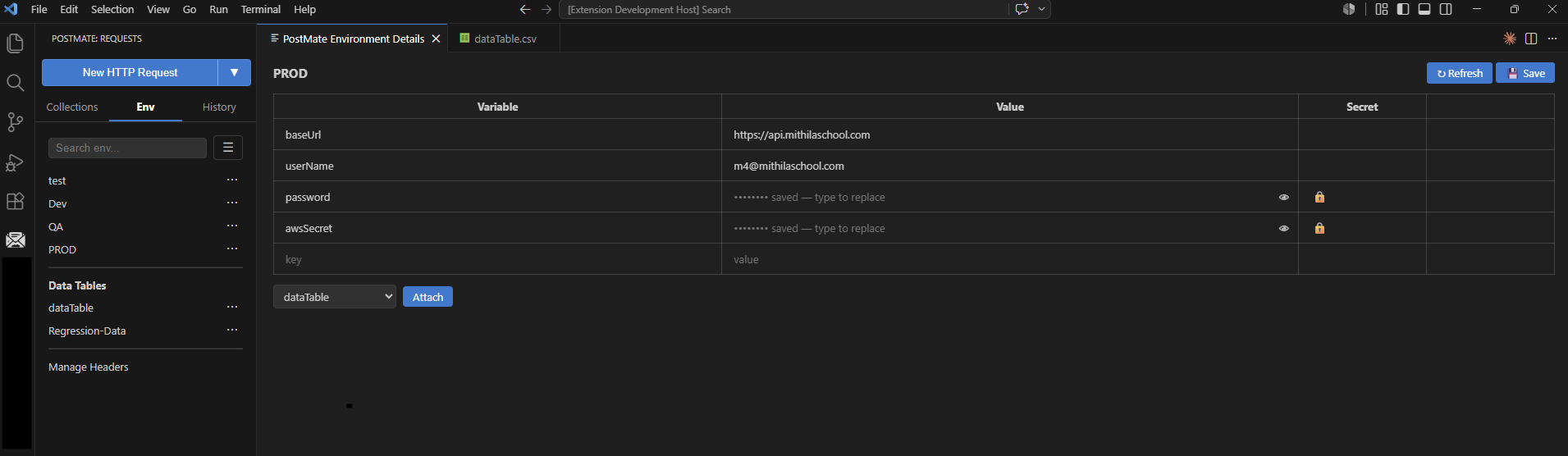
Auth-related fields such as passwords and AWS secret keys are natural candidates. A typical environment:
| Variable | Value | Secret |
|---|---|---|
baseUrl | https://api.example.com | 🔓 |
username | demo | 🔓 |
apiToken | •••••••• | 🔒 |
awsSecretKey | •••••••• | 🔒 |
Viewing and Editing a Secret
Saved secrets display as •••••••• saved — type to replace. The value is not sent to the editor UI at all — masking isn't cosmetic.
- Reveal: click the 👁 icon to fetch and display the value. It re-masks automatically after 15 seconds.
- Replace: just type a new value and save.
- Un-mark: click 🔒 to turn the variable back into a plain one. The keychain entry is deleted on save, and whatever is typed in the field is saved as a normal plaintext value.
- Delete: remove the row and save — the keychain entry is cleaned up too.
Everything Else Just Works
Secrets follow your environments through their whole lifecycle:
- Rename / clone an environment — keychain entries move or copy along with it.
- Delete an environment — its keychain entries are removed. No orphans.
- Export an environment — secrets export as markers only. The person importing fills in their own values once; their values land in their keychain.
- Scripts — pre-request and test scripts see the resolved value, so computed auth flows keep working.
- Request preview — the URL bar and env preview show
••••••••, never the value.
Missing Secret? Loud Failure, Not a Broken Request
If a request references a secret with no stored value (e.g. right after importing a teammate's environment), Postmate fails the request immediately with a clear error naming the variable — instead of silently sending an unsigned or malformed request you'd debug for an hour:
Missing secret value: "apiToken". Set it in the environment panel,
or pass --secret apiToken=<value> / POSTMATE_SECRET_APITOKEN when using the CLI.
This is fail-at-use, not fail-at-load: an environment can carry unfilled secrets that a given collection doesn't reference, and those runs proceed normally. Only touching a missing secret fails.
Secrets in the CLI and CI/CD
The Postmate CLI can't read your VS Code keychain — by design. In the terminal and in CI, secret values come from:
# explicit flags (repeatable)
pmc run school QA --secret apiToken=abc123

# or environment variables — what CI systems inject
POSTMATE_SECRET_APITOKEN=abc123 pmc run school QA
The env-var name is the variable name uppercased, with any non-alphanumeric character replaced by _ — so aws-secret becomes POSTMATE_SECRET_AWS_SECRET. Flags win over env vars when both are set.
The same committed collection and environment files run everywhere: VS Code resolves secrets from the keychain, CI resolves them from its own secret store. See the GitHub Actions guide for a full workflow.
Importing Secrets from Postman
Postman marks secret-typed variables in its environment exports. When you import a Postman environment, Postmate honors this automatically:
- Variables with
"type": "secret"become Postmate secret variables. - If the export contains the value, it goes straight into your keychain — the imported file on disk gets only the marker.
Your credentials are arguably safer after migrating than they were before.
FAQs
Can I still see a secret after saving it?
Yes — click the 👁 icon on the variable's row. This is a deliberate, per-click action; the value re-masks after 15 seconds and is never written back to disk.
Does masking the value protect it from someone using my computer?
No — and no API client can. Anyone who can send requests from your machine can observe the values those requests contain. Secret variables protect against the leaks that actually happen in practice: values landing in committed files, exports, previews, and screen shares.
What happens on another machine?
Keychain values are per-machine and never sync. After cloning a repo or importing an environment, saved secrets show as unfilled — enter the value once and it lands in that machine's keychain. In CI there is no keychain at all — supply values via POSTMATE_SECRET_<NAME> env vars or --secret flags instead.
Do secret variables work with data tables?
Data table cells stay plain (they're CSV files on disk). Reference a secret env variable from your requests instead — e.g. keep apiToken in the environment, not in a CSV column.