API Testing Behind a Corporate Proxy in VS Code
Postmate Client works inside enterprise networks out of the box — including authenticated proxies, TLS-intercepting proxies (Zscaler, Netskope, Palo Alto and similar), and everything in between. Requests of every type (REST, GraphQL, WebSocket) route through your proxy, and your local API testing on localhost keeps working without any configuration.
Like everything in Postmate, proxy handling is fully local: your proxy credentials and CA certificates never leave your machine. If you're evaluating Postman alternatives that work behind a corporate firewall, this page covers exactly what your security team will ask about.
Quick start
In most corporate environments, you don't need to configure anything:
- If VS Code is already configured for your network (
http.proxysetting), Postmate uses it automatically. - If your machine sets the standard
HTTP_PROXY/HTTPS_PROXYenvironment variables, Postmate respects them.
If neither is set, add Postmate's own setting — Settings → search "postmate proxy":
"postmate.proxy.url": "http://proxy.yourcompany.com:8080"For proxies that require authentication:
"postmate.proxy.url": "http://username:[email protected]:8080"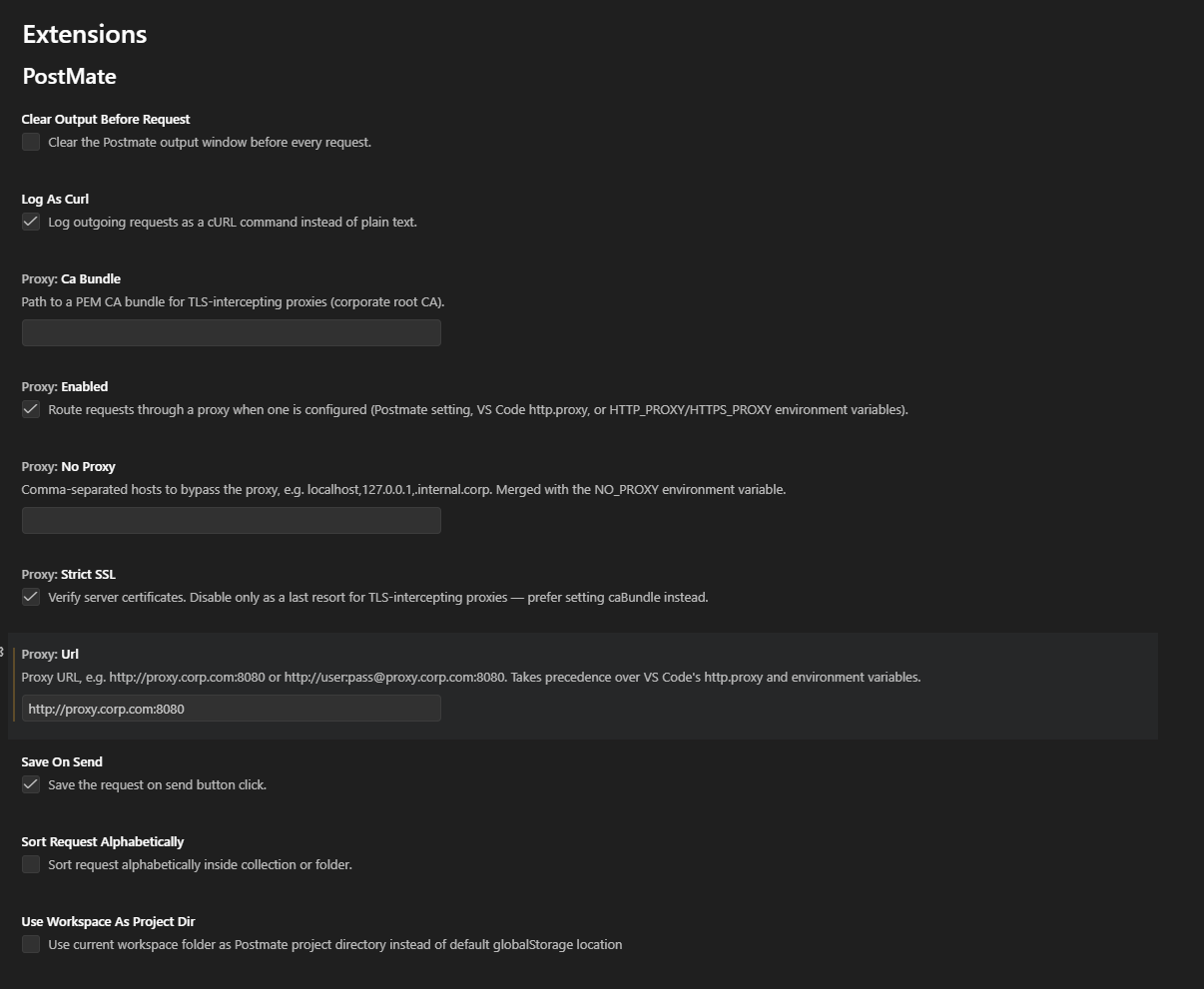
Send a request. That's it.
Recommended VS Code setting
Set "http.proxySupport": "on" in your VS Code settings. The default value ("override") makes VS Code replace the network handling of extensions that manage their own connections — which can bypass Postmate's proxy routing and break client-certificate handling. With "on", VS Code and Postmate coexist cleanly.
How Postmate picks a proxy
Postmate resolves the proxy from these sources, in order — the first one found wins:
postmate.proxy.url— Postmate's own setting. Set this to override everything else.- VS Code's
http.proxy— if you've configured VS Code for your network, Postmate follows along. HTTPS_PROXY/HTTP_PROXYenvironment variables — the convention used by corporate Linux setups, containers, and CI systems. Lowercase variants work too.
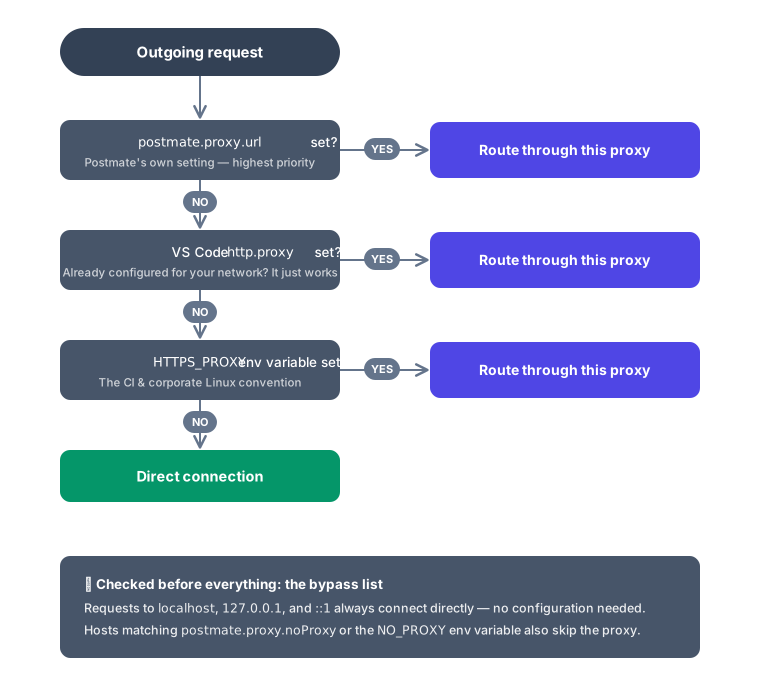
Changes apply immediately — no window reload needed.
Bypassing the proxy for specific hosts
Internal hosts often shouldn't go through the proxy. Use the noProxy setting:
"postmate.proxy.noProxy": "api.internal.corp,.dev.corp,registry.local:5000"Entries can be exact hostnames, domain suffixes (.dev.corp matches api.dev.corp), or host:port pairs. The NO_PROXY environment variable is honored as well — both lists are merged.
Localhost never goes through the proxy. Requests to localhost, 127.0.0.1, and ::1 always connect directly — no configuration needed. Your local development servers keep working exactly as before, even with a proxy configured.
TLS-intercepting proxies (custom root CA)
Many corporate proxies (Zscaler, Netskope, Palo Alto, and similar) intercept HTTPS traffic and re-sign it with the company's own root certificate. Without that certificate, every HTTPS request fails with an error like:
UNABLE_TO_VERIFY_LEAF_SIGNATUREPoint Postmate at your organization's root CA file (ask your IT team for it — it's usually a .pem or .crt file, and it's public information, not a secret):
"postmate.proxy.caBundle": "C:/certs/company-root-ca.pem"Requests now verify correctly against your company's certificate chain.
Avoid disabling verification
"postmate.proxy.strictSSL": false also makes the errors go away — by turning off certificate verification entirely. Use caBundle instead; it keeps verification on while trusting your company's CA. Reserve strictSSL: false for temporary debugging.
Client certificates (mTLS) through proxies
If you use Postmate's client certificate support for internal APIs that require mTLS, those certificates work through the proxy too. The certificate is presented to the destination server inside the proxy tunnel — the proxy itself never sees it. No extra configuration: your existing certificates.json entries apply whether a proxy is active or not.
WebSocket through proxies
wss:// connections tunnel through the proxy the same way HTTPS requests do — automatically. Connect, send, receive as usual. See the WebSocket testing guide for the basics.
Understanding proxy errors
When something goes wrong at the proxy layer, Postmate tells you what happened and how to fix it — instead of a raw socket error:
| What you see | What it means | Fix |
|---|---|---|
Status 407 with a JSON body ("error": "PROXY_AUTH_REQUIRED") | The proxy demanded credentials. Your request never reached the target server — the 407 came from the proxy. | Add credentials to the proxy URL: http://user:pass@host:port |
PROXY_CONNECTION_CLOSED | The proxy cut the connection during setup — most commonly an authentication requirement, sometimes a blocked destination. | Add credentials, or check whether the proxy allows this host/port |
PROXY_UNREACHABLE | Postmate couldn't reach the proxy itself. | Check the proxy address, or set postmate.proxy.enabled: false if you don't need a proxy |
UNABLE_TO_VERIFY_LEAF_SIGNATURE with a proxy active | A TLS-intercepting proxy is re-signing traffic. | Set postmate.proxy.caBundle — see above |
Responses generated by Postmate's proxy handling carry "source": "postmate-proxy-handler" in the body, so you can always tell them apart from real API responses — and assert on them in test scripts (RESPONSE.body.error === 'PROXY_AUTH_REQUIRED').
CI and the pmc CLI
The pmc CLI (v0.2.0+) respects HTTP_PROXY, HTTPS_PROXY, and NO_PROXY environment variables with zero configuration. If your CI runner sets them — as most corporate runners do — collection runs route through the proxy automatically:
# GitHub Actions example — usually your org's runner sets these already
- name: Run API tests
  env:
    HTTPS_PROXY: http://proxy.corp.com:8080
    NO_PROXY: localhost,.internal.corp
  run: pmc run --collection "Smoke Tests" --env staging
Connections are reused across the run: an entire collection typically shares a single tunnel through the proxy. See the CI/CD integration guide for full pipeline examples.
Settings reference
| Setting | Default | Description |
|---|---|---|
postmate.proxy.enabled | true | Master switch. Set false to ignore all proxy configuration. |
postmate.proxy.url | "" | Proxy URL. Supports http://user:pass@host:port. Takes precedence over http.proxy and env vars. |
postmate.proxy.noProxy | "" | Comma-separated bypass list. Merged with NO_PROXY env var. Localhost always bypasses. |
postmate.proxy.caBundle | "" | Path to a PEM root CA bundle for TLS-intercepting proxies. |
postmate.proxy.strictSSL | true | Verify server certificates. Prefer caBundle over disabling this. |
Troubleshooting
Requests seem to bypass the proxy entirely. Check VS Code's http.proxySupport setting — the default "override" can replace Postmate's connection handling. Set it to "on" and reload the window.
Proxy settings via environment variables aren't picked up. Environment variables are read when VS Code starts. Set the variable, close all VS Code windows, and launch from the same terminal (code -n .). Verify inside VS Code's integrated terminal: echo $env:HTTPS_PROXY (PowerShell) or echo $HTTPS_PROXY (bash).
Certificate errors only when the proxy is active. That's TLS interception — set postmate.proxy.caBundle to your company's root CA.
Verifying outside Postmate (Windows note). When testing your proxy setup with other tools, prefer a Node.js snippet over curl — Windows builds of curl use the schannel TLS stack, which fails on corporate and test CAs in several confusing ways (revocation checks, PEM import errors) that don't affect Postmate.
Requests to a local server return proxy errors. This shouldn't happen — localhost bypasses automatically. If you're addressing your machine by LAN IP or a custom hostname, add it to postmate.proxy.noProxy.
Frequently asked questions
Does Postmate work with Zscaler (or Netskope, Palo Alto, Blue Coat)? Yes. These are TLS-intercepting proxies — set postmate.proxy.caBundle to your organization's root CA certificate and everything works, with certificate verification still on.
How do I use an authenticated corporate proxy in VS Code for API testing? Put the credentials in the proxy URL: "postmate.proxy.url": "http://username:[email protected]:8080". Postmate handles the proxy authentication handshake; you'll get a clear 407 error with instructions if credentials are missing or wrong.
Do my proxy credentials or certificates get sent anywhere? No. Postmate is fully local — no telemetry, no cloud sync, no account. Proxy credentials live in your VS Code settings on your machine; certificates are read from the file paths you configure and used only for the TLS handshake. See the security overview for the full data-flow picture.
Does the proxy work for WebSocket and GraphQL requests too? Yes — all request types route through the proxy: REST, GraphQL, and WebSocket (wss:// tunnels through CONNECT like HTTPS).
Why do my requests ignore the proxy on default VS Code settings? VS Code's http.proxySupport defaults to "override", which replaces extensions' own network handling. Set it to "on" — Postmate manages its proxying (including mTLS and custom CAs, which the override mode breaks) and VS Code handles the rest.
Can I use a different proxy per workspace? Yes — postmate.proxy.* settings work at both User and Workspace level, so a workspace settings.json can carry team-specific proxy configuration (mind committing credentials, though — prefer env vars for secrets).
Proxy support was added in Postmate Client v1.5.0, validated against Squid (open and authenticated) and mitmproxy (TLS interception) across a 12-scenario test matrix — including mTLS-through-proxy and WebSocket-through-proxy. Questions or an edge case we missed? Open an issue or email [email protected].