Best Free API Testing Tools in 2027 (Free Plans Compared)
Last updated: November 26, 2026
The best free API testing tool in 2027 depends on one question: do you want a GUI API client, or tests written in code? For a GUI, Postmate Client is free with no seat or run limits, while Bruno and Hoppscotch have generous free plans with a few limits. For code, REST Assured, Karate and Playwright are free and open source.
The free tiers changed a lot in 2026. Postman cut its free plan to one user. Thunder Client moved scripting and data-driven testing to paid plans. Yaak needs a license once you use it at work. This guide is about what you actually get for $0 today, and where each "free" plan stops.
How we picked the tools
We looked at four things for every tool:
- What is free: the real limits on users, collection runs, protocols and scripting. Not trial features.
- Where your data lives: on your disk, in Git, or in the vendor's cloud. This matters if your API calls carry tokens or customer data.
- Testing, not just sending: assertions, collection runs, data-driven tests and a CLI for CI.
- AI on the free plan: whether AI agents such as GitHub Copilot or Claude can work with the tool (usually through MCP), whether AI is metered by credits, and whether your API data is sent to a model.
- Can you use it at work for free: some tools are free only for personal use.
Pricing was checked against each vendor's own pricing page in November 2026. Full disclosure: we build Postmate Client, one of the tools on this list. We have tried to judge it by the same rules as the others, catches included.
Quick comparison
| Tool | Type | Free at work? | Where data lives | AI on free plan | Free plan catch |
|---|---|---|---|---|---|
| Postmate Client | VS Code extension | Yes | Local JSON files | Local MCP server for Copilot | VS Code only |
| Bruno | Desktop app (open source) | Yes | Plain-text files in your repo | AI assistant (beta), your own API key | 2 workspaces; private Git providers are paid |
| Hoppscotch | Web, desktop, self-host (open source) | Yes | Browser, cloud or your own server | Experimental AI helpers; MCP on Business plan | Personal workspace only; team workspaces and mocking are paid |
| Insomnia | Desktop app | Yes | Local Vault, Git or cloud | MCP client, AI mocks; free "for now" | Git Sync free for up to 3 users; 1,000 mock requests/month |
| Postman | Desktop and web app | Yes | Postman cloud | Agent Mode, small monthly credit allowance | 1 user only; team work needs a paid plan |
| Thunder Client | VS Code / JetBrains extension | Yes | Local, account needed | MCP server | No custom scripting or data-driven tests; 50 local runs/month |
| Yaak | Desktop app | No, personal use only | Local files, Git | Agent-friendly CLI | Work use needs a paid license |
| REST Client | VS Code extension (open source) | Yes | .http files in your repo | None built in | No collection runner or assertions UI |
| REST Assured, Karate, Playwright | Code libraries (open source) | Yes | Your test code | Via your coding assistant | You write and maintain the tests |
Prices and limits as listed on each vendor's pricing page, November 2026.
Best free API clients for testing (GUI tools)
1. Postmate Client: best free API tester inside VS Code
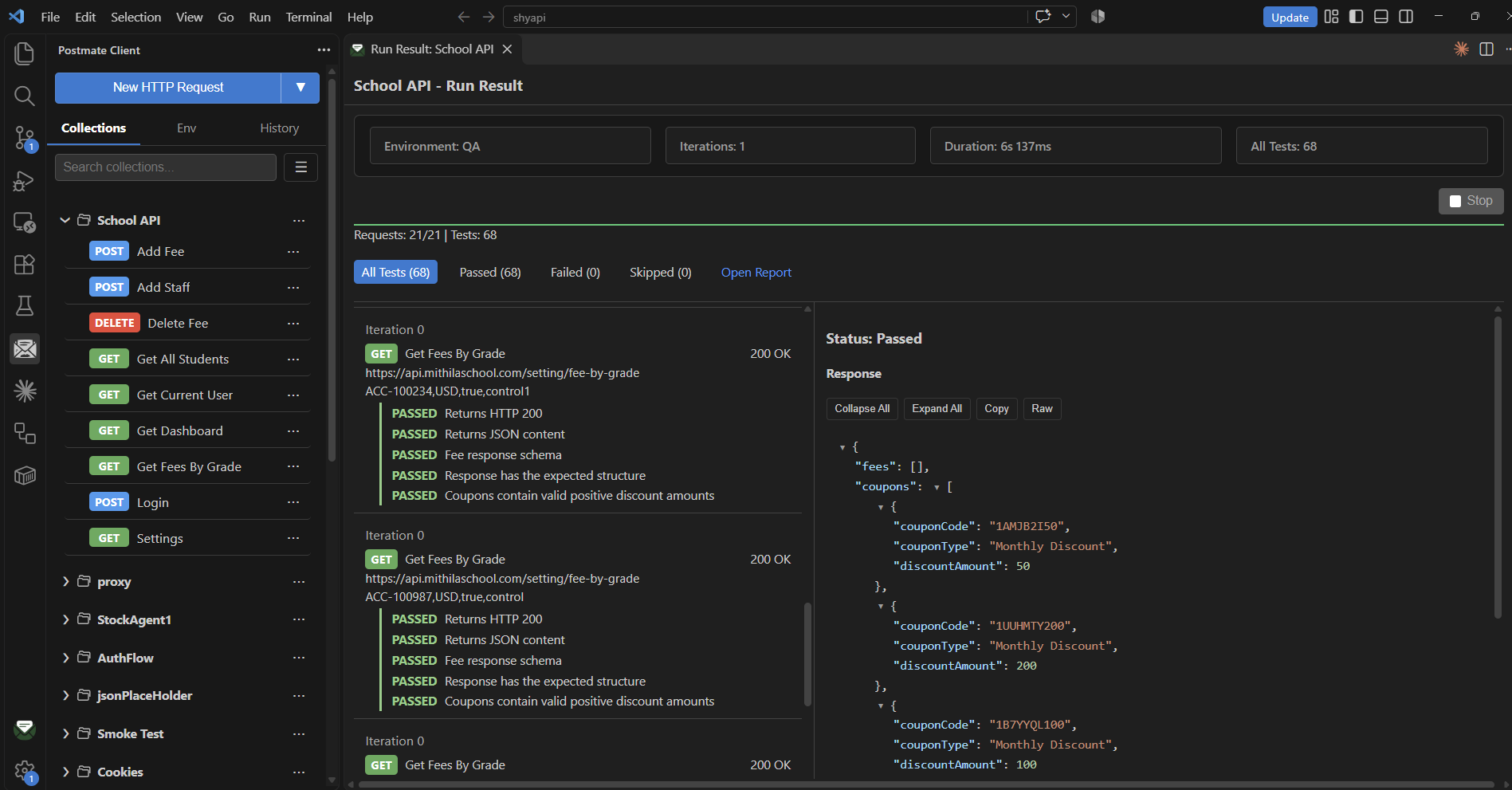
Postmate Client is a VS Code extension for REST, GraphQL, WebSocket and gRPC. It is free, needs no login, sends no telemetry, and saves collections as plain JSON files on your disk.
For testing, you get scriptless assertions, plus JavaScript test scripts using a pm-style API. The collection runner has data-driven tests from data tables, and you can compare two responses side by side. The pmc CLI runs the same collections in CI. A local MCP server lets GitHub Copilot read responses and run saved requests. Corporate proxies, mTLS and client certificates are supported.
You can import collections from Postman, Thunder Client, Bruno and cURL.
The catch: it only runs inside VS Code (and Open VSX editors such as Cursor and Windsurf). It is also closed source, so you are trusting the vendor's no-telemetry promise rather than reading the code. You can check it yourself with a proxy such as mitmproxy; our security page shows how.
AI: a built-in local MCP server lets GitHub Copilot read live responses and run saved requests. It runs on your machine, and secrets are redacted before anything reaches the agent. See how to generate API tests with AI.
Best for: developers who already live in VS Code and want their API data to stay on their machine.
2. Bruno: best open-source desktop client for Git teams
Bruno is an open-source desktop app that stores every request as a plain-text file in your repo. Teams review API changes in pull requests, just like code. It supports HTTP, REST, GraphQL and gRPC, and has its own CLI for CI runs.
The catch: the free Open Source plan is limited to 2 workspaces and 5 OpenAPI syncs a month. Git UI features work with public Git providers only; private providers need Pro ($6 per user per month, billed annually).
AI: Bruno v4 added a built-in AI assistant (beta) that can generate tests and scripts. You bring your own OpenAI, Anthropic or self-hosted model key.
Best for: teams that want their API collections versioned next to their code.
Bruno vs Postmate Client: Bruno is a separate desktop app. Postmate runs inside VS Code, next to your code. If you would rather not switch windows every time you test an API, that is the main difference.
Already using Bruno? Postmate Client can import Bruno collections directly. See how to move from Bruno to Postmate.
3. Hoppscotch: best zero-install option
Hoppscotch runs in the browser, so you can send a request without installing anything. It also has a desktop app, a CLI for CI, and an open-source Community Edition you can self-host for free. It covers REST, GraphQL, WebSocket, SSE, MQTT and Socket.IO.
The catch: the free plan gives you a personal workspace only. Team workspaces, shared collections, API mocking and published docs need Business ($6 per user per month, billed annually). The hosted version also keeps your data in Hoppscotch's cloud; to keep it in-house, you have to self-host the Community Edition.
AI: experimental AI helpers can write test and pre-request scripts in the Cloud and Desktop apps (not in the self-hosted edition). MCP server support is on the Business plan, and AI agent features are Enterprise only.
Best for: quick checks from any machine, and teams willing to self-host.
4. Insomnia: best free plan for small teams on a desktop app
Insomnia, made by Kong, has one of the more generous free plans. Essentials includes unlimited local and cloud projects, unlimited collection runs, the Inso CLI for CI, and Git Sync for up to 3 users. You choose per project whether data stays in a Local Vault, in Git, or in Insomnia's cloud.
The catch: Git Sync beyond 3 users needs Pro at $12 per user per month. Mock servers are capped at 1,000 requests a month. Most of the app is built around a free account; only the Scratch Pad works with no login.
AI: Insomnia 12 added an MCP client for testing MCP servers, AI-generated mock servers and AI commit messages. Kong says these AI features are free for now, and that this may change.
Best for: small teams, and anyone doing heavy GraphQL work.
5. Postman free plan: best if you work alone and want the biggest ecosystem
Postman is still the most widely used API platform, with the largest library of public collections. Under its 2026 plans, manual collection runner runs are unlimited, and the free plan includes 1,000 API monitoring requests a month.
The catch: the free plan is for 1 user only. Any shared workspace means Solo ($9 a month) or Team ($19 per user per month, billed annually). Your collections sync to Postman's cloud by default, which some companies don't allow.
AI: Agent Mode can build requests and write tests, but every action spends AI credits. The free plan gets only a small monthly allowance; Solo and Team get 400 per user.
Best for: solo developers who want Postman's integrations and don't mind cloud sync.
6. Thunder Client: free, but with fewer testing features
Thunder Client is a lightweight extension for VS Code and JetBrains. The free plan now covers CLI and CI/CD, WebSocket, SSE and gRPC, and its MCP server. Commercial use is allowed.
The catch: custom scripting, data-driven testing, Git Sync and global environments are paid, starting at $3 per user per month. The free plan also caps you at 50 requests per collection and 50 local collection runs per user per month. Since version 3, you need to sign in even to use the free plan.
AI: the MCP server is included in the free plan, so AI agents can work with your requests.
Moving off Thunder Client? Postmate Client can find your local Thunder Client collections and import them. See our Thunder Client alternative guide.
Best for: simple request-and-check testing inside the editor.
7. Yaak: best for personal projects
Yaak is a fast, local-first desktop client from the creator of Insomnia. It supports HTTP, GraphQL, gRPC, WebSocket and SSE, works offline, and syncs through Git.
The catch: it is free only for personal use. Using it for work in a for-profit company of two or more people needs a paid license.
AI: Yaak's CLI is built for coding agents such as Claude Code, Cursor and Codex, and can install an agent skill that teaches them how to use it.
Best for: side projects, students, and solo founders.
8. REST Client: best for plain-text requests
REST Client is an open-source VS Code extension. You write requests in .http files and click Send. The files live in your repo, so they are easy to share and review.
The catch: it is a request sender, not a test runner. There is no collection runner, no assertion UI and no data-driven testing.
AI: no AI features of its own. Because requests are plain text, a coding assistant can still write .http files for you.
Best for: developers who want the lightest possible setup and only need to check responses by eye.
Best free code-first API testing frameworks
If your API tests belong in the same repo and pipeline as your app, a code library is often the better choice. These four are free, open source, and have no paid tier you will run into.
9. REST Assured (Java)
REST Assured is the standard API testing library for Java teams. Its given/when/then style reads almost like a sentence, and it plugs into JUnit or TestNG.
Best for: Java and Spring Boot teams who want API tests in the same build as unit tests.
10. Karate
Karate lets you write API tests in a Gherkin-style syntax without writing Java glue code. It also handles mocks and performance tests in the same framework.
Best for: QA teams who want readable tests without deep programming.
11. Playwright API testing
Playwright is known for browser tests, but its request context makes plain API calls too. You can set up data through the API and then check the UI in the same test.
Best for: teams already using Playwright for end-to-end tests, in TypeScript, Python, Java or .NET.
12. pytest with requests or httpx
For Python teams, pytest plus an HTTP library is the simplest stack there is. Fixtures handle auth and setup, and parametrize gives you data-driven tests for free.
Best for: Python backends, and anyone who wants full control with very little framework.
The catch for all four: you write and maintain every test in code. There is no GUI for quick exploration, so most teams pair one of these with a GUI client from the list above.
AI for all four: none of them ship AI features, and they don't need to. Your coding assistant (Copilot, Claude Code, Cursor) writes these tests like any other code.
How to choose
Start from your situation, not the feature list.
| Your situation | Good free pick |
|---|---|
| You work in VS Code and your company won't allow API data in a vendor cloud | Postmate Client |
| Your team wants collections reviewed in pull requests | Bruno |
| You need to test from any machine with nothing installed | Hoppscotch |
| You are a team of 2–3 that wants a desktop app with sync | Insomnia |
| You work alone and rely on Postman's public collections | Postman free plan |
| You only send requests and read the responses | REST Client |
| Your tests must run in the same build as your Java code | REST Assured |
| Your QA team wants readable tests without much code | Karate |
| You already have Playwright end-to-end tests | Playwright API testing |
| Your backend is Python | pytest with requests or httpx |
One more check before you commit: read the license, not just the price. A plan that is free for personal use, or free only up to a run or seat limit, can turn into a bill when your team grows.
FAQ
What is the best free API testing tool in 2027?
There is no single winner. For a free GUI tool, Postmate Client, Bruno and Hoppscotch are the strongest picks. Postmate has no seat or run limits; Bruno's free plan caps you at 2 workspaces, and Hoppscotch's free plan is a personal workspace only. For tests in code, REST Assured (Java), Karate, Playwright and pytest are all free and open source.
Is Postman still free?
Yes, but only for one user. Since the 2026 plan changes, any shared workspace needs a paid plan. Solo is $9 a month and Team is $19 per user per month, billed annually.
Which free API testing tools work fully offline without a login?
Postmate Client, Bruno, REST Client and Yaak work offline with no account. Insomnia's Scratch Pad also works without a login, but most of its project features expect a free account. Thunder Client needs a sign-in from version 3.
Which free API testing tools can run in CI/CD?
Postmate Client (pmc), Bruno, Hoppscotch, Insomnia (Inso CLI) and Thunder Client all have a CLI on the free plan. Code frameworks such as REST Assured, Karate, Playwright and pytest run in CI by design.
Can I use free API testing tools at work?
Most of them, yes. Yaak is the main exception: it is free only for personal use. Always check each tool's license page before rolling it out to a team.
What is the best free Postman alternative for VS Code?
Postmate Client, Thunder Client and REST Client all run inside VS Code. Postmate is free with no login and includes scripting and data-driven tests. Thunder Client keeps those features on paid plans. REST Client is the lightest option but has no test runner. For a deeper comparison, see Postman alternatives for VS Code and our guide to the best free Postman alternatives.
Which free API testing tools have AI features?
Postmate Client and Thunder Client include an MCP server on the free plan, so agents like GitHub Copilot can work with your requests. Bruno has an AI assistant that uses your own API key. Insomnia's AI features are free for now. Postman's Agent Mode runs on a small monthly credit allowance.