Postmate Client: A Privacy-First Postman Alternative for VS Code
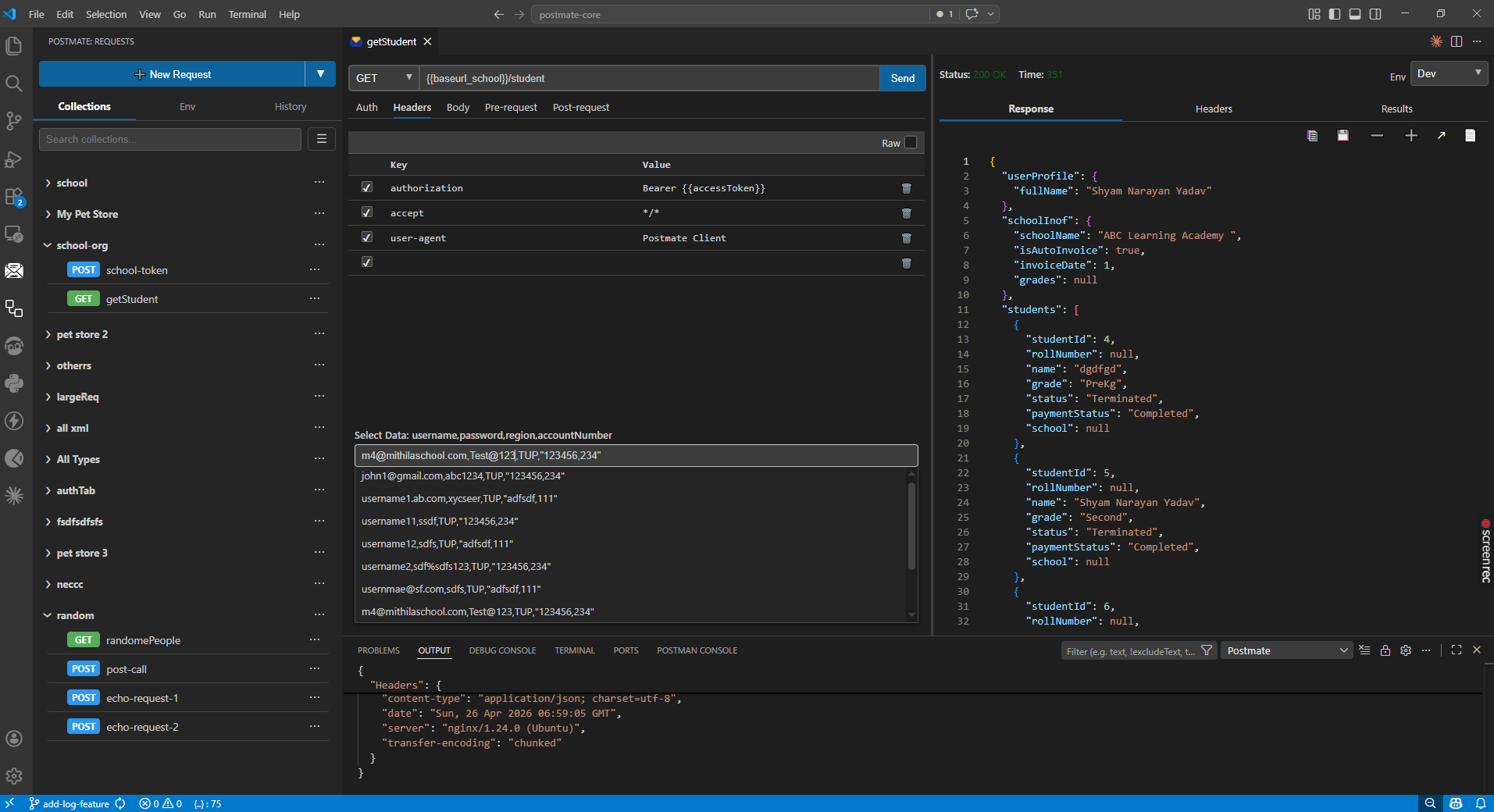
If you have ever found yourself alt-tabbing between Postman and VS Code fifty times an hour, A fast, privacy-first Postman alternative that runs natively inside VS Code — no login, no cloud sync, no context switching., or wondering why a simple GET request requires a cloud account, you are not alone. The tools developers use to test APIs every day have quietly grown heavier, more invasive, and more disconnected from the editor where actual work happens.
Postmate Client is a lightweight, privacy-first Postman alternative for VS Code designed to fix exactly these problems. This article walks through what it does, why it exists, and how it compares to the API testing tools most teams use today.
Why Developers Are Looking for a Postman Alternative
Postman started as a simple browser extension for sending HTTP requests. Over the years it has grown into a full-featured platform with workspaces, collaboration features, cloud sync, monitoring, and a paid tier. For some teams, that breadth is valuable. For many developers, it has become more tool than they need — and more friction than they want.
The most common frustrations developers raise about modern API clients fall into three categories.
1. Forced Login and Cloud Sync
Most popular API testing tools today require an account. They sync your collections, environment variables, and authentication tokens to the cloud whether you ask them to or not. For solo developers this might feel harmless, but for teams under client NDAs, regulated industries, or internal security policies, it is a real concern.
API responses routinely contain sensitive material — authentication tokens, personally identifiable information, internal customer data, and pre-release product details. When that data is automatically synced to a vendor's infrastructure, the team has expanded its security perimeter without making a deliberate decision to do so.
2. Constant Context Switching
If you work in VS Code all day, switching to a separate desktop application every time you need to test an endpoint adds up. Open the app, find the right workspace, navigate to the right collection, send the request, copy something back to your code editor, repeat. Every switch is a small tax on concentration, and across a workday it becomes a significant one.
3. Heavy, Slow, Bloated Tools
Many modern API clients are Electron applications with long startup times, high memory usage, and UI complexity that goes far beyond what most daily work requires. Developers who simply want to send a request and see a response should not need to launch what amounts to a second IDE.
What Postmate Client Does Differently
Postmate Client is built around a simple idea: API testing should live where developers already live, run locally, and stay out of the way.
It is a fully native VS Code extension — not an Electron wrapper, not a browser tab, not a separate desktop application. It installs from the VS Code Marketplace in one click, starts instantly, and works entirely on your machine.
Here are the three problems it solves most directly.
Privacy-First API Testing With No Login Required
Postmate Client takes the opposite stance from cloud-synced tools:
- No account or login required, ever
- No cloud sync — collections live on your filesystem
- No telemetry on your API data
- Collections and environments can be version-controlled like any other source code
This is not a premium feature or a paid tier. It is the default behavior. For teams that need to keep client data, internal endpoints, or pre-release APIs out of third-party infrastructure, this single design choice removes an entire category of risk.
Compare API Responses Without Leaving Your Editor
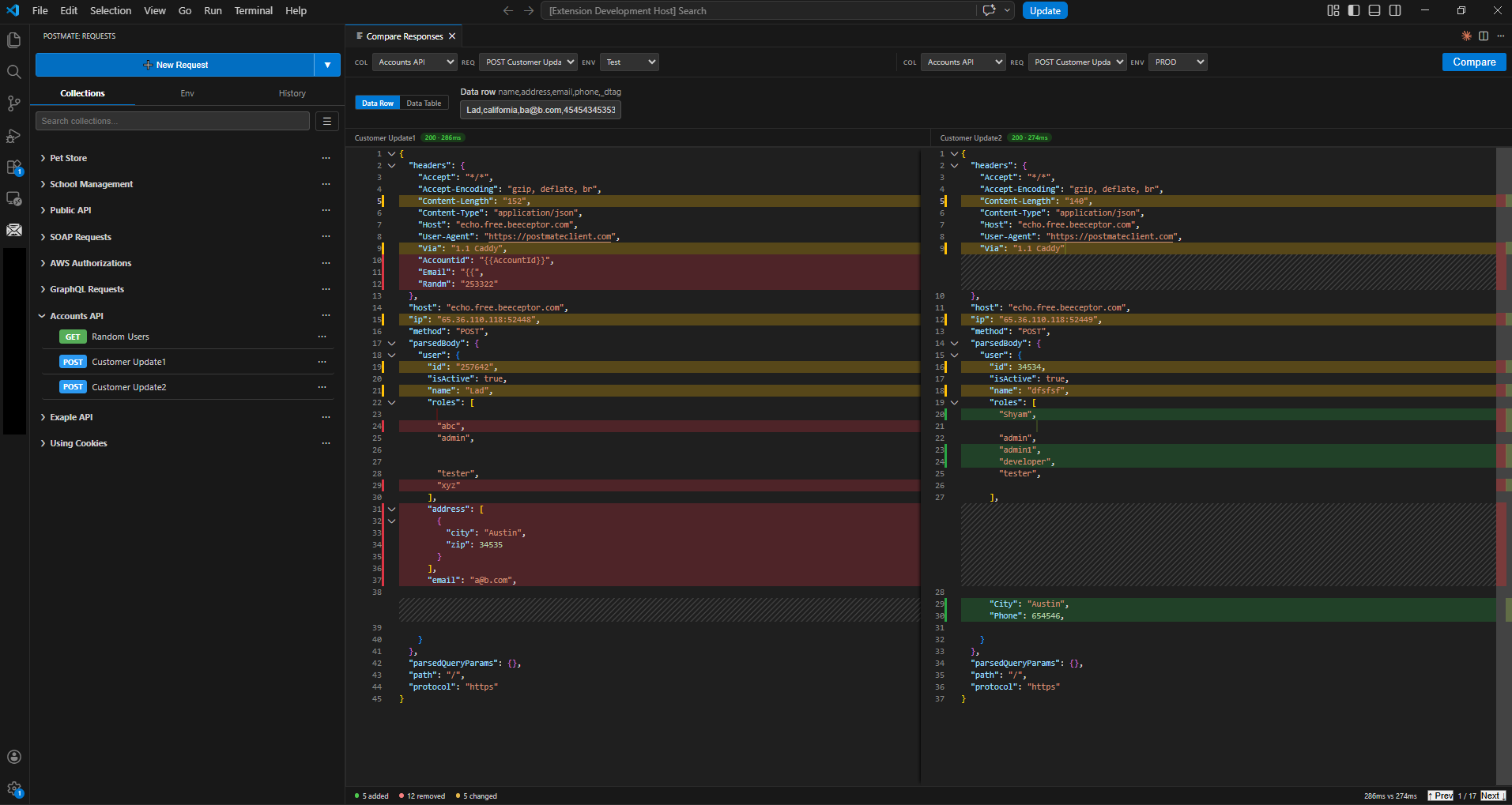
One of the most common API testing tasks — comparing responses across environments or versions — is also one of the most painful in traditional tools. The usual workflow involves sending two requests, copying both JSON responses, opening an online diff website, manually stripping out sensitive tokens, and reading a line-based diff that was not designed for JSON semantics.
Postmate Client includes a built-in Compare Responses panel directly inside VS Code. Right-click a request, pick another request or environment to compare against, and both requests fire in parallel with environment variables and authentication applied automatically. The result is a semantic JSON diff — order-independent, structure-aware — generated in seconds.
The shift this creates is more than convenience. When response comparison takes ten seconds instead of five minutes, it stops being an emergency debugging tool and becomes part of the regular workflow. Pre-deploy validation, environment parity checks, and version migration verification all become natural habits.
Read full article on How to Compare API Responses
Data-Driven API Testing Without Custom Scripts
Most APIs need to be tested against multiple sets of inputs. A login endpoint should be validated against valid credentials, invalid credentials, expired accounts, and edge cases. A pricing endpoint needs coverage across regions and account tiers. A search endpoint should be tested with empty results, paginated results, and special characters.
In theory every team agrees this matters. In practice, most teams skip it because the setup cost is high — data files live separately from requests and environments, and re-running a single failing input usually means rerunning the whole collection and digging through logs.
Postmate Client takes a different approach: the Data Table is attached to the environment, not the individual request. That single design choice changes the workflow. When you switch environments — Dev to Staging to Prod — the data swaps with it automatically.
Dev has its own test user IDs. Prod has its canary IDs. Nothing to reconfigure. And because the data is tied to the environment, every row of the table appears in a dropdown right inside the request panel. Pick a row, hit Send. Pick row 11, hit Send. Same request, same tab, no edits. You can attach a CSV with as many columns as you need — IDs, expected names, expected status codes — and reference any column anywhere in your request using the same {{variableName}} syntax that already exists for environment variables. The built-in Collection Runner executes the entire collection through every row, and the included CLI generates HTML reports for CI/CD pipelines.
The result: running the same request against 50 different inputs takes seconds, not an afternoon — and you don't write a single line of looping code. 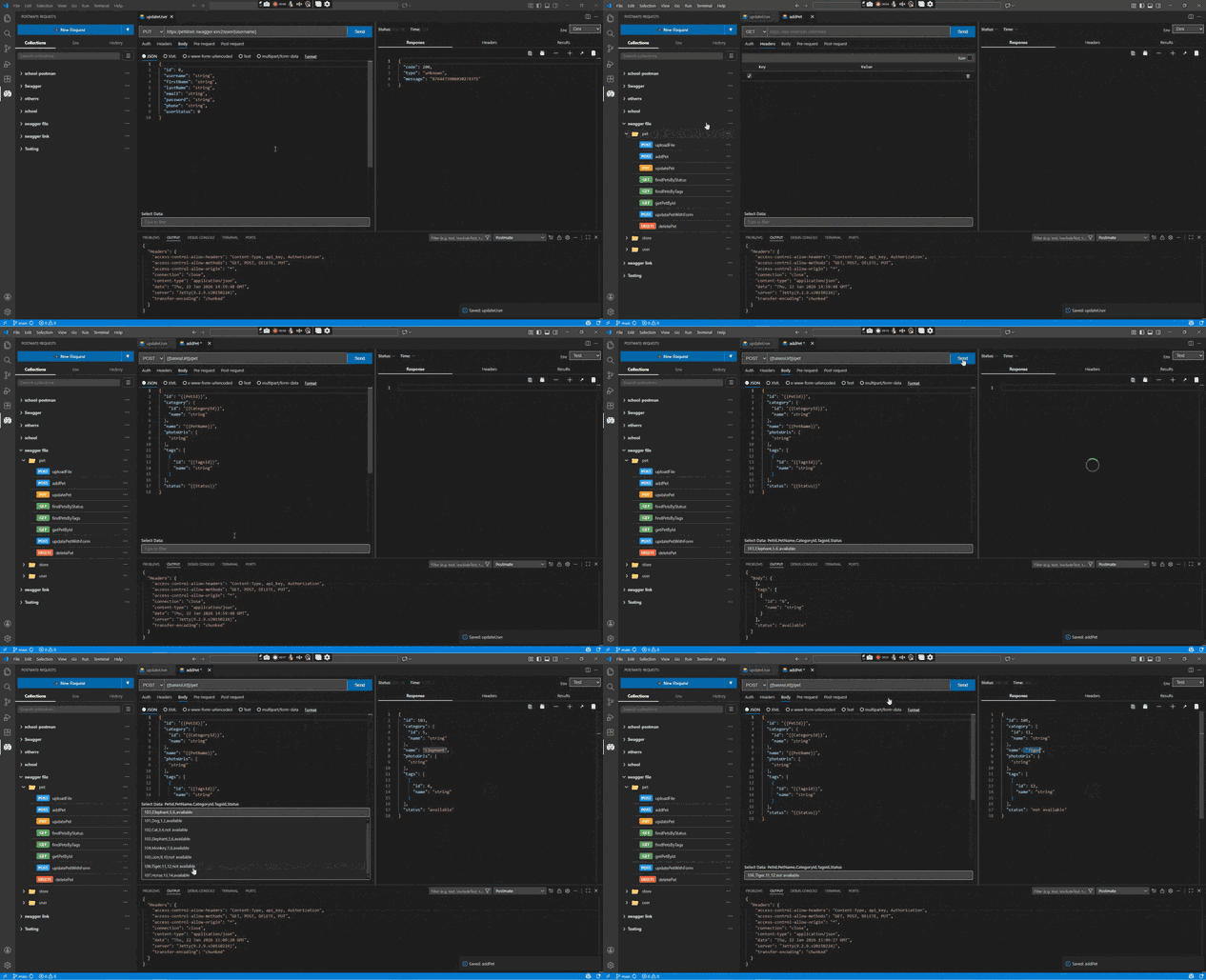
Postmate Client vs Postman: A Quick Comparison
| Feature | Postmate Client | Postman |
|---|---|---|
| Native VS Code integration | ✅ Yes | ❌ Separate app |
| Login required | ❌ No | ✅ Yes |
| Cloud sync | ❌ Optional / never | ✅ Default |
| Local-first storage | ✅ Yes | ❌ No |
| Built-in response comparison | ✅ Yes | ❌ Manual |
| Data tables (CSV-driven testing) | ✅ Unlimited | ⚠️ Limited |
| CLI for CI/CD | ✅ Included | ✅ Newman (separate) |
| Postman collection import | ✅ Yes | — |
| Pricing | Free | Freemium |
Who Postmate Client Is Built For
Postmate Client is most useful for:
- Backend developers who live in VS Code and want a faster feedback loop without leaving the editor
- QA engineers who need data-driven testing, response comparison, and CI/CD integration without managing a separate framework
- Teams under NDA or compliance requirements who cannot send API data to third-party clouds
- Solo developers and freelancers who want a free, full-featured API client without account walls
- Anyone migrating from Postman who wants to keep familiar workflows like the
pmscripting library and collection imports
Migrating From Postman Takes Seconds
One of the friction points in switching API tools is losing existing work. Postmate Client supports direct import of:
- Postman collections (full migration in seconds)
- cURL commands
- Swagger and OpenAPI specifications
The built-in pm scripting library mirrors the API many developers already know, which means existing tests written for Postman often work with little or no modification.
How to Install Postmate Client
Postmate Client is free and available on the Visual Studio Code Marketplace. To install:
- Open VS Code
- Go to the Extensions panel
- Search for Postmate Client
- Click Install
Or install directly from the VS Code Marketplace.
Final Thoughts
The best developer tools are the ones that disappear into the workflow. They start fast, stay out of the way, respect your data, and let you focus on the actual work. For developers and QA engineers who want a Postman alternative for VS Code that does exactly that — without forcing a login, syncing data to the cloud, or pulling them out of their editor — Postmate Client is built for that exact need.
Try it free, import your existing collections, and see whether it fits how you already work.