The Postman Alternative for VS Code
A free, privacy-first REST, GraphQL, and WebSocket API client built natively into Visual Studio Code. No login. No cloud sync. No telemetry. No paid tiers.
Why a VS Code-native Postman alternative?
If you're searching for a Postman alternative for VS Code, you've probably hit one of these walls:
- Postman's desktop app forces a login and pushes your collections to its cloud by default
- Switching between your editor and a separate API client breaks flow on every test cycle
- Your API tokens, request bodies, and response payloads contain sensitive data you'd rather not sync anywhere
- Free Postman tiers keep shrinking, and team features are paywalled
Postmate Client takes the opposite approach. It runs entirely inside VS Code, stores everything locally, and never phones home. You get a full visual request builder — tabs for params, headers, body, auth, tests, and pre/post-request scripts — without leaving your editor and without sending a single byte to anyone else's server. See exactly how your data stays local →
Working inside an enterprise network? Postmate Client ships with full corporate proxy support and mTLS client certificates — built in, not bolted on.
Already using a VS Code client and running into its paywall? We've written a separate page on Postmate Client as a Thunder Client alternative.
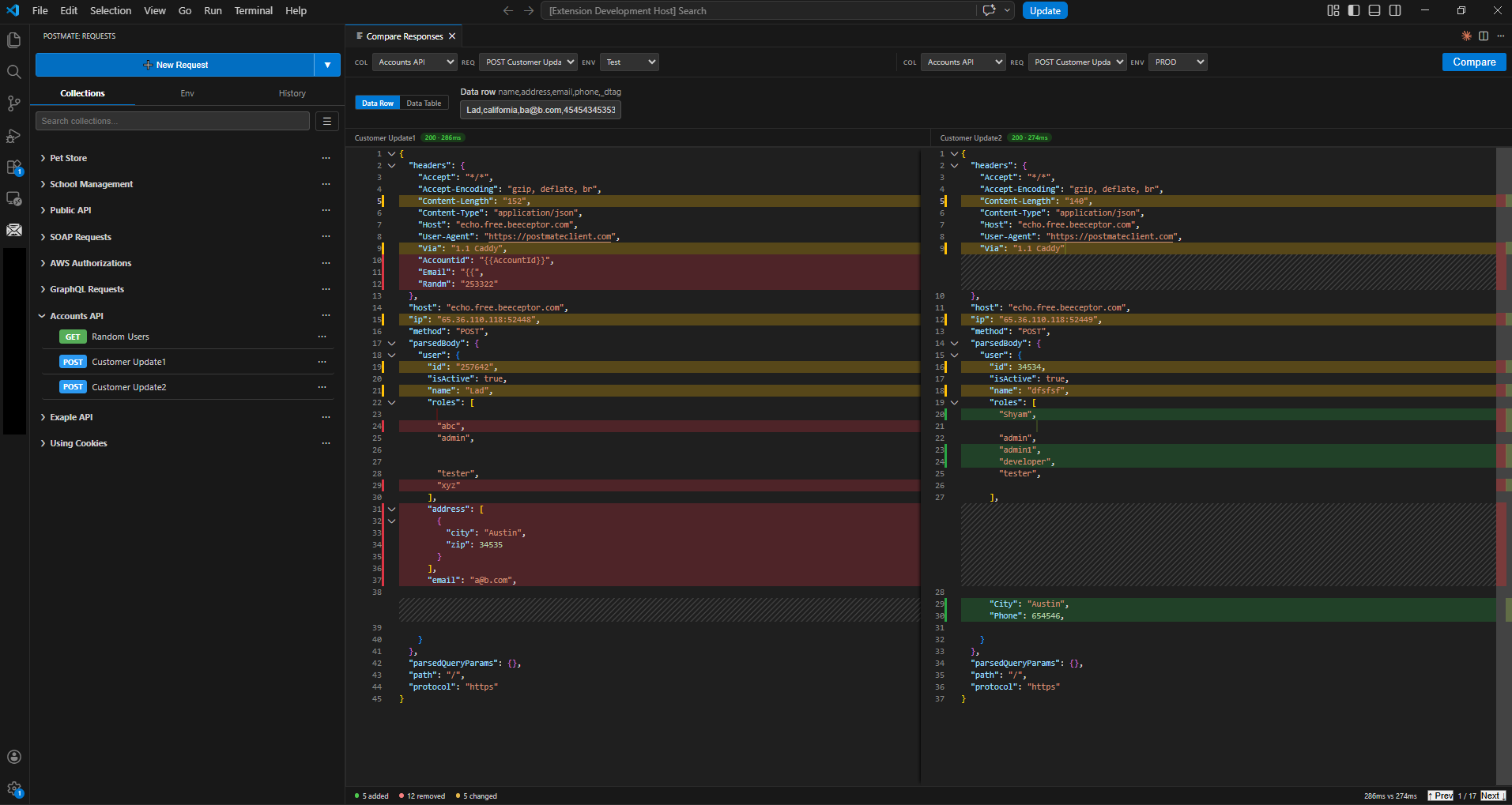
Compare API responses across environments
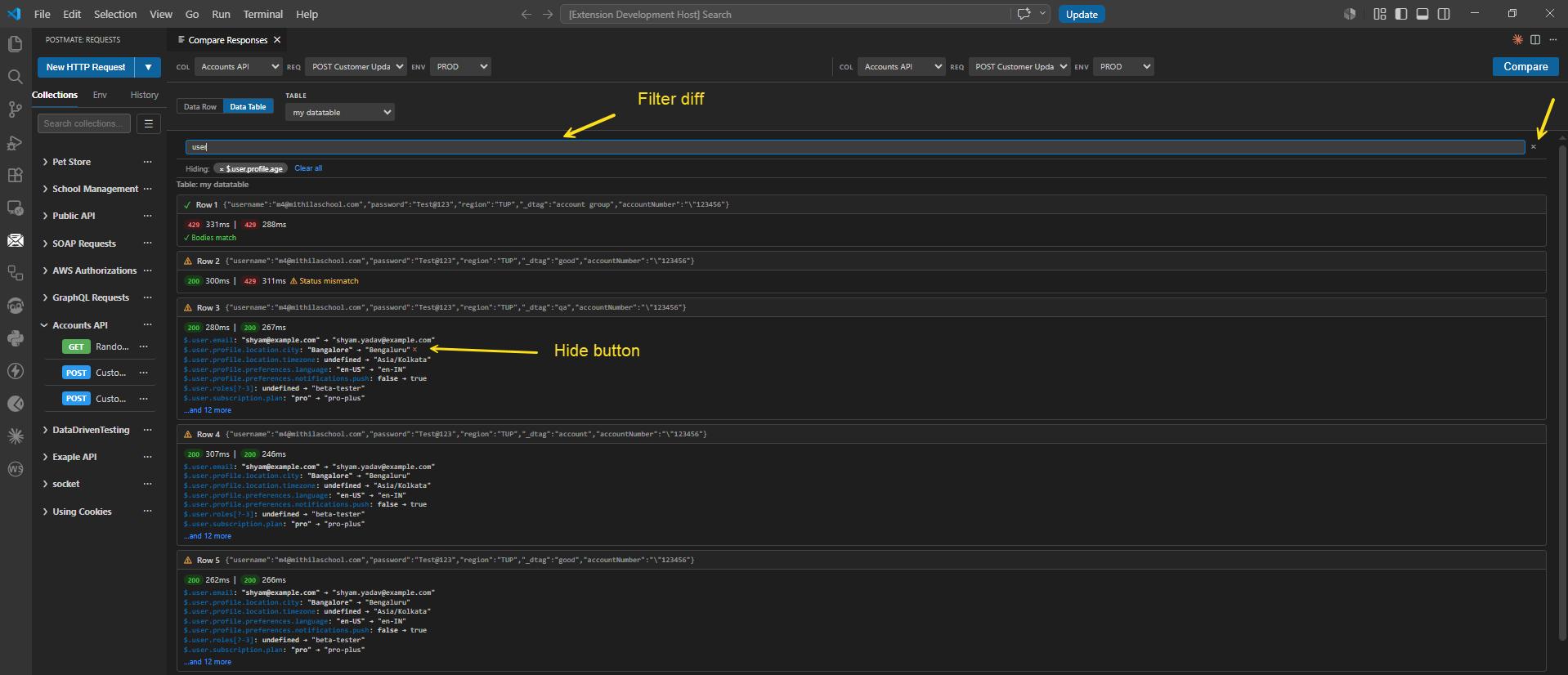
Catch breaking changes before they hit production. Pick two environments, fire parallel requests, and see exactly what changed — in clean JSONPath notation. Need to compare hundreds of inputs? Point it at a CSV data table.
Run collections from VS Code or your CI/CD pipeline
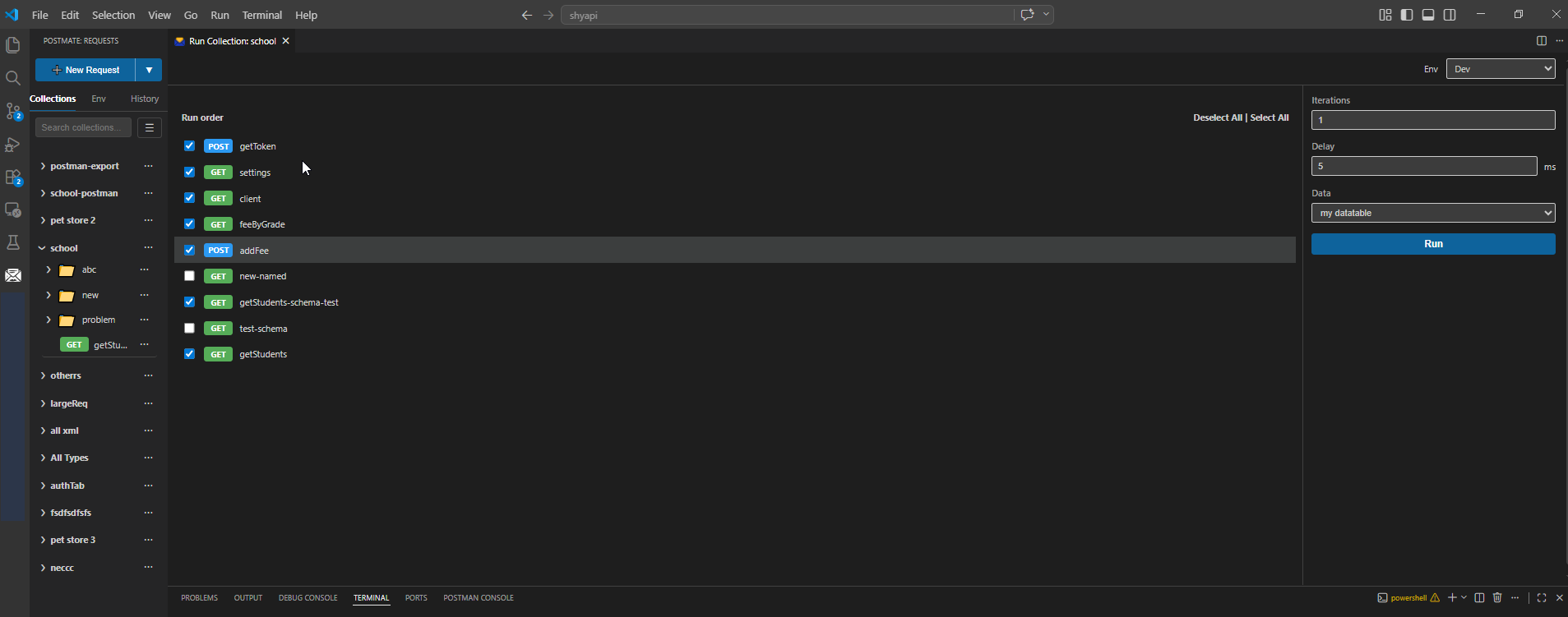
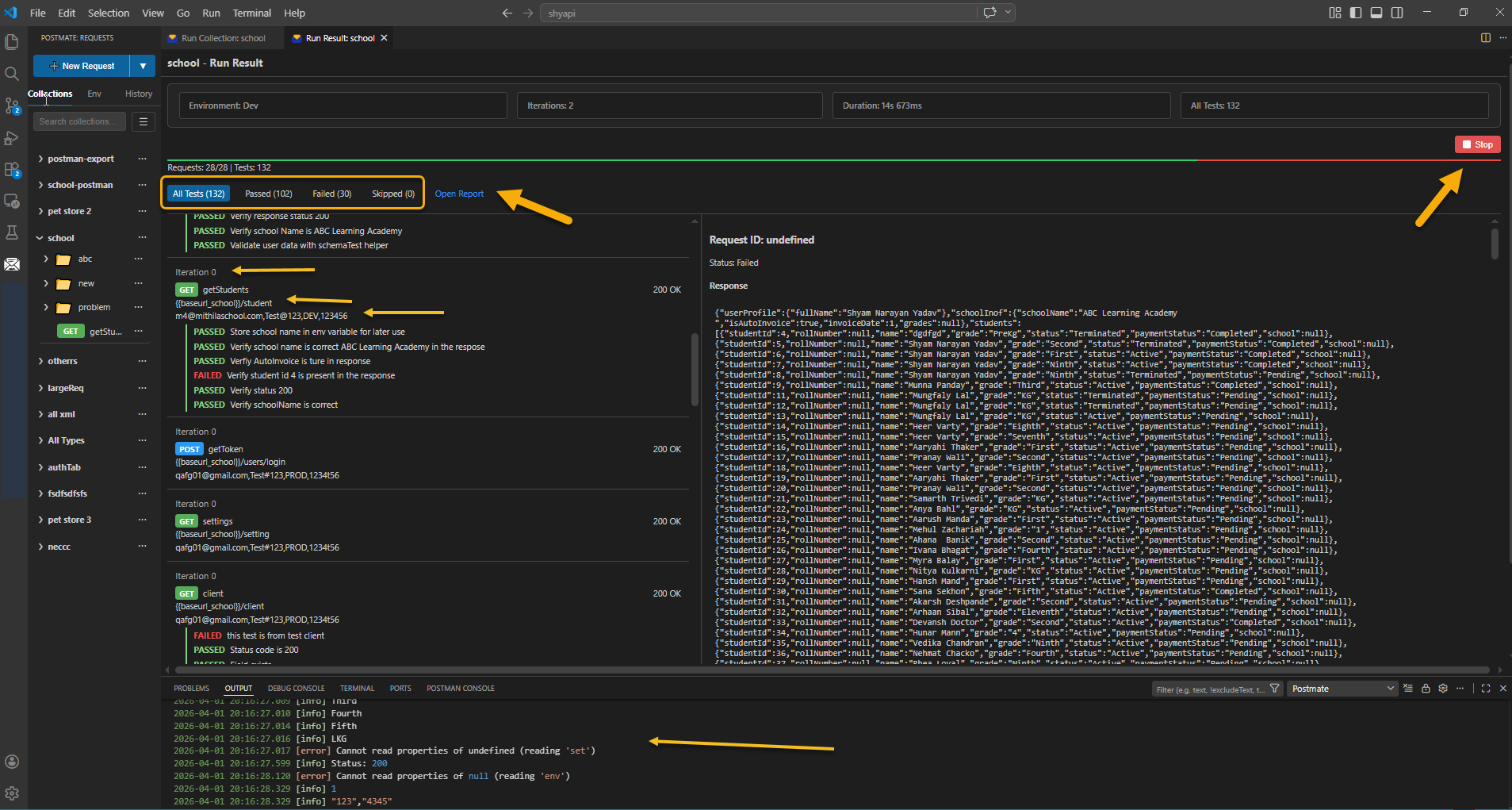
The built-in Collection Runner executes entire test suites — from a single VS Code panel or from your CI/CD pipeline via the free CLI. Pass/fail summaries, response times, assertion details, and HTML reports included.
How Postmate Client compares
A side-by-side with the two API clients VS Code developers most often consider.
| Postmate Client | Postman | Thunder Client | |
|---|---|---|---|
| Runs inside VS Code | ✅ Native | ⚠️ Extension, sign-in required | ✅ Native |
| Works offline | ✅ Always | ⚠️ Limited | ✅ Local storage |
| Works without login | ✅ Always | ❌ Required | ⚠️ Paid licence needed for most features |
| Zero telemetry | ✅ None | ❌ Yes | ⚠️ Anonymised, can be disabled |
| Cursor, Windsurf, VSCodium | ✅ Free | ⚠️ Sign-in required | 💰 Paid tier |
| Git-friendly local storage | ✅ Local files | ⚠️ Cloud default | 💰 Git-Sync is paid |
| Corporate proxy & mTLS | ✅ Built-in | ✅ | ✅ |
| Plain-English assertions (no code) | ✅ Built-in | ❌ Script only | ✅ Built-in |
| Scripting API | ✅ pm assertions, chai expect | ✅ Native pm | ❌ Own tc syntax, paid only |
| AI test generation | ✅ Free, reads your live response | 💰 Metered AI credits | 💰 Business tier and up |
| Postman collection import | ✅ One click, scripts auto-converted | ✅ Native | ⚠️ Manual script conversion |
| OpenAPI / Swagger import | ✅ One click | ✅ | ✅ |
| Data-driven testing from CSV | ✅ Built-in | ✅ Runner data files | 💰 Paid tier |
| Free for commercial use | ✅ Always | ✅ | ❌ Under 10 employees only |
| Collections on the free tier | ✅ Unlimited | ✅ | ❌ Paid version only |
| Environments on the free tier | ✅ Unlimited | ✅ | ❌ Paid version only |
| WebSocket / WSS support | ✅ Free | ⚠️ Login required | 💰 Paid tier |
| Free CLI for CI/CD | ✅ Free | ✅ Newman, free | 💰 Paid tier |
| Parallel response diff | ✅ Built-in | — | — |
| Bulk CSV comparison | ✅ Built-in | — | — |
| JetBrains IDEs | ❌ VS Code only | ✅ Separate app | 💰 Paid tier |
✅ available · 💰 paid plans only · ⚠️ partial or conditional · ❌ not available · — we couldn't find it documented. Checked 29 August 2026 against each vendor's published pricing and terms. Tools change — tell us if something here is out of date.
For the full Thunder Client breakdown — free-tier limits, licence terms, and where Thunder Client is still the better pick — see the Thunder Client alternative page.
Why we built this
Postmate Client started because our team needed something nobody was shipping: a fast, local API client that could fire parallel calls at Prod and Staging from a CSV before every deployment, without sending our request bodies to someone else's cloud.
We tried Postman. The login wall, the cloud sync, the paywalled features — none of it fit how we actually worked. We tried Thunder Client. Closer, and genuinely well built — but it's a commercial product, and the features we needed most sat on the paid plans. So we built our own, kept it inside VS Code where we already lived, and made every feature free because the whole point was to remove gates, not add new ones.
That's still the philosophy. No telemetry, no login, no premium tier. If you find Postmate Client useful, the best thing you can do is tell another developer about it.
Get started in under a minute
- Install the Postmate Client extension from the VS Code Marketplace.
- Click the Postmate Client icon in the VS Code Activity Bar, then click New Request.
- Paste a URL, hit Send — your first API call without leaving the editor.
No account creation. No onboarding flow. No email confirmation. You're testing APIs in under a minute.
Explore the docs
Frequently asked questions
Is Postmate Client really free?
Yes. Postmate Client is 100% free, with no paid tier, no team-size limits, and no premium features locked behind a subscription. Every capability — REST, GraphQL, WebSocket, collection runner, CLI, response comparison — is available to every user.
Does Postmate Client send my data anywhere?
No. Postmate Client has zero telemetry, no cloud sync, and no login. Every request, collection, environment, and token stays on your machine. Your API data never touches our servers because we don't have any. See the security overview for the full picture.
Does Postmate Client work behind a corporate proxy?
Yes. Postmate Client has full corporate proxy support — HTTP/HTTPS tunneling, proxy authentication with proper 407 handling, and NO_PROXY rules. It also supports mTLS client certificates for enterprise environments. See the corporate proxy guide.
Can I import my Postman collections?
Yes. Postmate Client imports Postman v2.1 collections, OpenAPI 3.0, Swagger 2.0, and cURL commands in one click. Bring your existing work with you — no rebuilding required.
Does Postmate Client work offline?
Yes. Postmate Client runs entirely inside VS Code with no external runtime dependency. You can send requests, manage collections, and run tests without an internet connection (as long as your target API is reachable).
How does Postmate Client compare to Thunder Client?
Both are VS Code-native API clients that store data locally. The difference is the licence: Thunder Client is a commercial product whose free version is restricted to non-commercial use at companies under ten employees, and whose environments, CLI and WebSocket support sit on paid plans. Postmate Client is free for everyone, including commercial use. Full side-by-side comparison →
Can my team share collections?
Yes — through Git. Postmate Client stores collections as local files in your repo, which means version control, code review, and team sharing happen through the same workflow you already use for source code.
Does it support GraphQL and WebSockets?
Yes. Postmate Client includes a dedicated GraphQL editor with Query and Variables panes, plus full WebSocket support for ws:// and wss:// endpoints with TEXT, JSON, XML, and HTML message modes — all free, no paid tier.
What's the catch?
Postmate Client is local-first by design, so there's no built-in cloud workspace or real-time multi-user collaboration. If your team needs centralized cloud sync with live editing, Postman is a better fit. If you want a fast, private, free API client that lives in your editor and syncs through Git, Postmate Client is built for you.
Try Postmate Client
Install the extension and send your first request in under a minute.