An account just to see your own requests
Since version 3.0, the free plan needs a login. Until you sign in, the extension stops showing collections you saved before the update. The files are still on your disk — here's how to get them back.
Thunder Client alternative for VS Code
First they capped requests. Then collections. Since 3.0 you need an account just to see the requests you already saved. Postmate Client is a free API client for VS Code with no tier above it, no account — and a CLI that runs in CI/CD without a subscription.
Free for commercial use · No account · Works offline
Coming from Thunder Client? Postmate finds your Thunder collections and environments on your machine and imports them in one click — no export, no login. Requests gone after the update? Get them back →
Collections and environments: what we saw in Thunder Client v2.x on 29 August 2026 — a free install refused to create either one, logged out and logged in both. The rest is from their terms and pricing. Their limits have changed repeatedly and may have changed again — tell us if this is stale.
Thunder Client is a well-built tool, and for small personal projects the free edition still does the job. The friction shows up at work — which is usually when people start looking for a Thunder Client alternative.
Since version 3.0, the free plan needs a login. Until you sign in, the extension stops showing collections you saved before the update. The files are still on your disk — here's how to get them back.
The free version is restricted to non-commercial use. Companies under ten employees are permitted, as are schools and universities — but if your organisation is larger than that, the free tier isn't available to you at any level of use. That threshold was five employees in 2024.
The free version won't save either one. No grouping requests, no dev/staging/prod switching — the extension refuses both outright, and there is no way to work around it. This is the limit that catches people first.
A subscription is required to run the Thunder Client CLI locally and on CI and CD build servers — which is exactly when API tests start earning their keep.
Starter includes 250 local collection runs per user per month, Business 500, and only Enterprise is unlimited. A run budget is a strange thing to think about while debugging.
None of this makes Thunder Client a bad tool. It's a commercial product with a free edition — a fair way to build software, just not always the model that fits a team that has already had one API client taken away from it.
| Postmate Client | Thunder Client | |
|---|---|---|
| Runs inside VS Code | Yes | Yes |
| Local-first storage | Yes | Yes |
| Cursor, Windsurf, VSCodium | Yes | Paid plans only |
| Account or login required | No | Yes, since 3.0 — including the free plan |
| Free for commercial use | Yes | No — non-commercial only, under 10 employees |
| Collections | Unlimited | None on the free version |
| Environments | Unlimited | None on the free version |
| Collection run limits | None | 250–500 local runs/user/month, unlimited on Enterprise |
| Plain-English assertions, no code | Yes | Yes |
| Scripting | pm object with chai expect | Own tc syntax, paid plans only |
| Postman script import | Converted automatically | Manual conversion required |
| Import from Thunder Client | One click, reads Thunder's local folder | — |
| CLI, locally and in CI/CD | Free | Paid plans only |
| Sharing across devices or teammates | Yes | Paid plans only |
| GraphQL | Yes | Yes |
| WebSocket testing | Yes | Paid plans only |
| mTLS / client certificates | Yes | Yes |
| Corporate proxy support | Yes | Yes |
| VS Code Web / Remote / WSL | Yes | Paid plans only |
| JetBrains IDEs | No | Paid plans only |
| Price | Free | $36–$192 per user/year |
Compared 29 August 2026 against Thunder Client's published pricing and terms. Tools change — if something here is out of date, tell us and we'll correct it.
We tested the API clients available for VS Code before writing this page. These didn't turn up anywhere else in that group.
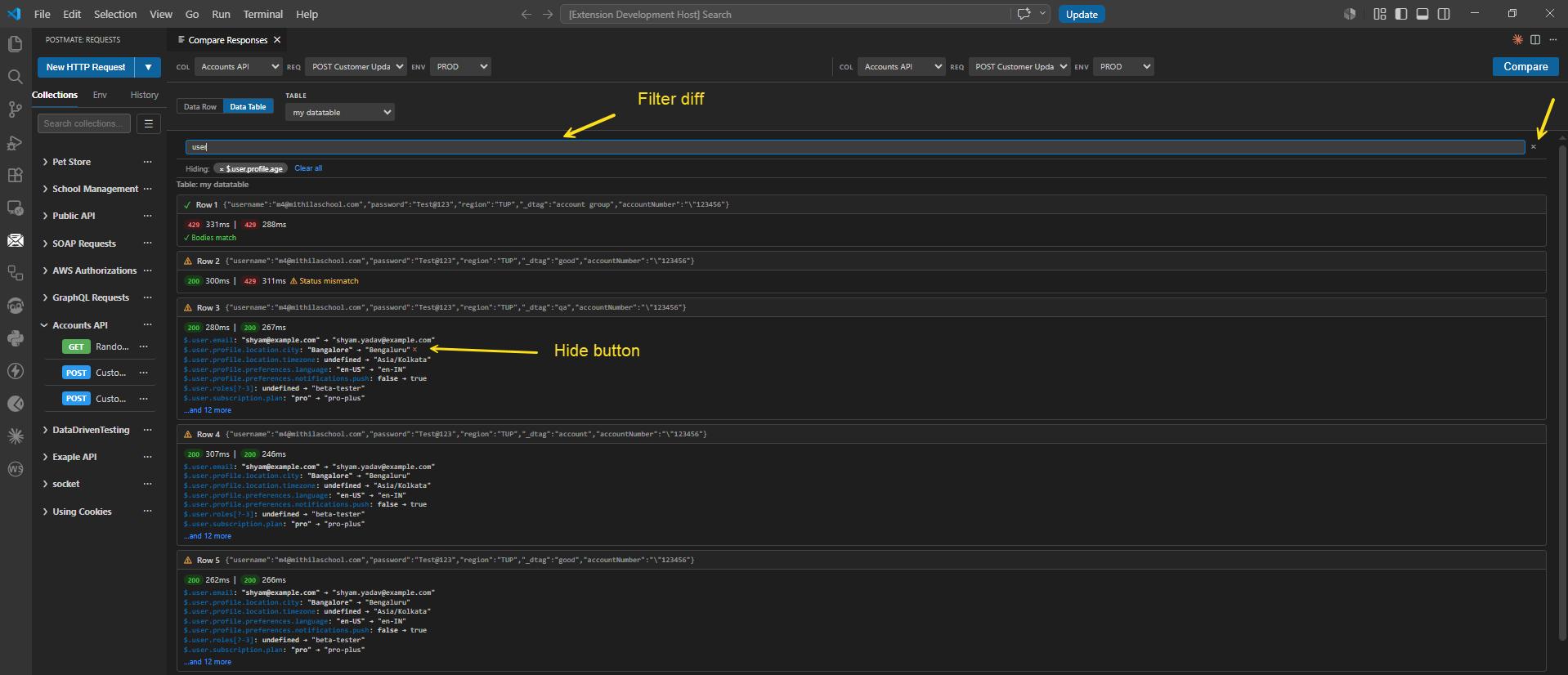
Run a request twice and diff the two responses with highlighting, or compare responses across an entire collection run at once. Filter the diff so noisy fields — timestamps, request IDs, trace headers — stop drowning out the change you actually care about.
This is the feature people usually build a throwaway script for.
Read the docs →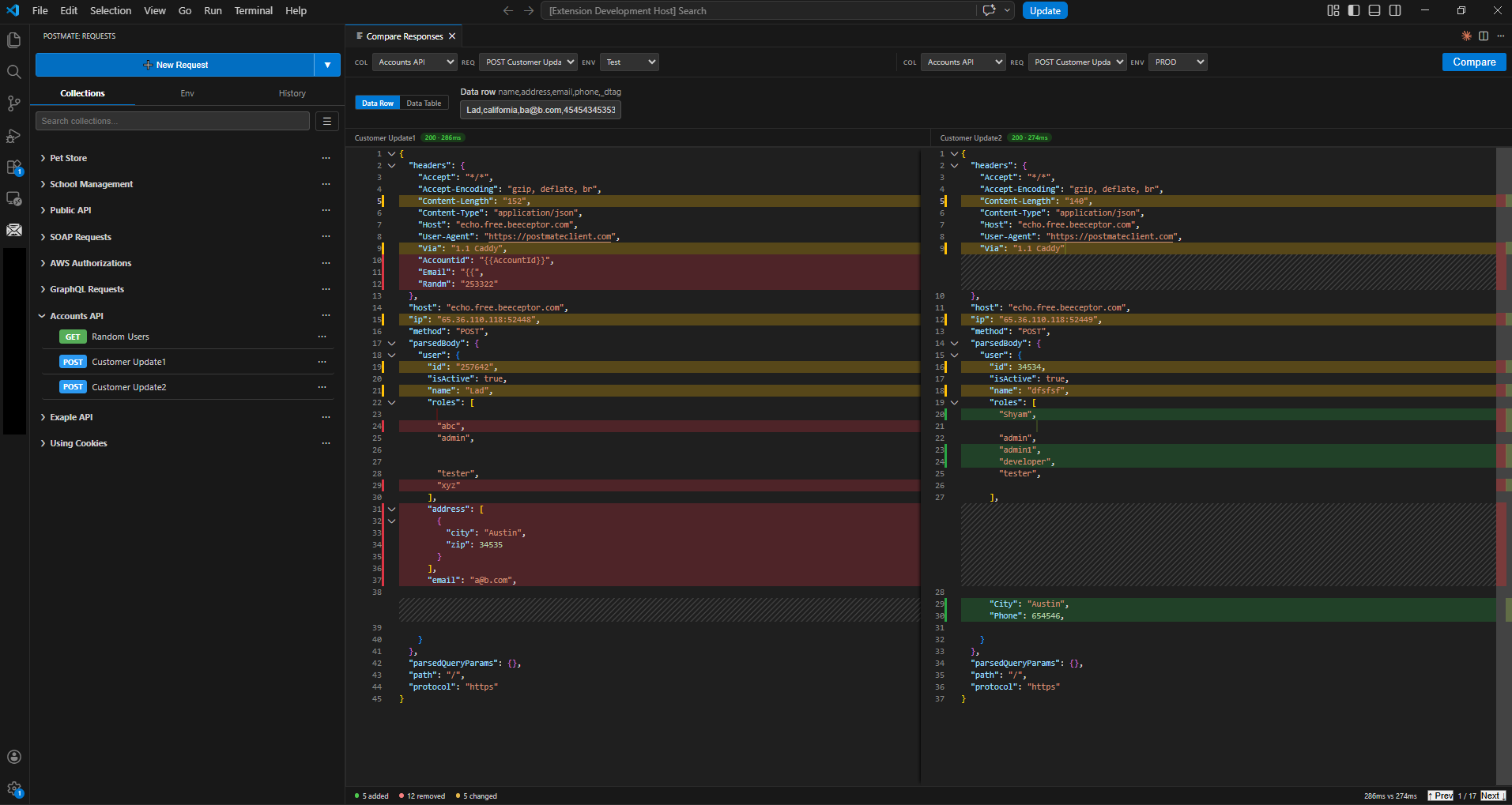
Data files in a collection runner aren't new. Binding a CSV table to an environment, picking the data set straight from the request panel, and filtering rows with _dtag is the part that's different — the data lives where the environment lives, not in a file path you have to remember at run time.
Unlimited rows.
Read the docs →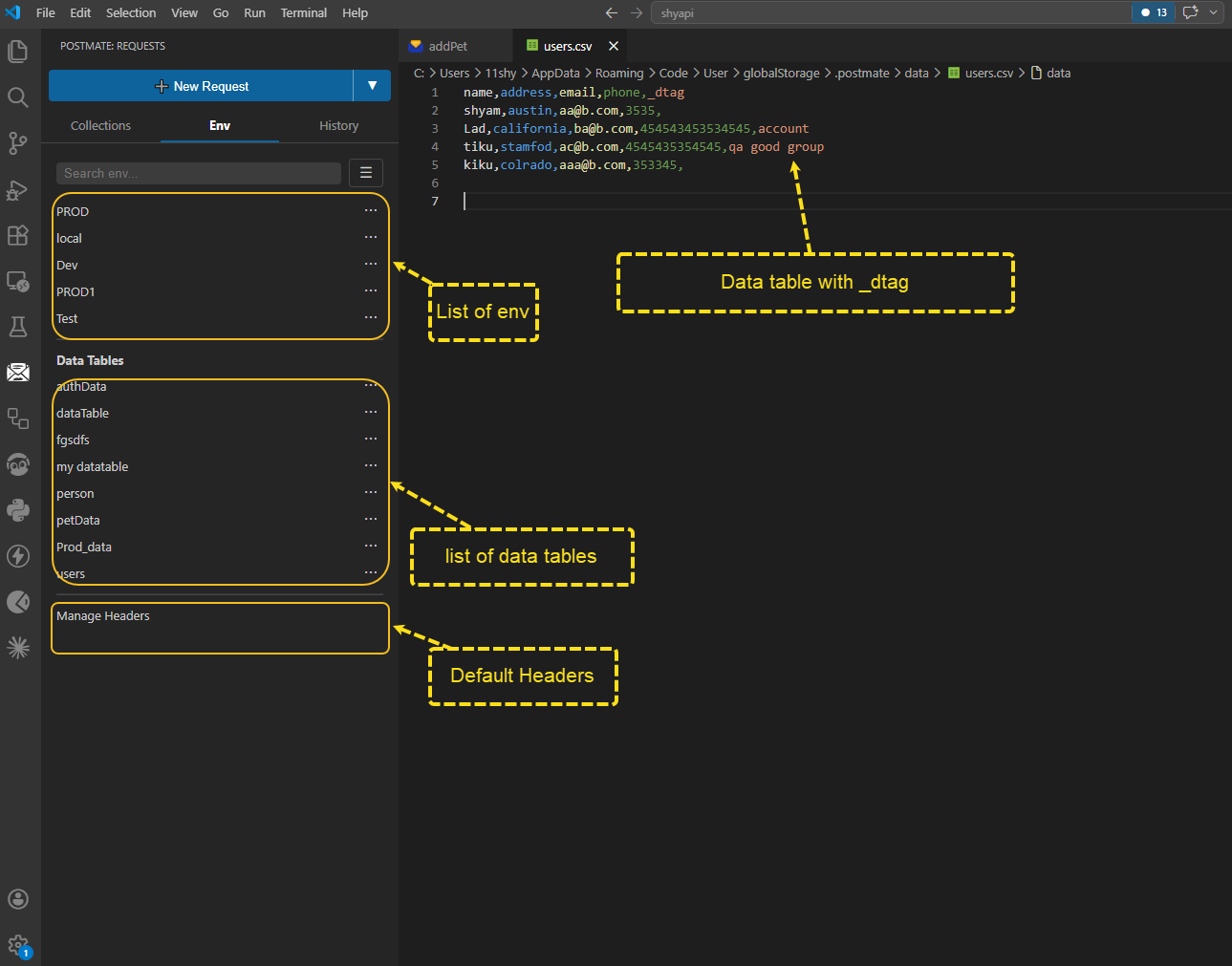
Build assertions in plain English from the tabular editor — pick a field, pick a condition, done. Or drop into the full pm scripting library with chai expect, the same shape you already write in Postman. Both work on the same request.
Thunder Client renamed everything to its own tc namespace, so Postman scripts have to be rewritten by hand — their docs carry a 40-row conversion table and a separate page on converting with AI. Postmate Client converts your scripts during import instead.
One click to copy, save, collapse, expand, or open a response in a new tab. One click to generate a JSON schema from it. One click to generate a post-response test script instead of writing assertions by hand.
And a search that behaves properly on deep JSON: when your term matches a key inside a collapsed object, Postmate highlights the collapsed parent so you know which node to open. Ctrl+F highlights every occurrence and leaves you hunting for the hidden ones.
Plus everything you'd expect: collection runner, request chaining, HTML and JSON reports, Postman and OpenAPI/Swagger import, environments and variables.
If you work in JetBrains IDEs, Thunder Client has a plugin on its paid plans and Postmate Client doesn't — Postmate is VS Code only. And if you're a solo developer on personal projects who fits inside the free tier, there's no urgent reason to switch.
Your Thunder Client collections sit on your machine, so nothing is locked away. Postmate Client reads Thunder's local folder directly: pick the collections and environments you want and click OK. No export, and no Thunder login first. Folders, request order, bodies, auth and {{variables}} come across; same-named environments only gain the variables they're missing, so nothing you already have is overwritten.
It also imports exported Thunder Client files, Postman collections and OpenAPI/Swagger specs, and converts Postman scripts as it goes.
Migrate from Thunder Client: full guide →No. Thunder Client keeps them as JSON files on your disk; since 3.0 it just won't show them until you sign in. See where they are and how to get them back.
Yes, in one click. Postmate reads Thunder's local folder directly, so you don't need to export anything or log in to Thunder first. Exported Thunder files work too.
If you liked Thunder Client because it lives inside VS Code and keeps your requests local, Postmate works the same way — without an account, a paid tier or limits on collections, environments and runs. It also runs in Cursor, Windsurf and VSCodium.
Yes. No paid tier, no seat licence, no separate plan for teams or companies.
No. Postmate Client is local-first — your collections, environments and data files stay on your machine and never leave it.
No. Build assertions in plain English from the tabular editor — pick a field, pick a condition, done. If you do want scripting, the full pm library with chai expect is there too, and Postman scripts are converted for you on import. Use either, or both on the same request.
No. The pmc CLI runs in GitHub Actions, GitLab CI, Jenkins or any other pipeline at no cost.
No.
Yes, including mTLS through a proxy and client certificate authentication per host — the setups that usually force people back to curl.
Yes, entirely.
Nothing to sign up for. If it doesn't fit, uninstalling costs you nothing either.
Install from the MarketplaceComparing other tools too? See the Postman alternative for VS Code.