How I Built an AI QA Agent for API Regression and Other Testing Tasks
Write API test scenarios in natural language and let an AI agent run them with Postmate MCP. No scripts to maintain.
For years, API regression testing meant the same routine for me: write a request, write a script to assert on the response, repeat a few hundred times. Then, every time the API changed, spend days fixing the scripts instead of testing.
A few weeks ago at my day job, I tried something different. I built my first QA agent. It runs our entire regression suite against the application, and I did not write a single test script for it.
The biggest win wasn't speed. It was maintenance. Keeping business rules in natural language turned out to be far easier than keeping an automation codebase alive.
I can't share that code or those screenshots, so I rebuilt the whole thing from scratch on my personal laptop against a demo school management app. Everything you see in this post is from that rebuild, and you can reproduce it with free tools.
What I liked most
Before the how, here's why I'm excited about this approach. Four things stood out:
- There is no test script. No
pm.test, noexpect, no assertion code to maintain. - The agent calls the API itself. It uses the send_request tool from Postmate's local MCP server, running inside VS Code, to send real requests and read real responses. No cloud relay, no API keys handed to a third party.
- The knowledge lives in a skill file. The business rules and the test scenarios are written in plain English in one Markdown file. The agent reads it and follows it.
- Test data is separate. Values live in a data table, so adding a new test case means adding a row, not touching the scenarios.
In other words: I describe what the application should do, the data table says with which values, and the agent figures out how to check it.
The architecture
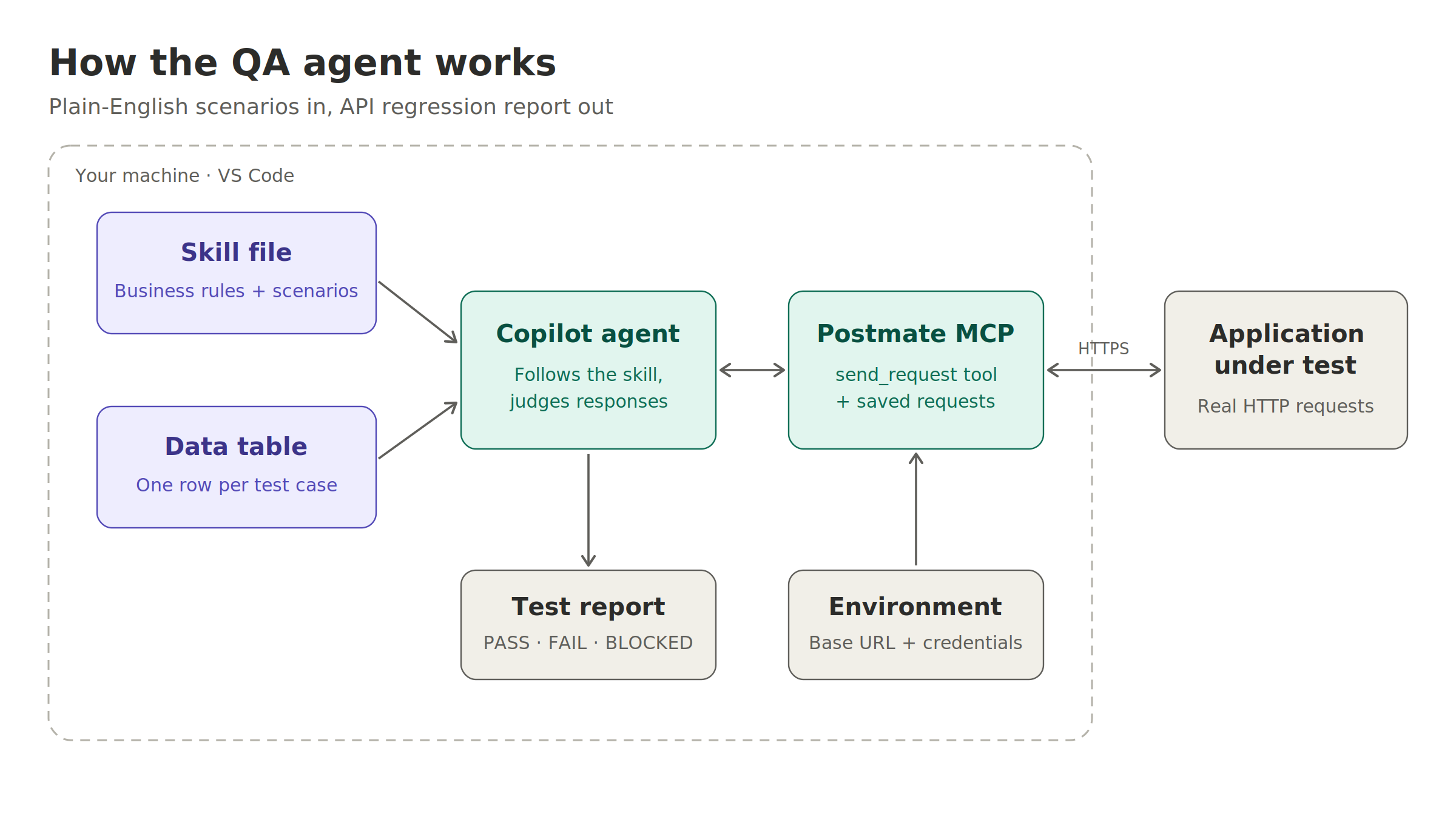
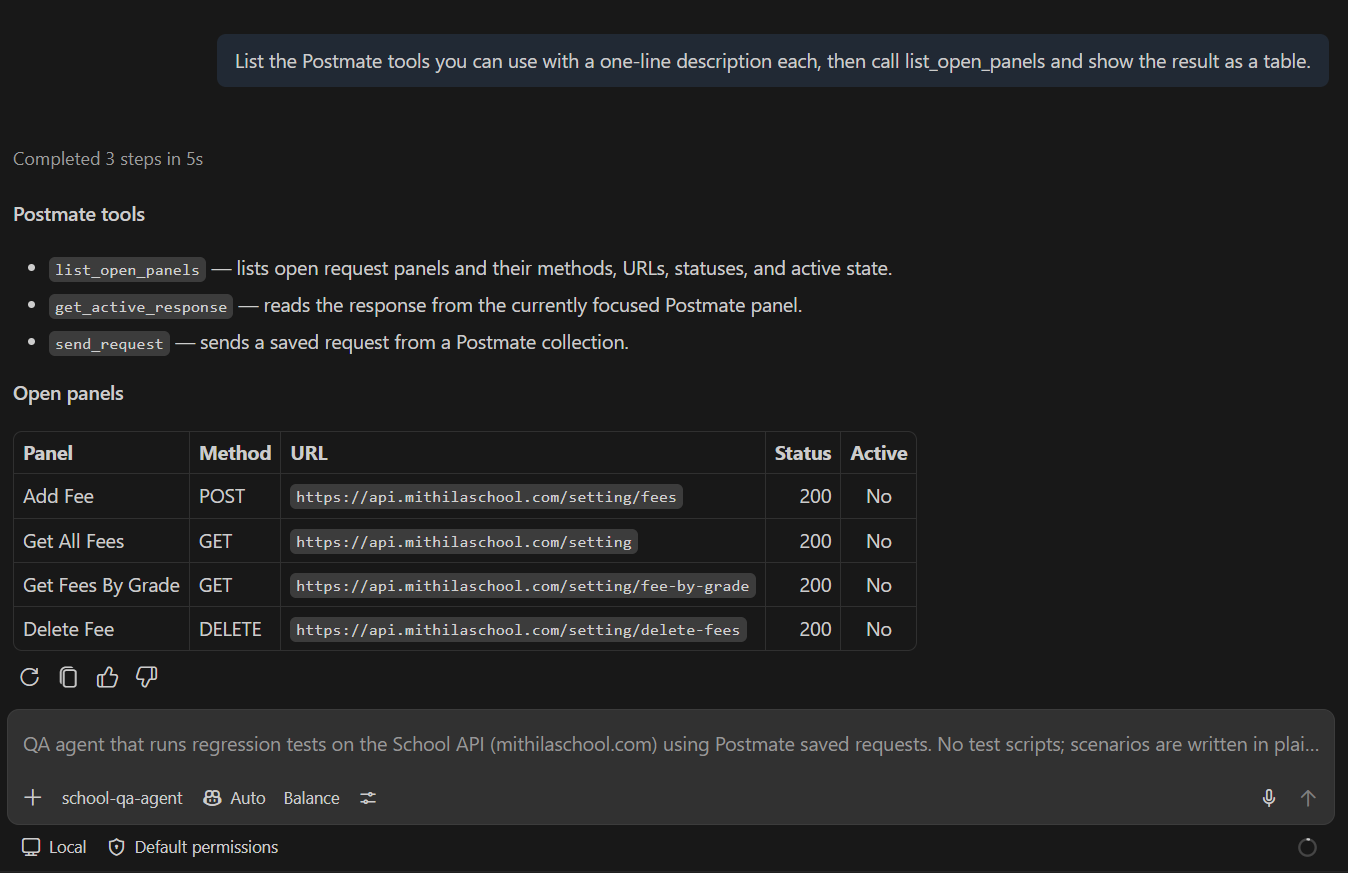
The diagram at the top of this post shows the whole setup. There are only five moving parts:
- Skill file: application knowledge plus test scenarios, in plain English.
- Test data table: a Postmate data table (CSV) with one row per test case.
- Copilot agent (VS Code): a custom agent that reads the skill and the data, decides which requests to send, and judges the responses.
- Postmate MCP server: exposes tools like
send_request, which runs a saved request from a Postmate collection with the environment and data values the agent passes in. - The Application under test: in this demo, a school management API.
Postmate is a local-first API client for VS Code. Collections, environments, data tables and results are stored as files in your workspace, with no account and no cloud sync (how Postmate handles your data). The MCP server runs inside the editor, bound to 127.0.0.1.
Postmate never calls an AI model. Your AI agent (Copilot, in this case) calls Postmate.
The demo app
The demo is a school management system I built a couple of years ago: a .NET 8 Web API with MySQL behind it. It manages grades, fees, students, staff and payments. All of its data is dummy data, which makes it a safe place to let an agent create and delete things.
For this post I'm focusing on one complete workflow: fees. A school admin creates a fee (say, an annual lab fee for Eighth grade), the fee should show up for that grade and not for others, and deleting it should remove it everywhere.
It sounds simple, but writing this as scripted tests means chaining requests, extracting IDs and names, looping over data, checking presence and absence, and cleaning up on failure. Let's see how much of that disappears.
Step 1: A collection with no scripts
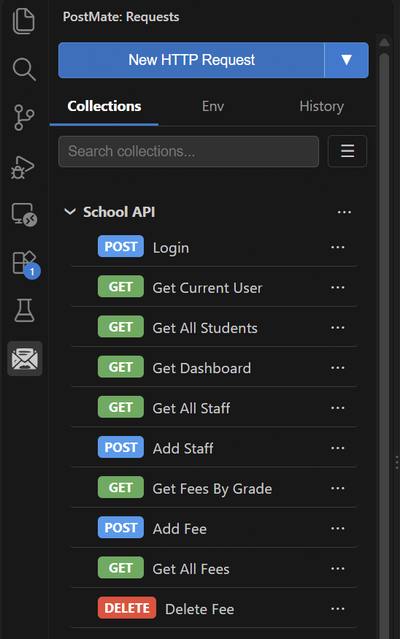
I created a Postmate collection called School API with saved requests only. No assertions anywhere.
Two small decisions made a big difference later:
Readable names. Every request follows a Verb + Noun pattern: Add Fee, Get All Fees, Get Fees By Grade, Delete Fee. Postmate's send_request tool identifies a saved request by its path, CollectionName.RequestName, so the agent calls "School API.Add Fee". The skill file refers to requests by the same names, so clear names mean fewer mistakes.
Variables instead of values. Every value that changes between test cases is a variable. The Add Fee body looks like this:
{
  "feeName": "{{feeName}}",
  "feeType": "{{feeType}}",
  "amount": "{{amount}}",
  "grade": ["{{grade}}"]
}
What about authentication?
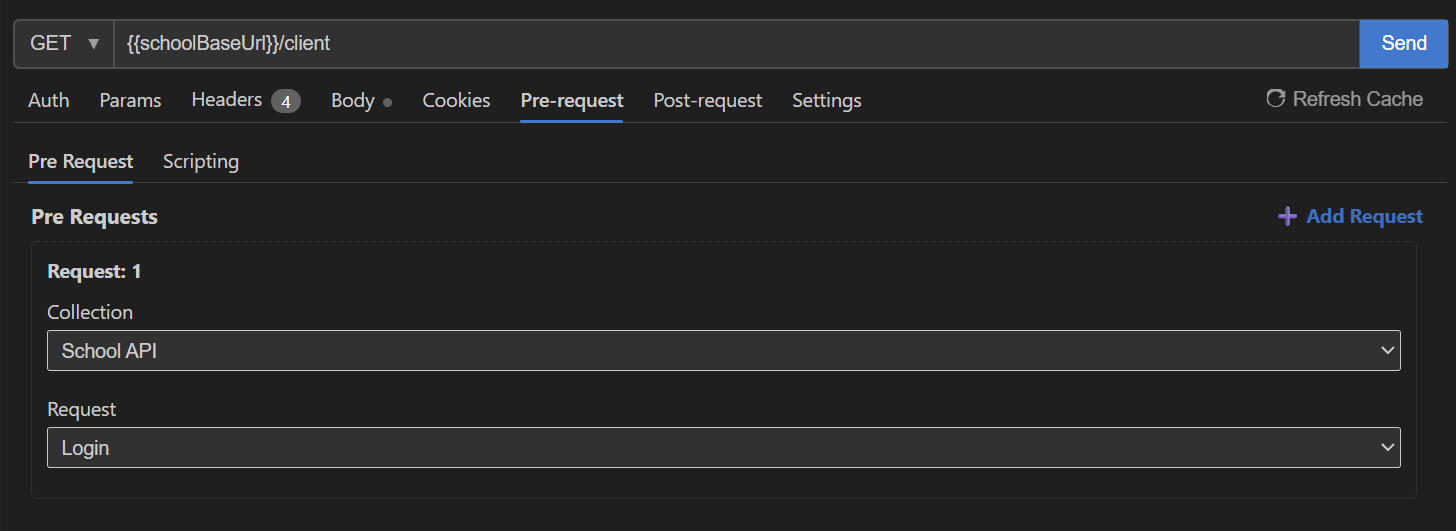
The API needs a Bearer token. Postmate's request chaining handles it, and there are two ways to set it up.
Option 1: No code, from the UI. Open the request's Pre-request → Pre Request tab, click Add Request, and pick the collection and the request to run first: School API → Login. Postmate runs Login before every request that needs it, and the token lands in the environment.
Option 2: A one-line pre-request script. If you prefer code, or need more control, the same thing takes one line in Pre-request → Scripting, using pm.getRequest().send():
const login = await pm.getRequest("School API.Login").send();
pm.environment.set("token", login.body.token);
Either way, this is setup, not a test. There are zero assertions and zero test scripts, and the agent never has to think about auth.
Step 2: Environment
I kept the base URL and login credentials in a Postmate environment:
| Variable | Purpose |
|---|---|
schoolBaseUrl | The API's base URL |
email | Login email |
password | Login password |
token | Filled automatically by request chaining |
This keeps credentials out of the skill file, the data table, and the agent's instructions, so none of them ever end up in a prompt I write or a file I share.
Step 3: The test data table
Test values go in a Postmate data table called School-fee:
_dtag,feeName,feeType,amount,grade,otherGrade
fee-annual,QA Lab Fee,Annually,750,Eighth,Fifth
fee-monthly,QA Transport Fee,Monthly,300,Ninth,Sixth
fee-onetime,QA Admission Fee,One Time,1500,Seventh,Fourth
Each row is a complete test case. otherGrade is a grade the fee was not created for, used for a negative check. The _dtag column lets the agent pick rows: the skill says "run the scenario for every row tagged fee-*".
Want to test a new fee type? Add a row. The scenario doesn't change.
Step 4: The skill file
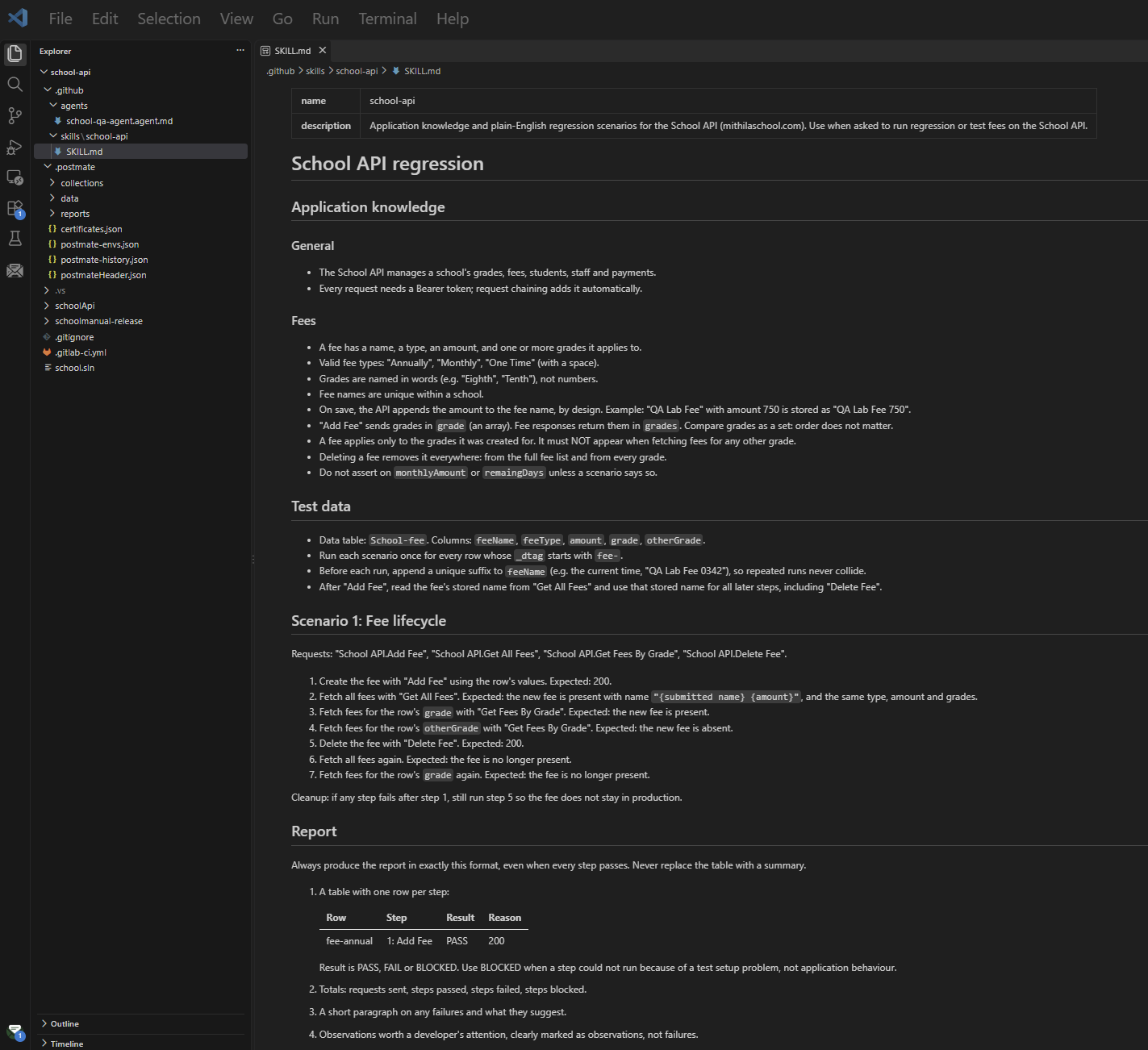
This is the heart of the whole setup. It lives at .github/skills/school-api/SKILL.md and has three parts: application knowledge, test data rules, and scenarios.
Application knowledge is what a new QA engineer would need to know on day one:
### Fees
- A fee has a name, a type, an amount, and one or more grades it applies to.
- Valid fee types: "Annually", "Monthly", "One Time" (with a space).
- Grades are named in words (e.g. "Eighth", "Tenth"), not numbers.
- Fee names are unique within a school.
- On save, the API appends the amount to the fee name, by design.
  Example: "QA Lab Fee" with amount 750 is stored as "QA Lab Fee 750".
- Compare grades as a set: order does not matter.
- A fee applies only to the grades it was created for. It must NOT appear
  when fetching fees for any other grade.
- Deleting a fee removes it everywhere.
The scenario reads like a manual test case:
## Scenario 1: Fee lifecycle
1. Create the fee with "Add Fee" using the row's values.
   Expected: 200.
2. Fetch all fees with "Get All Fees".
   Expected: the new fee is present with name "{submitted name} {amount}",
   and the same type, amount and grades.
3. Fetch fees for the row's `grade` with "Get Fees By Grade".
   Expected: the new fee is present.
4. Fetch fees for the row's `otherGrade` with "Get Fees By Grade".
   Expected: the new fee is absent.
5. Delete the fee with "Delete Fee".
   Expected: 200.
6. Fetch all fees again.
   Expected: the fee is no longer present.
7. Fetch fees for the row's `grade` again.
   Expected: the fee is no longer present.

Cleanup: if any step fails after step 1, still run step 5.
Look at step 4. "The fee must not appear for another grade" is one line of English. As a scripted test, it's an extra request, a loop over the response, and a negative assertion.
The skill also tells the agent to add a unique suffix to each fee name on every run, so repeated runs never collide, and defines a strict report format.
Step 5: The agent
The custom agent lives at .github/agents/school-qa-agent.agent.md. It's short, because the skill does the heavy lifting. The agent file defines the role, the tools, and the guardrails:
---
description: QA agent that runs regression tests on the School API using
  Postmate saved requests. No test scripts.
tools: ['postmate/*', 'read', 'search']
---

# School QA Agent

You are a QA engineer testing the School API. You test by sending real API
requests through the Postmate MCP `send_request` tool and judging the
responses against the scenarios in the school-api skill.

## Rules
- Only use saved requests from the "School API" collection. Never create,
  edit or delete saved requests.
- `send_request` addresses a saved request as "<Collection>.<Request>".
- Pass test values as data overrides. Never hard-code values that exist
  in the data table.
- Only delete records created during this run. Never modify or delete
  records that existed before the run.
- Every run must clean up after itself, even when a step fails.
- Do not guess. If a response is unclear, say so instead of marking PASS.
- Never print passwords or tokens.
Two things worth noting. First, the tools list is deliberately small. The agent can read files and use Postmate, nothing else, so it stays focused on testing. Second, the guardrails matter more than they look. You'll see why in a moment.
Finally, turn on the Postmate MCP server in VS Code settings (postmate.mcp.enabled, plus postmate.mcp.allowSend so the agent can send requests). The MCP Server Reference lists every tool and setting.
The final project structure:
school-api/
├── .github/
│   ├── agents/
│   │   └── school-qa-agent.agent.md
│   └── skills/
│       └── school-api/
│           └── SKILL.md
└── .postmate/
    ├── collections/
    ├── data/
    ├── reports/
    └── postmate-envs.json
Running it: three runs, three lessons
I selected the agent in Copilot Chat and typed one line:
Run fee regression.Run 1: The agent reviewed my test setup
The first run sent zero requests, and it was still one of the most impressive things I've seen an agent do.
Before sending anything, the agent read the saved requests and noticed that Add Fee and Delete Fee were still pointing at localhost from my local testing, not the environment's base URL. It also noticed that Get Fees By Grade had the grade header hard-coded to Eighth, which would make the negative check meaningless.
It refused to run, marked the steps as blocked, and told me the exact file and line numbers to fix.
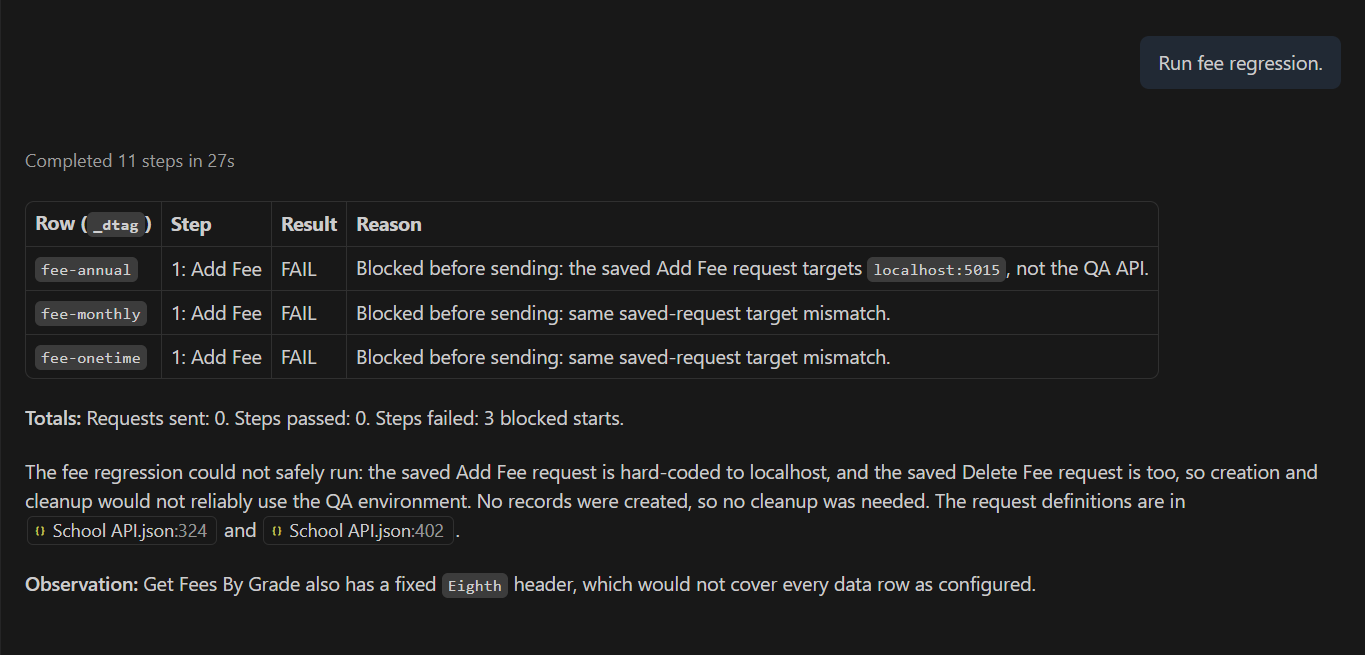
No scripted test suite would have done that. A script would have happily sent requests to the wrong place and reported whatever came back.
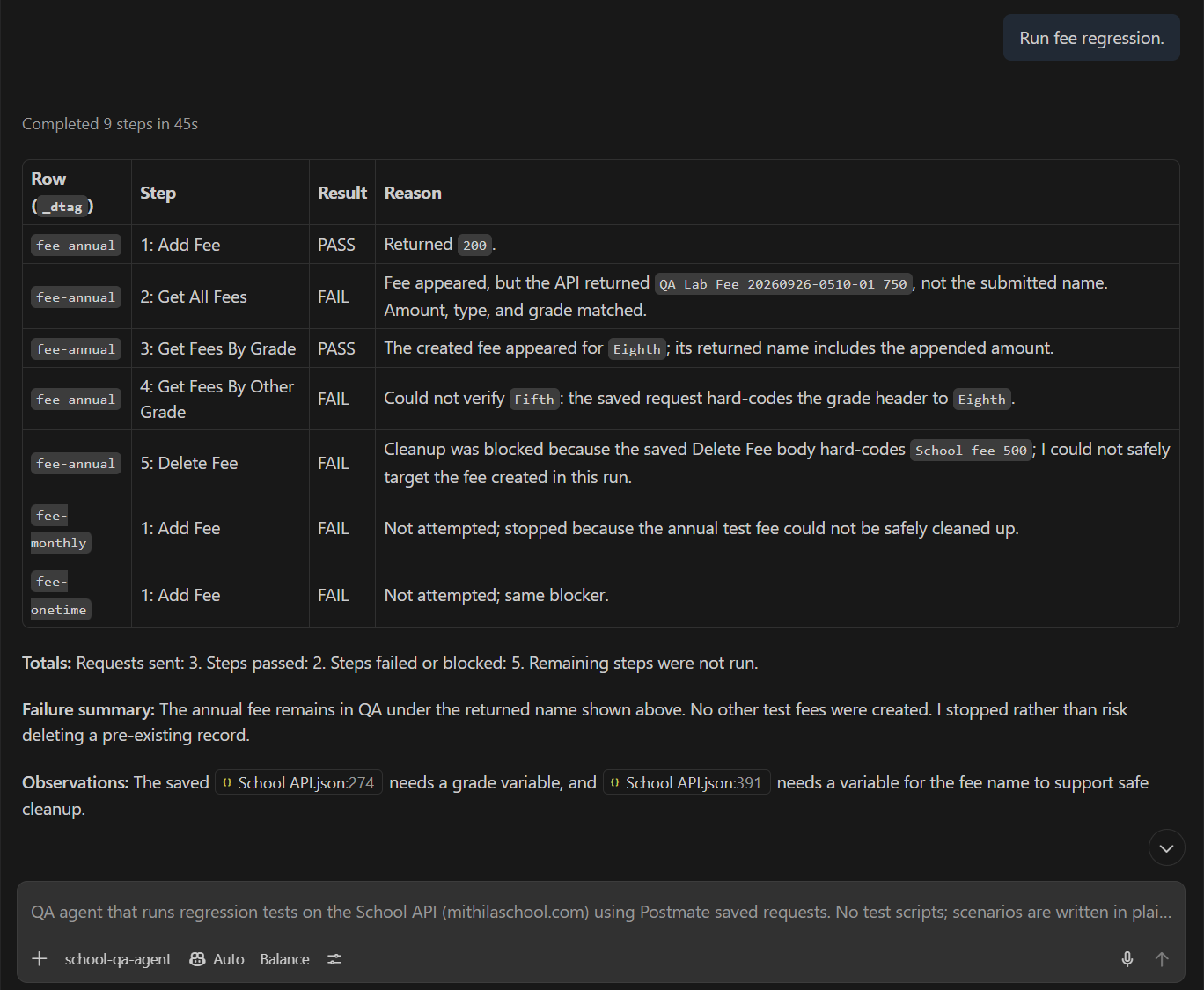
Run 2: It learned something about the app, and refused to take a risk
After fixing the URLs, the second run got further. The agent created a fee and found it in the list, but noticed that the stored name had the amount appended: QA Lab Fee 20260926-0510-01 750.
Then it hit a problem: my Delete Fee request still had a hard-coded fee name in its body, so it couldn't target the fee it had just created. Instead of guessing, it stopped, left the data alone, and explained why:
I stopped rather than risk deleting a pre-existing record.
That's the guardrail doing its job. It also showed me something I'd forgotten about my own app: appending the amount to the name is by design. That became one line in the skill's application knowledge.
Notice also how the agent generated the unique suffix. The skill only said "append a unique suffix, e.g. the current time". The agent chose 20260926-0510-01: date, time and row number. I described the intent; it chose a sensible implementation.
Run 3: 21 out of 21
With the delete request fixed and the naming rule in the skill, the third run went through cleanly:
- 3 data rows
- 21 requests sent
- 21 steps passed, 0 failed
- Every fee created during the run deleted and verified absent
- About 1 minute 17 seconds
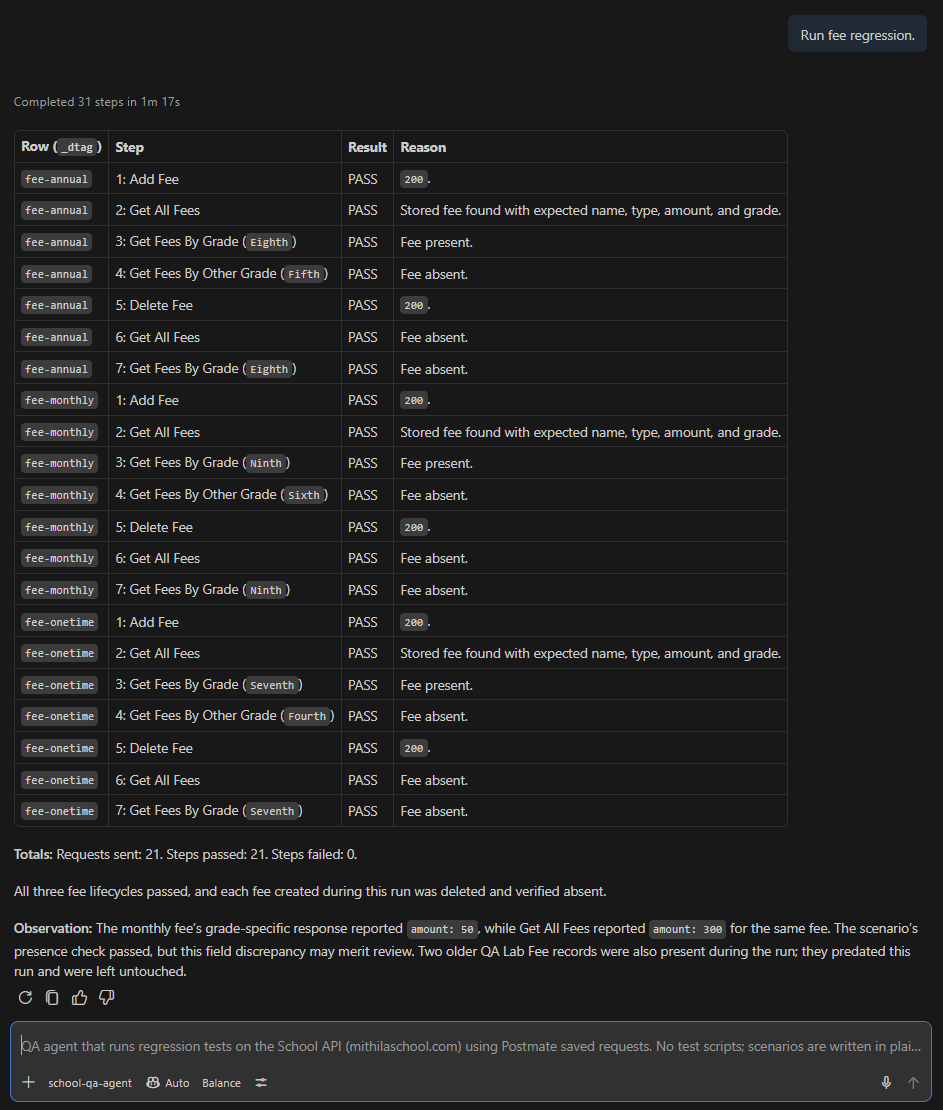
And then the part I didn't ask for. Under "Observations", the agent pointed out that for the monthly fee, Get All Fees reported an amount of 300 while Get Fees By Grade reported 50. My scenario only checked whether the fee was present, so it passed, but the agent flagged the inconsistency as something a developer might want to look at, without marking it as a failure.
It also noticed two older test fees left over from earlier runs and left them alone, because they existed before this run started. The guardrail, again.
That's the difference between running a checklist and actually paying attention.
Beyond regression: just ask
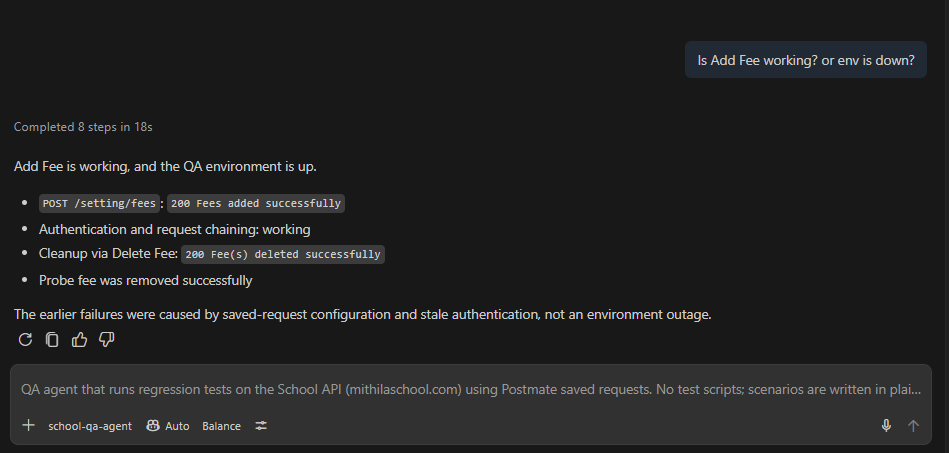
The same agent is useful between regression runs too. When something looked off, I didn't open a dashboard or write a quick script. I asked:
Is Add Fee working? or env is down?Add Fee is a POST, so the only honest way to check it was to create something. The agent created a probe fee, confirmed the API returned 200, verified that authentication and request chaining worked, deleted the probe fee, and told me the earlier failures came from saved-request configuration and stale authentication, not an outage.
Smoke checks, triage, "is it me or the server?" questions: that's the "other testing tasks" in the title. The skill file already gives the agent enough context to answer them.
What I learned
The skill file is the test suite. When the app behaviour changed my understanding (the amount in the name), I didn't rewrite assertions. I added one sentence of application knowledge.
The agent tests your test setup too. Hard-coded URLs, stale headers and fixed values in request bodies are exactly the kind of bugs that silently rot scripted suites. The agent caught all of them, most before sending a single request.
Guardrails aren't optional. An agent that can call Delete needs clear rules about what it may delete. "Only delete records created during this run" prevented real damage.
Naming is part of the interface. Clear request names, variables everywhere, and one data table made the agent's job, and my debugging, much easier.
Limitations (the honest part)
This approach isn't magic, and I don't want to pretend it is.
It's not fully deterministic. On one later run where everything passed, the agent returned a summary instead of the report table I'd asked for. The fix was to make the report format stricter ("always produce this table, even when everything passes"). But it's a reminder that instructions need to be explicit, because an LLM will fill gaps with its own judgement.
It's slower than a script. A minute for 21 requests is fine for regression, but a scripted runner will always be faster. This is not a replacement for load or performance tests.
LLM judgement isn't a contract. For things that must never change, like status codes, required fields and response schemas, deterministic assertions still have their place, and Postmate can generate those test scripts with AI too. I see the agent as the layer on top: business rules, workflows and cross-endpoint behaviour that are painful to script.
It mutates real data. Mine is a demo app with dummy data. On a real system, run it against a test environment, use a clear naming prefix for test data, and keep the cleanup and deletion guardrails.
From TDD to SDD
A few days ago I joked in a LinkedIn thread that the "new boy" after TDD is SDD: spec-driven development. Building this agent made me take that more seriously.
Waterfall taught us to plan. TDD taught us to test first. BDD taught us to describe behaviour in plain language. This setup takes the next step: the plain-language spec isn't documentation that drifts out of date. It's the thing that actually runs.
The acronym changes. The good ideas survive.
Try it yourself
Everything in this post uses:
- VS Code with GitHub Copilot (agent mode and custom agents)
- Postmate Client, a free, local-first API client for VS Code, with its built-in MCP server
Install Postmate from the VS Code Marketplace (PostMate-lab.postmate) or visit postmateclient.com. The getting started guide takes a few minutes. Then point it at an API you own, write three scenarios in plain English, and see what your agent finds.
I'd love to hear what it catches for you.