Postmate Client vs Bruno: An Honest Comparison
Whenever Postmate Client comes up — LinkedIn, Reddit, anywhere — the first question is always the same: "have you tried Bruno?"
Fair question. Postmate Client and Bruno are both local-first Postman alternatives — but if you're looking for a Bruno alternative with deeper QA workflows, this is the honest, complete answer.
First: credit where it's due
Bruno got the big thing right — it proved developers would leave a polished incumbent to keep their collections local. But validating the category isn't the same as finishing the job. Bruno rebuilt the request client; the QA workflow around it (test data, regression comparison, reporting) is still where Postman left it.
This post is for people who felt that gap.
The short version
Bruno replaced Postman's request client. Postmate Client also replaces the QA workflow around it.
Same local-first philosophy. Different depth. Bruno is a desktop app first (with a VS Code companion extension); Postmate Client is built as a VS Code extension from the ground up — the extension is the product, QA workflow included.
Where the two tools actually differ
1. Telemetry: opt-out vs nothing to opt out of
Bruno ships with anonymous usage telemetry enabled by default. You can turn it off — the option is right there in the settings — but it's on until you do.
Postmate Client has no telemetry at all. Not anonymized, not aggregated, not opt-out. There is no setting, because there is nothing to switch off. For most developers this is a small difference. For people whose security team just banned Postman, it's the whole point.
2. Test data management: files you browse vs tables that live with your environment
This is where the QA background behind Postmate Client shows.
In most API clients, data-driven testing means: find the right CSV, select it, run, repeat — and hope you didn't grab the prod file for a non-prod run. The test data is an input you supply every single time.
In Postmate Client, data tables are attached to the environment itself. Switch to staging and the staging data table is simply active — for a single request or a full collection run. No browsing, no re-selecting, no wrong-file accidents. Your test data management follows your environments, the way it always should have.
Then it goes a step further with data tagging: add a _dtag column to your table and each request runs only the rows targeted at it. One table can drive an entire collection — login rows for the auth request, checkout rows for the payment flow, edge rows for the requests that need boundary testing — each request pulling exactly the slice of data-driven testing it needs, with zero duplicate CSVs.
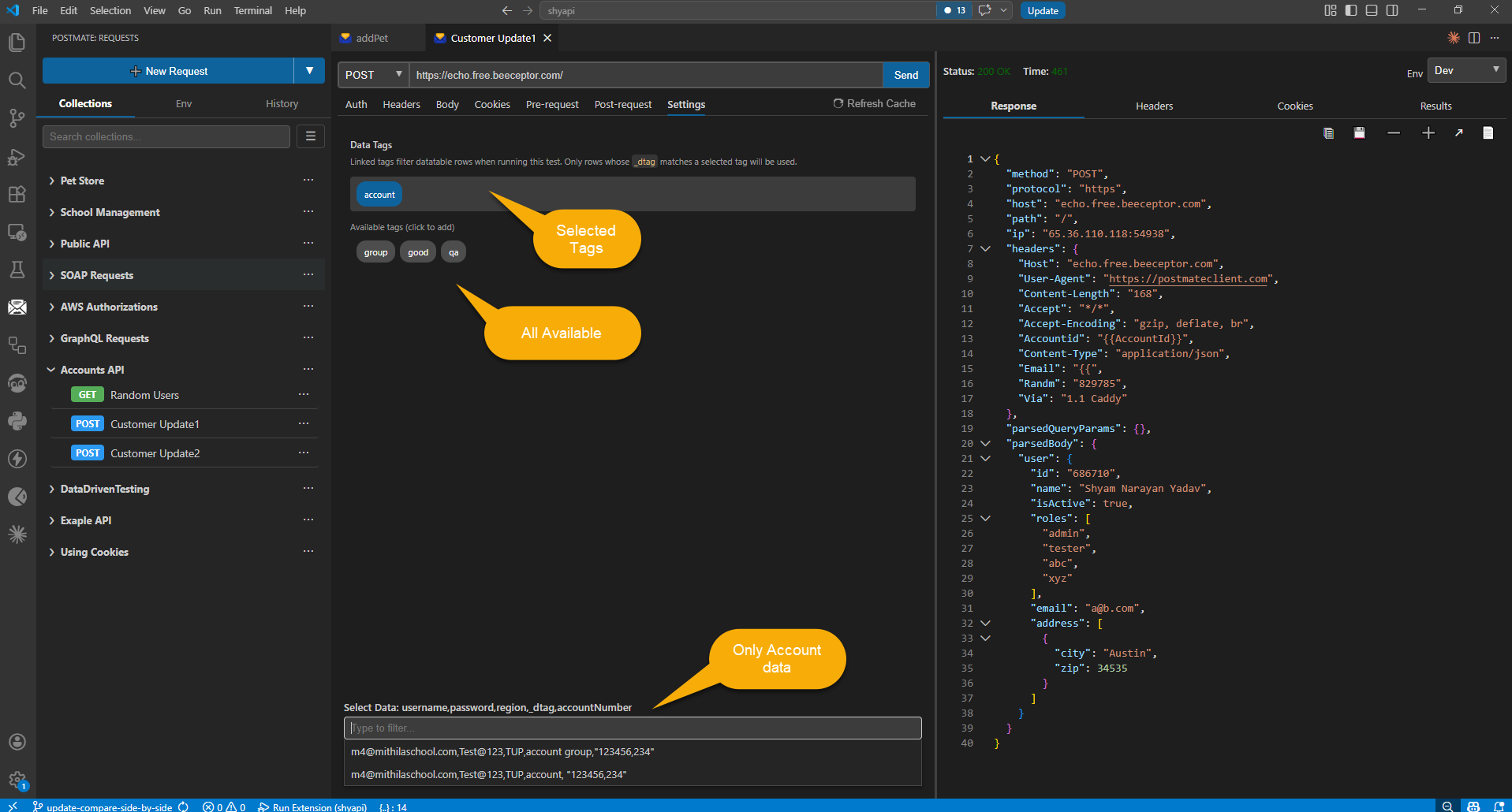
One data table, tagged rows — each request runs only the data meant for it.
3. Response comparison: built-in, parallel, and bulk
Prod-vs-staging regression checking is a daily QA reality, and in most API clients the workflow is: send request A, send request B, paste two JSON blobs into an online diff tool, squint.
Postmate Client has a Compare Responses panel built in. Pick any two requests — different environments, different collections, even v1 vs v2 of an endpoint — and hit Compare. Both requests fire in parallel, and the responses land in a side-by-side diff with every added, removed, and changed value highlighted. The diff is order-independent, so reordered arrays and keys aren't flagged as false differences — only real changes are. A counter (3 / 47) walks you through each one.
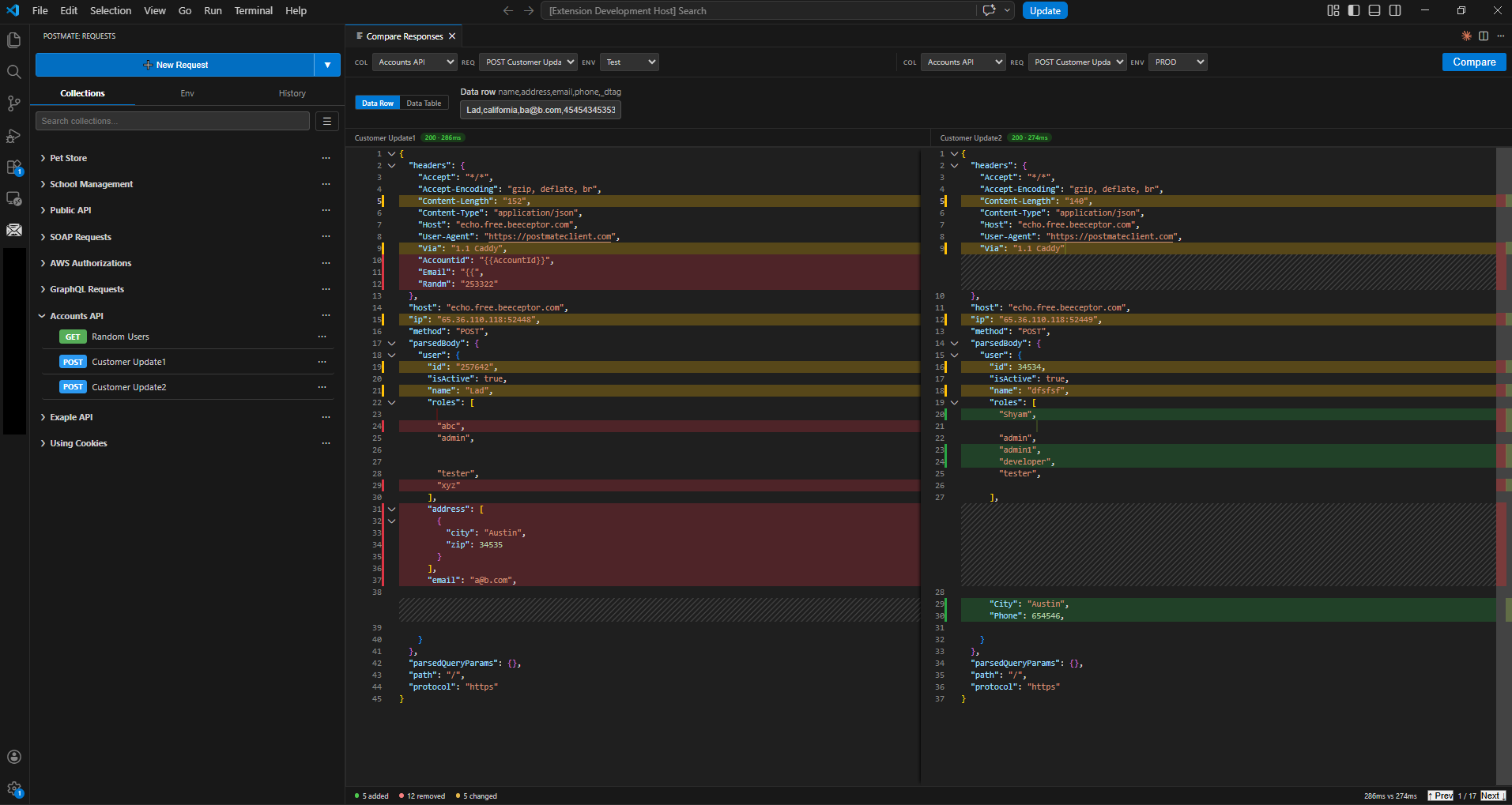
One click, both environments, every difference highlighted.
And it scales: bulk response comparison runs the same comparison across an entire CSV data table — every row, both environments, one click. A full regression sweep without writing a single assertion.
I have not found this workflow built into any other API client. It exists because I needed it every single week as a QA engineer.
4. Reporting: zero-config vs flags-per-format
Bruno can generate reports — through its CLI, by passing a reporter flag for each format on each run. In the desktop app, there's no report at all.
Postmate Client generates HTML and JSON API test reports automatically after every collection run — no flags, no configuration, no plugins. The HTML report is a self-contained file (embedded assets, works fully offline) with the execution summary, pass rate, per-request timings, and expandable response data — ready to hand to a stakeholder as-is. The JSON report is built for machines: parse it in CI to fail the pipeline on test failures, or feed it into a dashboard.
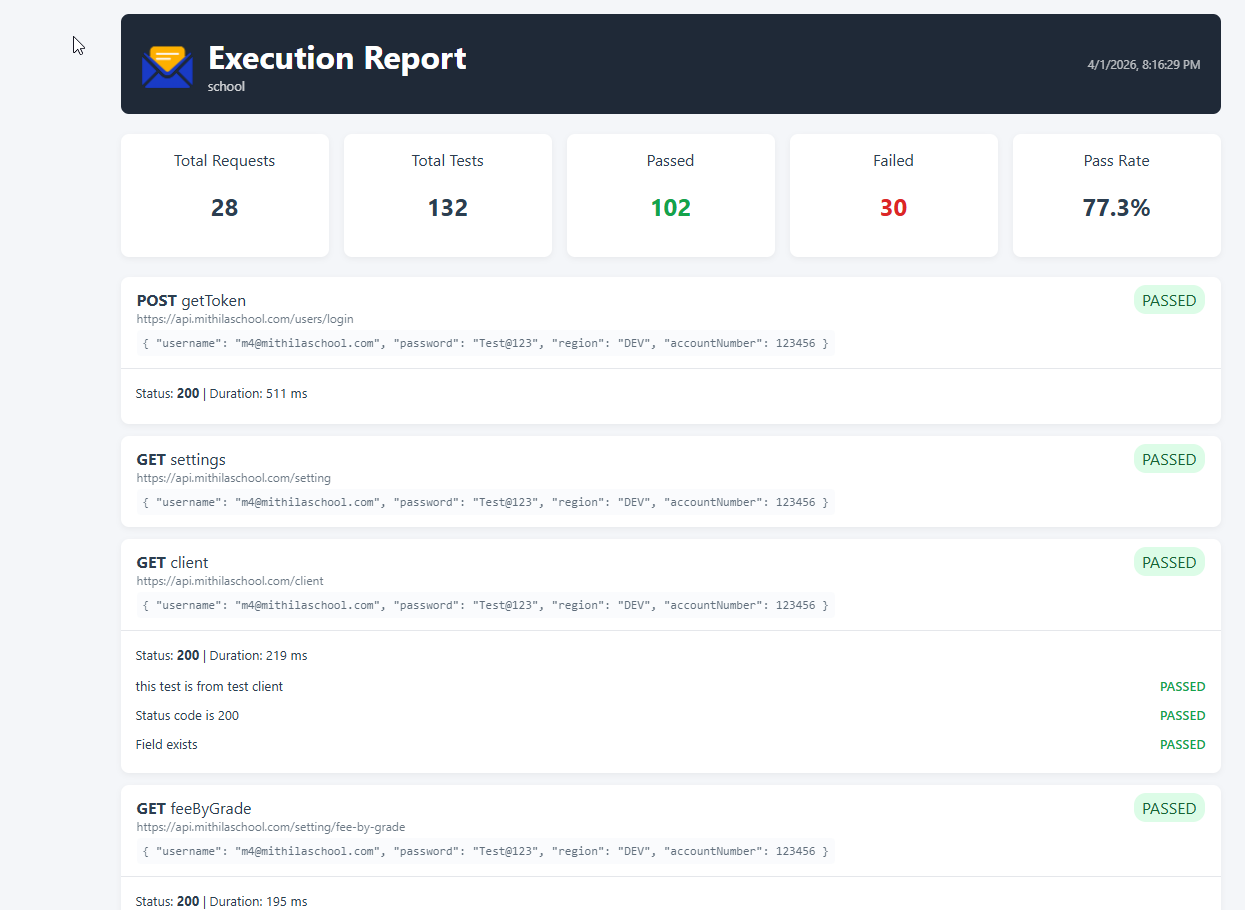
Every collection run produces this — no flags, no plugins, ready to share.
In VS Code, you click Open Report in the run results. In CI, the same reports land in .postmate/reports/, because the extension and the CLI share one core — same run, same report, wherever you run it.
5. Schema validation: one click from response to test
Contract checking usually dies at the same step: nobody wants to hand-write a JSON Schema for a 40-field response.
Postmate Client removes that step. Get a response, click once — the built-in schema generator produces the JSON Schema from the actual response body. Drop it into pm.schemaTest and it runs as a named test alongside the rest of your assertions:
pm.schemaTest('User schema is valid', schema, RESPONSE.body);One line, and every future run validates the response contract — in the editor and in CI. If the API team quietly changes a field type, your run fails before your users notice.
Feature comparison
| Postmate Client | Bruno | |
|---|---|---|
| Local-first, no login | ✅ | ✅ |
| Telemetry | ✅ None | ⚠️ On by default, opt-out |
| Data tables bound to environments | ✅ Built-in | ❌ |
Per-request row tagging (_dtag) | ✅ Built-in | ❌ |
| Parallel response compare (single + bulk CSV) | ✅ Built-in | ❌ |
| Auto HTML/JSON reports (GUI + CLI, zero config) | ✅ Built-in | ⚠️ CLI only, flag per format |
| One-click schema generation → validation test | ✅ Built-in | ❌ |
| Swagger/OpenAPI → data-driven collection | ✅ Beta | — |
| Free CLI for CI/CD | ✅ | ✅ |
What Bruno does that Postmate Client doesn't
An honest comparison cuts both ways.
Bruno is open source with a large community, has been battle-tested longer, and its Bru file format has an ecosystem forming around it. It's a mature standalone app with years of polish, and if you want a Postman-shaped application — a dedicated window with that familiar layout — Bruno is exactly that, minus the cloud.
Postmate Client is newer, built by one developer (me), and closed source. What you trade in community size, you get back in QA workflow depth and never leaving your editor. Whether that trade is worth it depends entirely on how you work.
Postmate Client as a Bruno alternative: who should pick which
Pick Bruno if: you want an open-source Postman replacement, your workflow is mostly sending and organizing requests, and a large community around the tool matters to you.
Pick Postmate Client if: you test APIs against multiple environments with real test data, you want data-driven testing, response comparison, and reports built in rather than bolted on — and "run the regression suite and hand me the report" is a sentence you say at work.
Try it — and migrating is one import away
Postmate Client is free, with every feature included — no paid tier. Install it from the VS Code Marketplace, and if you're coming from Bruno, the migration guide walks you through it.
And if you try it and still prefer Bruno — that's a fine outcome too. The point was never Bruno vs Postmate. The point is that your API data stays on your machine, whichever tool you pick.
FAQ
Is Postmate Client free?
Yes — completely, with every feature included. Data tables, response comparison, reporting, the CLI: all free, no paid tier, no login. Install it from the VS Code Marketplace.
Does Bruno collect telemetry?
Bruno ships with anonymous usage telemetry enabled by default; you can disable it in settings. Postmate Client collects none — there is no telemetry setting because there is nothing to turn off.
Can I import my Bruno collections into Postmate Client?
Yes — the migration guide covers it step by step. Postman v2.1 collections, OpenAPI/Swagger specs, and raw cURL commands import too.
Is Postmate Client open source?
No — it's free but closed source, built by a solo developer. Your collections are plain files on your machine, so your data is never locked in: you can read, version-control, and move them anytime.
Does Postmate Client work in CI/CD pipelines?
Yes — the free pmc CLI runs collections in any pipeline and produces the same HTML/JSON reports as the editor, since both share one core. CLI reference →