How to Compare JSON Responses (3 Easy Methods + Tools for API Testing)
Comparing two JSON responses (or running a JSON diff on API responses) sounds trivial — until you actually try it on real API data. Field ordering changes, arrays shift, timestamps drift, and a "tiny refactor" silently rewrites half the payload. Spotting what actually changed, fast, is one of the highest-leverage skills in API testing.
This guide walks through three ways to compare JSON responses — online diff tools, custom scripts, and Postmate Client — with step-by-step setup for each, and honest tradeoffs so you can pick the right tool for the job.
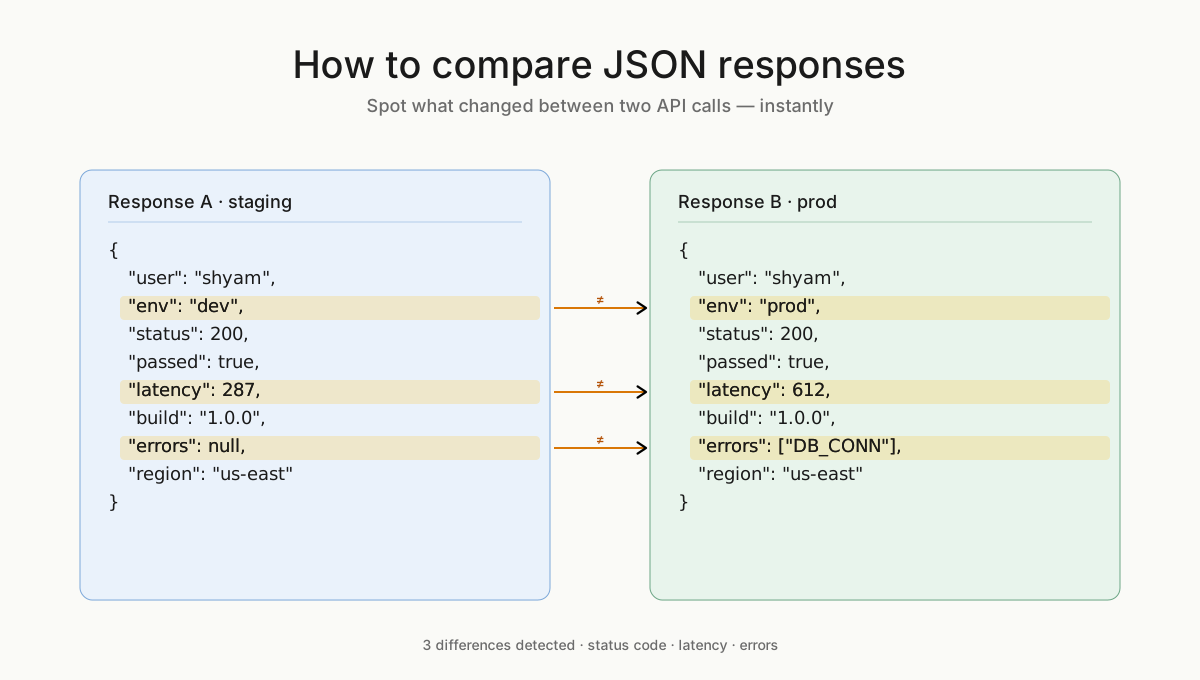
What is JSON Comparison?
JSON comparison (or JSON diffing) is the process of identifying differences between two JSON objects — including added fields, removed fields, and changed values. It’s commonly used in API testing, regression testing, and debugging.
JSON Diff vs JSON Comparison: Is There a Difference?
“JSON diff” and “JSON comparison” are often used interchangeably. Both refer to identifying differences between two JSON objects, though “diff” is more commonly used in developer tools and version control contexts.
TL;DR
- Quick one-off check? Use an online JSON diff tool
- Need automation or CI? Use a script (Python/JavaScript)
- Comparing APIs across environments or bulk data? Use Postmate Client
Why Compare JSON Responses?
API response comparison is critical when validating changes across environments or releases. Before the how, the why. Comparing JSON responses across two runs, two environments, or two versions of an API is the foundation of:
- Regression testing — catching unintended changes after a release.
- Environment parity checks — confirming
stagingmatchesprodbefore a cutover. - Backend refactors — verifying a rewritten service returns identical data to the legacy one.
- Contract testing — making sure clients won't break when an API evolves.
- Debugging flaky behavior — pinpointing exactly which field changed between two seemingly identical calls.
A good comparison workflow saves hours of eyeball-scanning logs and prevents the worst kind of bug: the one a human "reviewed" but didn't actually see.
Method 1: Online JSON Diff Tools (Compare JSON Online)
Online diff tools — JSONDiff, JSON Compare, Diffchecker, and similar — are the fastest way to spot-check two payloads. You paste two blobs of JSON into a browser and get a side-by-side colored diff.
When it works well
- One-off comparisons during debugging.
- Sharing a diff with a teammate via screenshot.
- You don't have tooling installed and need an answer in 30 seconds.
Step-by-step
- Open your tool of choice (e.g. jsondiff.com, diffchecker.com).
- Paste the first JSON response into the left pane.
- Paste the second response into the right pane.
- Click Compare.
- Read the highlighted diff — added, removed, and changed fields are color-coded.
The catches
- Privacy. You're pasting potentially sensitive payloads — auth tokens, customer data, internal IDs — into a third-party website. For anything beyond toy data, this is a non-starter.
- No automation. Every comparison is manual paste-and-click. You can't run it in CI, schedule it, or compare 500 rows of bulk data.
- No request execution. The tool compares strings you already have. You still have to call both APIs yourself, which means two terminals, two Postman tabs, or two browser sessions before you even start diffing.
- Noise. Most tools show every difference, including ones you don't care about (timestamps, request IDs). Filtering means manual JSON editing.
Verdict: Great for quick, low-stakes checks. Don't build a workflow on it.
Method 2: Compare JSON Using Python or JavaScript
For developers comfortable in Python or JavaScript, rolling your own comparison script is appealing — total control, no third-party trust, and you can fold it into CI.
When it works well
- You're already a developer with the runtime installed.
- You need a comparison embedded in a larger automated pipeline.
- You have unusual ignore rules (e.g. "ignore everything under
metadata.audit").
Step-by-step (Python with deepdiff)
- Install the library:bash
pip install deepdiff requests - Write a script that calls both endpoints and diffs the results:python
import requests from deepdiff import DeepDiff r1 = requests.post("https://staging.example.com/api/users", json={"name": "shyam"}).json() r2 = requests.post("https://prod.example.com/api/users", json={"name": "shyam"}).json() diff = DeepDiff(r1, r2, ignore_order=True, exclude_paths=["root['timestamp']", "root['requestId']"]) print(diff.pretty()) - Run it:
python compare.py - Read the output —
DeepDiffreports added items, removed items, and value changes with JSONPath-style references.
The catches
- You own it. Every new edge case — nested arrays, optional fields, environment-specific noise — means more code, more tests, more maintenance.
- No UI. Sharing results with a non-developer teammate means screenshots of terminal output or building your own report layer.
- Bulk testing is a project. "Run this against 200 rows of CSV input" is a couple of evenings of work — argument parsing, parallelism, error handling, output formatting.
- Auth, environments, variables. You'll end up reinventing what a proper API client gives you for free: env switching, secret management, request templating.
Verdict: Powerful and flexible, but the maintenance cost adds up fast. Worth it only if you have genuinely custom logic that off-the-shelf tools can't express.
Method 3: Use Postmate Client
Postmate Client is a lightweight REST API client built natively into Visual Studio Code with response comparison built in as a first-class feature. It calls both APIs for you, runs the diff, filters the noise, and presents a focused view of what actually changed — across one request or hundreds of rows of bulk data.
When it works well
- Comparing API responses across two environments (
stagingvsprod, old vs new service). - Regression testing after a release.
- Bulk/data-driven comparison using a CSV or data table.
- Any workflow where you want to share results with a non-technical teammate.
Step-by-step: Data Row mode (single comparison)
- Open Postmate Client and create or select a request in your collection.
- Open the Compare Responses tab.
- Pick your two sides:
- Left: request + environment (e.g.
POST /usersonSTAGING) - Right: request + environment (e.g.
POST /usersonPROD)
- Left: request + environment (e.g.
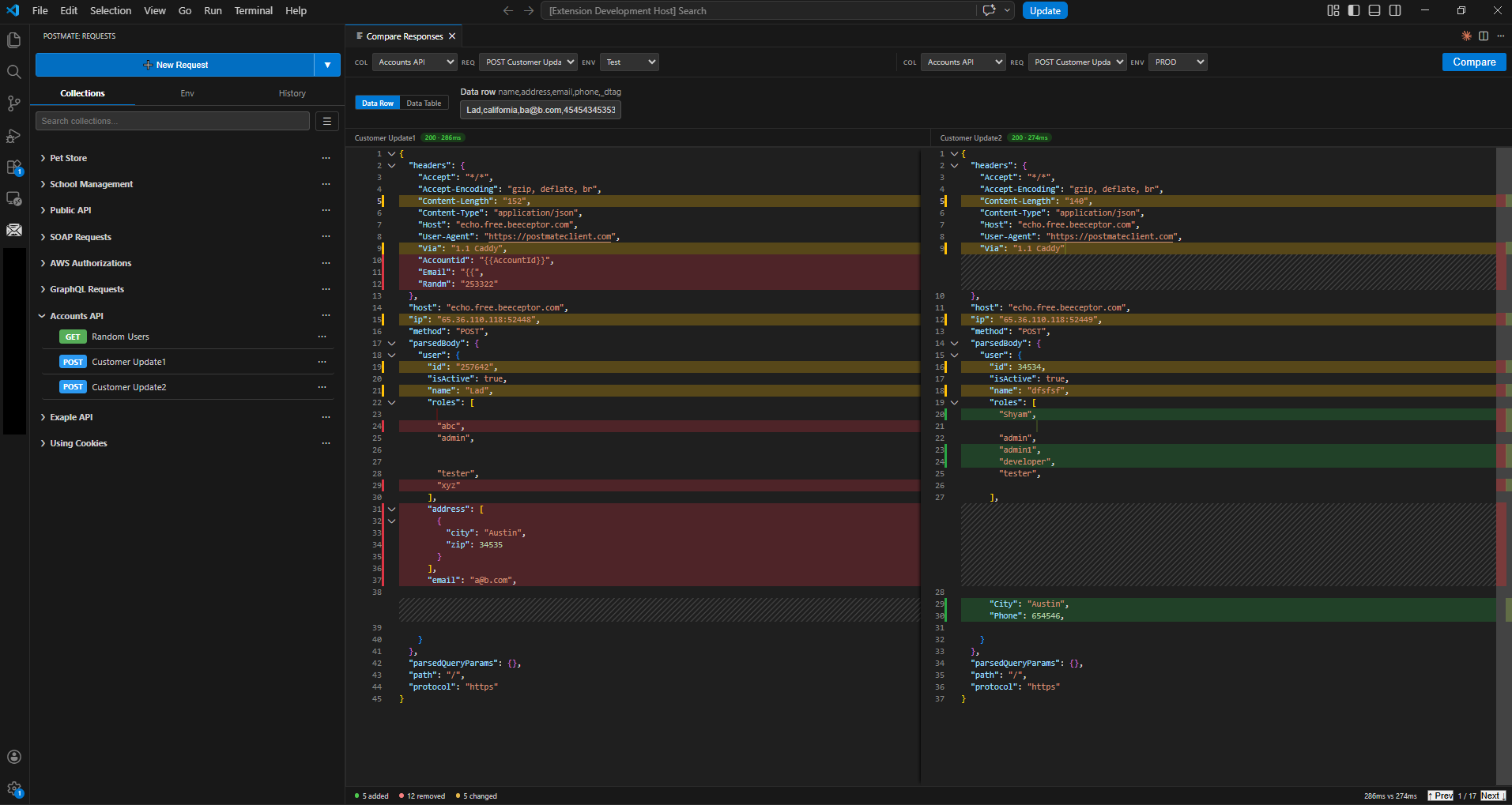
- Click Compare.
- Postmate sends both requests in parallel and shows a clean diff — only the JSONPath fields that differ, with values on each side. Identical fields are hidden.
Step-by-step: Data Table mode (bulk comparison)
- Define a data table in your collection (or import a CSV) with the inputs you want to test — one row per input.
- Open Compare Responses → Data Table.
- Select the table, the two requests, and the two environments.
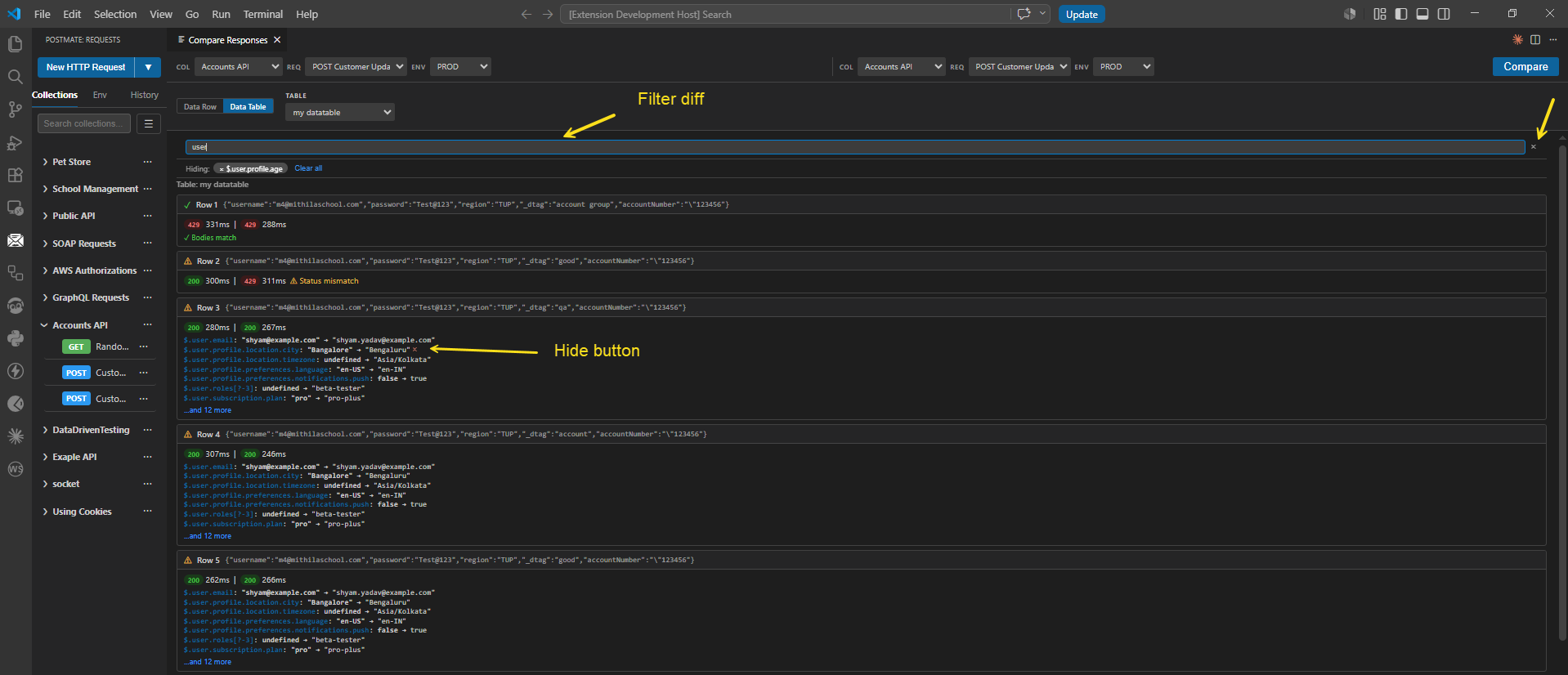
- Click Compare. Postmate iterates every row, sends both requests in parallel, and produces one diff card per row.
- Review: each card shows the input row, response times for both sides, and the JSONPath differences. Identical rows collapse out of the way; failing rows surface immediately.
Why Postmate wins for serious comparison work
- Both calls are made for you, in parallel. No juggling terminals or tabs.
- Diffs are focused. Only differences are shown, expressed in clean JSONPath notation (
$.user.email: "old@x.com" → "new@x.com"). - Bulk testing is a feature, not a project. Point it at a data table; it just works.
- Environments and secrets are first-class. Switch between
dev,staging, andprodfrom a dropdown — no code changes, no leaked tokens. - Shareable. Diff results live inside your collection, not in a teammate's terminal scrollback.
- Privacy. Requests run from your machine; payloads don't get pasted into a third-party web form.
The honest tradeoff: Postmate Client is a tool you install and learn. For a single 30-second one-off diff, an online tool is faster. For anything you'll do twice, Postmate Client pays for itself almost immediately.
Choosing the Right Method
| Online Diff Tool | Custom Script | Postmate Client | |
|---|---|---|---|
| Setup time | Seconds | Hours | Minutes |
| Privacy | Poor (third-party site) | Excellent | Excellent (local) |
| Bulk comparison | No | DIY | Built-in |
| Shareable results | Screenshots only | DIY | Yes |
| CI integration | No | Yes | Yes (via CLI) |
| Maintenance burden | None | High | None |
| Best for | Quick one-offs | Highly custom logic | Everything else |
Final Thoughts
Comparing JSON responses is one of those tasks that seems simple until you do it at scale. Online tools win on speed for trivial cases. Scripts win on flexibility when you need it. But for the day-to-day reality of testing modern APIs — multiple environments, bulk inputs, privacy concerns, teammates who need to read the results — a purpose-built tool like Postmate Client removes the friction and lets you focus on the actual work: shipping APIs that don't break.
If you regularly compare API responses across environments, try Postmate Client’s Compare Responses feature on your next regression check and see how much faster the same task gets.
Related reading
- Compare API responses (Data Row mode)
- Compare bulk API responses (Data Table mode)
- Data-Driven API Testing in Postmate Client
FAQs
What is the best way to compare JSON responses?
It depends on your use case: online tools for quick checks, scripts for automation, and tools like Postmate Client for repeated or bulk comparisons.
How do you ignore fields when comparing JSON?
Most tools allow excluding fields like timestamps or IDs using ignore rules or filters.
Can JSON comparison be automated?
Yes, using scripts (Python/JavaScript) or tools that support CI workflows.